Amazon S3 (Simple Storage Service) & Static Hosting
Amazon S3 provides object storage designed for 99.999999999% (11 9's) of data durability. Unlike block storage (EBS) or filesystem storage (EFS), S3 stores data as objects with metadata and a unique key…
Lesson 14 of 26 · Module: AWS
20 min read · Source notes — Static Website Hosting in AWS S3
Amazon S3 provides object storage designed for 99.999999999% (11 9's) of data durability. Unlike block storage (EBS) or filesystem storage (EFS), S3 stores data as objects with metadata and a unique key across flat namespaces.
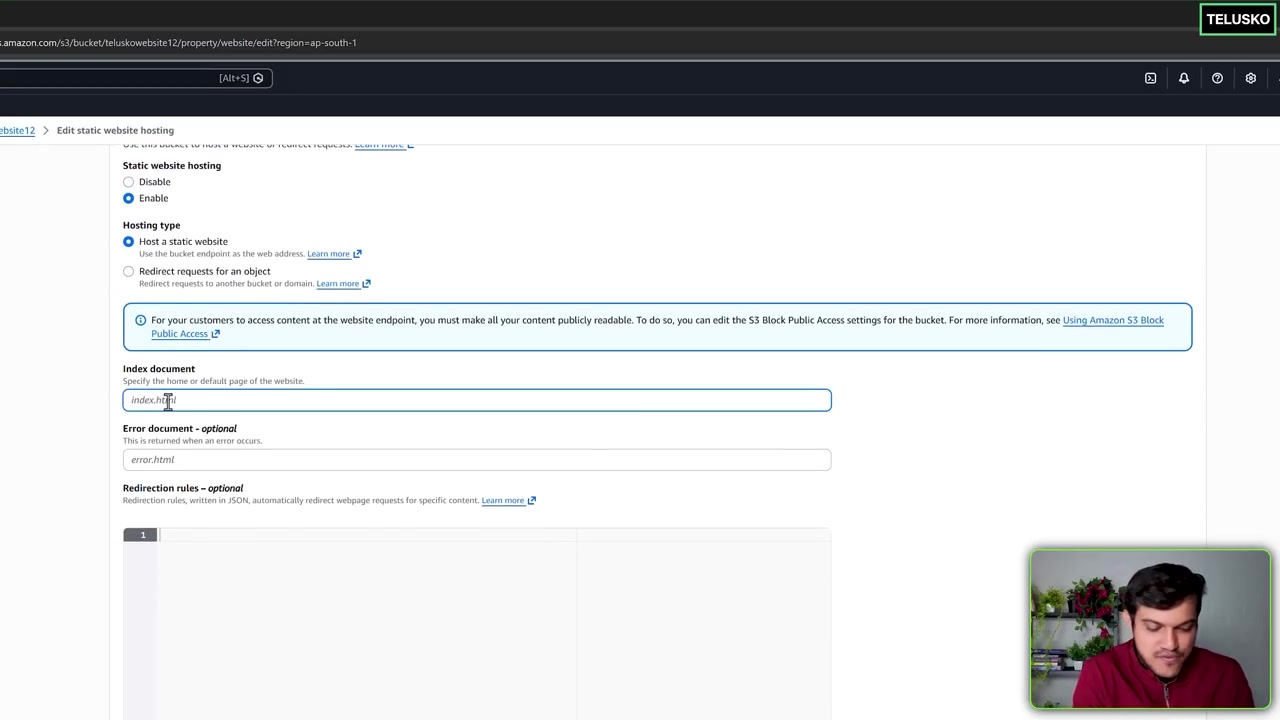
Enabling static website hosting, configuring index.html and error document redirection.
1. S3 Storage Tiers & Cost Optimization
| Storage Class | Availability | Cost per GB | Ideal DevOps Scenario |
|---|---|---|---|
| S3 Standard | 99.99% | $0.023 / GB | Active websites, frequently accessed user uploads, CI/CD artifacts. |
| S3 Standard-IA (Infrequent Access) | 99.9% | $0.0125 / GB | Disaster recovery backups and long-term storage accessed less than once a month. |
| S3 Glacier Flexible Retrieval | 99.99% | $0.0036 / GB | Archived log files, database dumps retained for regulatory audit compliance. |
| S3 Glacier Deep Archive | 99.99% | $0.00099 / GB | Cold archives stored for 7–10 years (retrieval takes 12–48 hours). |
2. Hosting a Production React / Vue SPA on S3
To host a Single Page Application (SPA), the bucket needs public read access and an Index Document configuration:
Public Read Bucket Policy
{
  "Version": "2012-10-17",
  "Statement": [
    {
      "Sid": "PublicReadGetObject",
      "Effect": "Allow",
      "Principal": "*",
      "Action": "s3:GetObject",
      "Resource": "arn:aws:s3:::my-frontend-app-prod/*"
    }
  ]
}
The SPA Routing Trap: Why 404 Routing Matters
In client-side SPAs (React Router, Next.js, Vue), URLs like /dashboard or /profile do not exist as physical files on S3! When a user refreshes the page, S3 returns a 404 Not Found. To fix this:
Set both Index Document and Error Document to index.html in the S3 Website Hosting tab or CloudFront custom error response!
Keep going: ← Lesson 13 · Lesson 15 → · Module overview · Track it in the Self Guide
Finished this one?
Part of Self Guide · Stage 5: AWS fundamentals. Progress is saved in this browser.