DL Project 3 Dog vs Cat Classification Transfer Learning
Course එකේ අන්තිම පාඩම, ඒකෙන් උගන්වන්නෙ deep-learning එකේ තියෙන ඇත්තටම practical skill එකම: කවුරුහරි කලින්ම, image මිලියන ගණනකට train කරපු model එකක් reuse කරන එක, zero වලින් පටන් ගන්නවා වෙනුවට.
The final lesson of the course, and it teaches the single most practical deep-learning skill: reusing a model someone else already trained on millions of images, instead of starting from zero.
Lesson 64 of 64 · Part 5 · Shipping Models to the World · DL 4. Dog vs Cat Classification - Transfer Learning · bilingual notes (English + සිංහල)
Why this matters. The final lesson of the course, and it teaches the single most practical deep-learning skill: reusing a model someone else already trained on millions of images, instead of starting from zero.
සිංහලෙන්: Course එකේ අන්තිම පාඩම, ඒකෙන් උගන්වන්නෙ deep-learning එකේ තියෙන ඇත්තටම practical skill එකම: කවුරුහරි කලින්ම, image මිලියන ගණනකට train කරපු model එකක් reuse කරන එක, zero වලින් පටන් ගන්නවා වෙනුවට.
What you'll use this for. Almost every production image classifier used commercially today starts with transfer learning — it's dramatically faster and needs far less data than training from scratch.
සිංහලෙන්: වාණිජමය ව අද පාවිච්චි කරන production image classifier ගොඩකම පටන් ගන්නෙ transfer learning එකෙන් — from scratch train කිරීමට වඩා ගොඩක් වේගවත්, data ගොඩක් අඩුවෙන් ඕන.
Key principles
- A model trained on millions of general images already "knows" edges, shapes, and textures. You only need to retrain the last few layers to recognise "cat vs dog" specifically — the early layers' general knowledge of shapes and edges transfers over almost for free.
Image මිලියන ගණනකට train කරපු model එකකට දැනටමත් edges, shapes, textures "පුරුදුයි"
Walkthrough
Extracting Dataset using Kaggle API
# installing the Kaggle library
!pip install kaggle
Output
Looking in indexes: https://pypi.org/simple, https://us-python.pkg.dev/colab-wheels/public/simple/
Requirement already satisfied: kaggle in /usr/local/lib/python3.7/dist-packages (1.5.12)
Requirement already satisfied: tqdm in /usr/local/lib/python3.7/dist-packages (from kaggle) (4.64.0)
Requirement already satisfied: certifi in /usr/local/lib/python3.7/dist-packages (from kaggle) (2022.6.15)
Requirement already satisfied: requests in /usr/local/lib/python3.7/dist-packages (from kaggle) (2.23.0)
Requirement already satisfied: python-slugify in /usr/local/lib/python3.7/dist-packages (from kaggle) (6.1.2)
Requirement already satisfied: urllib3 in /usr/local/lib/python3.7/dist-packages (from kaggle) (1.24.3)
Requirement already satisfied: python-dateutil in /usr/local/lib/python3.7/dist-packages (from kaggle) (2.8.2)
Requirement already satisfied: six>=1.10 in /usr/local/lib/python3.7/dist-packages (from kaggle) (1.15.0)
Requirement already satisfied: text-unidecode>=1.3 in /usr/local/lib/python3.7/dist-packages (from python-slugify->kaggle) (1.3)
Requirement already satisfied: chardet<4,>=3.0.2 in /usr/local/lib/python3.7/dist-packages (from requests->kaggle) (3.0.4)
Requirement already satisfied: idna<3,>=2.5 in /usr/local/lib/python3.7/dist-packages (from requests->kaggle) (2.10)# configuring the path of Kaggle.json file
!mkdir -p ~/.kaggle
!cp kaggle.json ~/.kaggle/
!chmod 600 ~/.kaggle/kaggle.jsonImporting the Dog vs Cat Dataset from Kaggle
# Kaggle api
!kaggle competitions download -c dogs-vs-cats
Output
Downloading dogs-vs-cats.zip to /content
 98% 793M/812M [00:22<00:00, 21.5MB/s]
100% 812M/812M [00:22<00:00, 38.2MB/s]!lsOutput
dogs-vs-cats.zip kaggle.json sample_data# extracting the compressed dataset
from zipfile import ZipFile
dataset = '/content/dogs-vs-cats.zip'
with ZipFile(dataset, 'r') as zip:
zip.extractall()
print('The dataset is extracted')Output
The dataset is extracted# extracting the compressed dataset
from zipfile import ZipFile
dataset = '/content/train.zip'
with ZipFile(dataset, 'r') as zip:
zip.extractall()
print('The dataset is extracted')Output
The dataset is extractedimport os
# counting the number of files in train folder
path, dirs, files = next(os.walk('/content/train'))
file_count = len(files)
print('Number of images: ', file_count)Output
Number of images: 25000Printing the name of images
file_names = os.listdir('/content/train/')
print(file_names)
Output
['dog.12067.jpg', 'cat.11189.jpg', 'cat.7561.jpg', 'cat.7760.jpg', 'cat.7076.jpg', 'dog.8298.jpg', 'cat.4352.jpg', 'cat.1873.jpg', 'cat.7969.jpg', 'dog.3687.jpgImporting the Dependencies
import numpy as np
from PIL import Image
import matplotlib.pyplot as plt
import matplotlib.image as mpimg
from sklearn.model_selection import train_test_split
from google.colab.patches import cv2_imshow
Displaying the images of dogs and cats
# display dog image
img = mpimg.imread('/content/train/dog.8298.jpg')
imgplt = plt.imshow(img)
plt.show()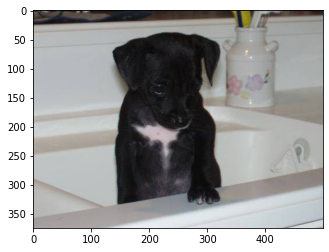
# display cat image
img = mpimg.imread('/content/train/cat.4352.jpg')
imgplt = plt.imshow(img)
plt.show()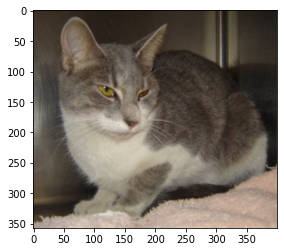
file_names = os.listdir('/content/train/')

for i in range(5):

  name = file_names[i]
  print(name[0:3])
Output
dog
cat
cat
cat
catfile_names = os.listdir('/content/train/')
dog_count = 0
cat_count = 0
for img_file in file_names:
name = img_file[0:3]
if name == 'dog':
dog_count += 1
else:
cat_count += 1
print('Number of dog images =', dog_count)
print('Number of cat images =', cat_count)Output
Number of dog images = 12500
Number of cat images = 12500
Resizing all the images
#creating a directory for resized images
os.mkdir('/content/image resized')original_folder = '/content/train/'
resized_folder = '/content/image resized/'
for i in range(2000):
filename = os.listdir(original_folder)[i]
img_path = original_folder+filename
img = Image.open(img_path)
img = img.resize((224, 224))
img = img.convert('RGB')
newImgPath = resized_folder+filename
img.save(newImgPath)# display resized dog image
img = mpimg.imread('/content/image resized/dog.8298.jpg')
imgplt = plt.imshow(img)
plt.show()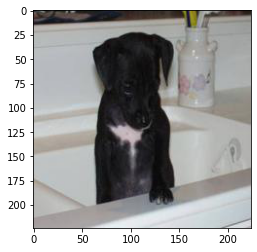
# display resized cat image
img = mpimg.imread('/content/image resized/cat.4352.jpg')
imgplt = plt.imshow(img)
plt.show()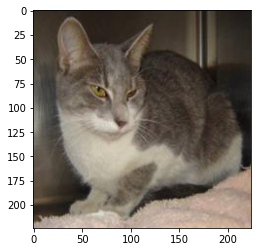
Creating labels for resized images of dogs and cats
Cat --> 0
Dog --> 1
# creaing a for loop to assign labels
filenames = os.listdir('/content/image resized/')

labels = []

for i in range(2000):

  file_name = filenames[i]
  label = file_name[0:3]

  if label == 'dog':
    labels.append(1)

  else:
labels.append(0)print(filenames[0:5])
print(len(filenames))Output
['dog.12067.jpg', 'cat.11189.jpg', 'cat.7561.jpg', 'cat.7760.jpg', 'cat.7076.jpg']
2000print(labels[0:5])
print(len(labels))Output
[1, 0, 0, 0, 0]
2000# counting the images of dogs and cats out of 2000 images
values, counts = np.unique(labels, return_counts=True)
print(values)
print(counts)Output
[0 1]
[ 992 1008]
Converting all the resized images to numpy arrays
import cv2
import globimage_directory = '/content/image resized/'
image_extension = ['png', 'jpg']
files = []
[files.extend(glob.glob(image_directory + '*.' + e)) for e in image_extension]
dog_cat_images = np.asarray([cv2.imread(file) for file in files])print(dog_cat_images)Output
[[[[ 79  93 142]
   [ 67  79 127]
   [ 77  87 135]
   ...
   [121 113 113]
   [130 117 119]
   [129 116 118]]

  [[ 43  54 106]
   [ 45  56 106]
   [ 72  79 128]
   ...
   [121 113 113]
   [131 119 119]
   [131 119 119]]

  [[ 64  71 126]
   [ 77  85 138]
… (289 more lines)type(dog_cat_images)Output
numpy.ndarrayprint(dog_cat_images.shape)Output
(2000, 224, 224, 3)X = dog_cat_images
Y = np.asarray(labels)Train Test Split
X_train, X_test, Y_train, Y_test = train_test_split(X, Y, test_size=0.2, random_state=2)print(X.shape, X_train.shape, X_test.shape)Output
(2000, 224, 224, 3) (1600, 224, 224, 3) (400, 224, 224, 3)1600 --> training images
400 --> test images
# scaling the data
X_train_scaled = X_train/255

X_test_scaled = X_test/255print(X_train_scaled)Output
[[[[0.75686275 0.9254902  0.88235294]
   [0.79215686 0.96078431 0.91764706]
   [0.77254902 0.95294118 0.90588235]
   ...
   [0.53333333 0.92156863 0.84313725]
   [0.50588235 0.90196078 0.81960784]
   [0.5372549  0.94117647 0.85882353]]

  [[0.75294118 0.94117647 0.89411765]
   [0.76862745 0.95686275 0.90980392]
   [0.76078431 0.94901961 0.90196078]
   ...
   [0.57647059 0.96470588 0.88627451]
   [0.49019608 0.88627451 0.80392157]
   [0.4627451  0.86666667 0.78431373]]

  [[0.6745098  0.88627451 0.83529412]
   [0.65882353 0.87843137 0.82745098]
… (289 more lines)
Building the Neural Network
import tensorflow as tf
import tensorflow_hub as hubmobilenet_model = 'https://tfhub.dev/google/tf2-preview/mobilenet_v2/feature_vector/4'
pretrained_model = hub.KerasLayer(mobilenet_model, input_shape=(224,224,3), trainable=False)num_of_classes = 2
model = tf.keras.Sequential([
pretrained_model,
tf.keras.layers.Dense(num_of_classes)
])
model.summary()Output
Model: "sequential"
_________________________________________________________________
 Layer (type)                Output Shape              Param #
=================================================================
 keras_layer (KerasLayer)    (None, 1280)              2257984

 dense (Dense)               (None, 2)                 2562

=================================================================
Total params: 2,260,546
Trainable params: 2,562
Non-trainable params: 2,257,984
_________________________________________________________________model.compile(
optimizer = 'adam',
loss = tf.keras.losses.SparseCategoricalCrossentropy(from_logits=True),
metrics = ['acc']
)model.fit(X_train_scaled, Y_train, epochs=5)Output
Epoch 1/5
50/50 [==============================] - 47s 861ms/step - loss: 0.2163 - acc: 0.9162
Epoch 2/5
50/50 [==============================] - 42s 838ms/step - loss: 0.0746 - acc: 0.9756
Epoch 3/5
50/50 [==============================] - 44s 872ms/step - loss: 0.0552 - acc: 0.9825
Epoch 4/5
50/50 [==============================] - 41s 824ms/step - loss: 0.0417 - acc: 0.9894
Epoch 5/5
50/50 [==============================] - 41s 825ms/step - loss: 0.0345 - acc: 0.9937
Output
<keras.callbacks.History at 0x7faedc598090>score, acc = model.evaluate(X_test_scaled, Y_test)
print('Test Loss =', score)
print('Test Accuracy =', acc)Output
13/13 [==============================] - 12s 866ms/step - loss: 0.0812 - acc: 0.9775
Test Loss = 0.0812455490231514
Test Accuracy = 0.9775000214576721
Predictive System
input_image_path = input('Path of the image to be predicted: ')

input_image = cv2.imread(input_image_path)

cv2_imshow(input_image)

input_image_resize = cv2.resize(input_image, (224,224))

input_image_scaled = input_image_resize/255

image_reshaped = np.reshape(input_image_scaled, [1,224,224,3])

input_prediction = model.predict(image_reshaped)

print(input_prediction)

input_pred_label = np.argmax(input_prediction)

print(input_pred_label)

if input_pred_label == 0:
  print('The image represents a Cat')

else:
  print('The image represents a Dog')
Output
Path of the image to be predicted: /content/dog.jpg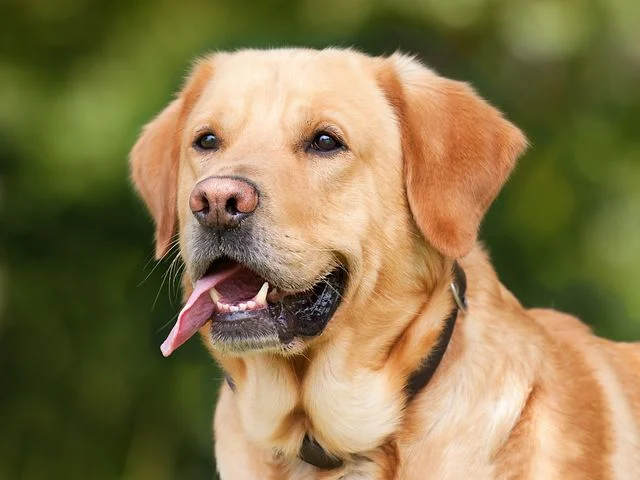
Output
[[-4.6012597  3.784018 ]]
1
The image represents a Doginput_image_path = input('Path of the image to be predicted: ')
input_image = cv2.imread(input_image_path)
cv2_imshow(input_image)
input_image_resize = cv2.resize(input_image, (224,224))
input_image_scaled = input_image_resize/255
image_reshaped = np.reshape(input_image_scaled, [1,224,224,3])
input_prediction = model.predict(image_reshaped)
print(input_prediction)
input_pred_label = np.argmax(input_prediction)
print(input_pred_label)
if input_pred_label == 0:
print('The image represents a Cat')
else:
print('The image represents a Dog')Output
Path of the image to be predicted: /content/cat.jpg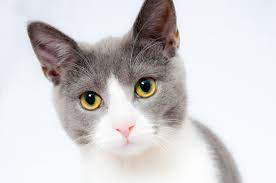
Output
[[ 4.302739 -4.893738]]
0
The image represents a Cat
Keep going: ← Lesson 63 · Next: Quintrix ITSO, ML in production → · Track it in the Self Guide
Finished this one?
Part of Self Guide · Stage 17: ML 5 — Shipping Models to the World. Progress is saved in this browser.



