Lin Reg implementation
ඒම algorithm එකටම දෙවෙනි වතාව, ටිකක් වෙනස් dataset එකකින් ශක්තිමත් කරනවා — මේ repetition එක හිතාමතාම, මොකද මින් පස්සේ එන ගොඩක් දේවලට root එක මේකයි.
A second pass at the same algorithm, reinforcing it with a slightly different dataset — repetition here is deliberate, because this algorithm underlies so much of what follows.
Lesson 34 of 64 · Part 3 · Building Models from Scratch · Algorithms from Scratch · bilingual notes (English + සිංහල)
Why this matters. A second pass at the same algorithm, reinforcing it with a slightly different dataset — repetition here is deliberate, because this algorithm underlies so much of what follows.
සිංහලෙන්: ඒම algorithm එකටම දෙවෙනි වතාව, ටිකක් වෙනස් dataset එකකින් ශක්තිමත් කරනවා — මේ repetition එක හිතාමතාම, මොකද මින් පස්සේ එන ගොඩක් දේවලට root එක මේකයි.
What you'll use this for. Seeing the same idea implemented twice, slightly differently, is what turns "I followed along once" into "I actually understand this."
සිංහලෙන්: එකම idea එක දෙපාරක්, ටිකක් වෙනස්ව implement වෙනවා දකින එකෙන් තමයි "මං එක පාරක් follow කලා" කියන එක "මට ඇත්තටම මේක තේරෙනවා" කියන එකට හැරෙන්නෙ.
Key principles
- Re-implementing a concept from a different angle is how it actually sticks. If you found this version easier or harder than the first, that difference is telling you exactly which part of the concept needs more attention.
Concept එකක් වෙනස් angle එකකින් නැවත implement කිරීමෙන් තමයි ඒක ඇත්තටම මතක තියෙන්නෙ
Walkthrough
import numpy as np
import pandas as pd
from sklearn.model_selection import train_test_split
import matplotlib.pyplot as plt

import Lin_Reg_model
Data Processing
# loading the data from csv file to pandas dataframe
salary_data = pd.read_csv('/content/salary_data.csv')# printing the first 5 rows of the dataframe
salary_data.head()| YearsExperience | Salary | |
|---|---|---|
| 0 | 1.1 | 39343 |
| 1 | 1.3 | 46205 |
| 2 | 1.5 | 37731 |
| 3 | 2.0 | 43525 |
| 4 | 2.2 | 39891 |
# number of rows & columns in the dataset
salary_data.shape
Output
(30, 2)# checking for missing values
salary_data.isnull().sum()Output
YearsExperience    0
Salary             0
dtype: int64
Splitting the feature & target
X = salary_data.iloc[:,:-1].values
Y = salary_data.iloc[:,1].valuesprint(X)Output
[[ 1.1]
 [ 1.3]
 [ 1.5]
 [ 2. ]
 [ 2.2]
 [ 2.9]
 [ 3. ]
 [ 3.2]
 [ 3.2]
 [ 3.7]
 [ 3.9]
 [ 4. ]
 [ 4. ]
 [ 4.1]
 [ 4.5]
 [ 4.9]
 [ 5.1]
 [ 5.3]
… (12 more lines)print(Y)Output
[ 39343  46205  37731  43525  39891  56642  60150  54445  64445  57189
  63218  55794  56957  57081  61111  67938  66029  83088  81363  93940
  91738  98273 101302 113812 109431 105582 116969 112635 122391 121872]
Splitting the data to training data & Test data
 X_train, X_test, Y_train, Y_test = train_test_split(X, Y, test_size = 0.33,
                                                     random_state = 2 )
Train the Logistic Regression Model
model = Lin_Reg_model.Linear_Regression(learning_rate=0.01, no_of_iterations=1000)model.fit(X_train, Y_train)# print the parameters
print('weight = ', model.w[0])
print('bias = ', model.b)Output
weight =  9580.301196603597
bias =  23226.38946603212
Predict the salary value for test data
test_data_prediction = model.predict(X_test)print(test_data_prediction)Output
[ 35680.78102162  33764.7207823   66337.74485075  58673.50389347
  91246.52796192  80708.19664565 101784.85927818  51967.29305584
  42386.99185924  88372.43760294]
Visualizing the predicted values and actual values
plt.scatter( X_test, Y_test, color = 'red' )
plt.plot( X_test, test_data_prediction, color = 'blue' )
plt.xlabel( 'Work Experience' )
plt.ylabel( 'Salary' )
plt.title( 'Salary vs Experience' )
plt.show()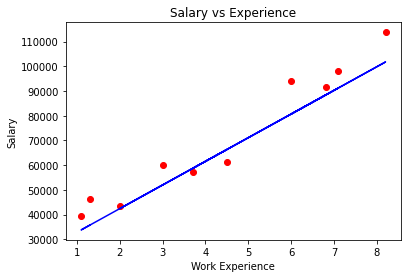
Keep going: ← Lesson 33 · Lesson 35 → · Track it in the Self Guide
Finished this one?
Part of Self Guide · Stage 15: ML 3 — Building Models from Scratch. Progress is saved in this browser.



