Project 5 House Price Prediction
මේක ඔයාගෙ පළවෙනි regression project එක — category එකක් නෙවෙයි, continuous number එකක් (price) predict කරන එක, ඒකට වෙනස් හිතුවෙක් සහ වෙනස් evaluation metrics ඕන.
This is your first regression project — predicting a continuous number (price) instead of a category, which needs a different kind of thinking and different evaluation metrics.
Lesson 30 of 64 · Part 2 · Maths & First Models · Hands-on Projects · bilingual notes (English + සිංහල)
Why this matters. This is your first regression project — predicting a continuous number (price) instead of a category, which needs a different kind of thinking and different evaluation metrics.
සිංහලෙන්: මේක ඔයාගෙ පළවෙනි regression project එක — category එකක් නෙවෙයි, continuous number එකක් (price) predict කරන එක, ඒකට වෙනස් හිතුවෙක් සහ වෙනස් evaluation metrics ඕන.
What you'll use this for. Real-estate price estimators, insurance quote engines, and salary predictors all follow this exact same regression pattern.
සිංහලෙන්: Real-estate price estimators, insurance quote engines, salary predictors — ඔක්කොම follow කරන්නෙ මේම regression pattern එකම.
Key principles
- A regression model is judged by how far off it is, not whether it's exactly right. Predicting $340,000 for a $350,000 house isn't a "wrong answer" the way a classifier's mistake is — metrics like RMSE measure the size of that gap, not just right/wrong.
Regression model එකක් judge කරන්නෙ ඇත්තටම හරිද කියලා නෙවෙයි, කොච්චර error එකක් තියෙනවද කියලා
Walkthrough
Importing the Dependencies
import numpy as np
import pandas as pd
import matplotlib.pyplot as plt
import seaborn as sns
import sklearn.datasets
from sklearn.model_selection import train_test_split
from xgboost import XGBRegressor
from sklearn import metrics
Importing the Boston House Price Dataset
house_price_dataset = sklearn.datasets.load_boston()print(house_price_dataset)Output
{'data': array([[6.3200e-03, 1.8000e+01, 2.3100e+00, ..., 1.5300e+01, 3.9690e+02,
        4.9800e+00],
       [2.7310e-02, 0.0000e+00, 7.0700e+00, ..., 1.7800e+01, 3.9690e+02,
        9.1400e+00],
       [2.7290e-02, 0.0000e+00, 7.0700e+00, ..., 1.7800e+01, 3.9283e+02,
        4.0300e+00],
       ...,
       [6.0760e-02, 0.0000e+00, 1.1930e+01, ..., 2.1000e+01, 3.9690e+02,
        5.6400e+00],
       [1.0959e-01, 0.0000e+00, 1.1930e+01, ..., 2.1000e+01, 3.9345e+02,
        6.4800e+00],
       [4.7410e-02, 0.0000e+00, 1.1930e+01, ..., 2.1000e+01, 3.9690e+02,
        7.8800e+00]]), 'target': array([24. , 21.6, 34.7, 33.4, 36.2, 28.7, 22.9, 27.1, 16.5, 18.9, 15. ,
       18.9, 21.7, 20.4, 18.2, 19.9, 23.1, 17.5, 20.2, 18.2, 13.6, 19.6,
       15.2, 14.5, 15.6, 13.9, 16.6, 14.8, 18.4, 21. , 12.7, 14.5, 13.2,
       13.1, 13.5, 18.9, 20. , 21. , 24.7, 30.8, 34.9, 26.6, 25.3, 24.7,
       21.2, 19.3, 20. , 16.6, 14.4, 19.4, 19.7, 20.5, 25. , 23.4, 18.9,
       35.4, 24.7, 31.6, 23.3, 19.6, 18.7, 16. , 22.2, 25. , 33. , 23.5,
… (41 more lines)# Loading the dataset to a Pandas DataFrame
house_price_dataframe = pd.DataFrame(house_price_dataset.data, columns = house_price_dataset.feature_names)# Print First 5 rows of our DataFrame
house_price_dataframe.head()| CRIM | ZN | INDUS | CHAS | NOX | RM | AGE | … | |
|---|---|---|---|---|---|---|---|---|
| 0 | 0.00632 | 18.0 | 2.31 | 0.0 | 0.538 | 6.575 | 65.2 | … |
| 1 | 0.02731 | 0.0 | 7.07 | 0.0 | 0.469 | 6.421 | 78.9 | … |
| 2 | 0.02729 | 0.0 | 7.07 | 0.0 | 0.469 | 7.185 | 61.1 | … |
| 3 | 0.03237 | 0.0 | 2.18 | 0.0 | 0.458 | 6.998 | 45.8 | … |
| 4 | 0.06905 | 0.0 | 2.18 | 0.0 | 0.458 | 7.147 | 54.2 | … |
# add the target (price) column to the DataFrame
house_price_dataframe['price'] = house_price_dataset.targethouse_price_dataframe.head()| CRIM | ZN | INDUS | CHAS | NOX | RM | AGE | … | |
|---|---|---|---|---|---|---|---|---|
| 0 | 0.00632 | 18.0 | 2.31 | 0.0 | 0.538 | 6.575 | 65.2 | … |
| 1 | 0.02731 | 0.0 | 7.07 | 0.0 | 0.469 | 6.421 | 78.9 | … |
| 2 | 0.02729 | 0.0 | 7.07 | 0.0 | 0.469 | 7.185 | 61.1 | … |
| 3 | 0.03237 | 0.0 | 2.18 | 0.0 | 0.458 | 6.998 | 45.8 | … |
| 4 | 0.06905 | 0.0 | 2.18 | 0.0 | 0.458 | 7.147 | 54.2 | … |
# checking the number of rows and Columns in the data frame
house_price_dataframe.shape
Output
(506, 14)# check for missing values
house_price_dataframe.isnull().sum()Output
CRIM       0
ZN         0
INDUS      0
CHAS       0
NOX        0
RM         0
AGE        0
DIS        0
RAD        0
TAX        0
PTRATIO    0
B          0
LSTAT      0
price      0
dtype: int64# statistical measures of the dataset
house_price_dataframe.describe()| CRIM | ZN | INDUS | CHAS | NOX | RM | AGE | … | |
|---|---|---|---|---|---|---|---|---|
| count | 506.000000 | 506.000000 | 506.000000 | 506.000000 | 506.000000 | 506.000000 | 506.000000 | … |
| mean | 3.613524 | 11.363636 | 11.136779 | 0.069170 | 0.554695 | 6.284634 | 68.574901 | … |
| std | 8.601545 | 23.322453 | 6.860353 | 0.253994 | 0.115878 | 0.702617 | 28.148861 | … |
| min | 0.006320 | 0.000000 | 0.460000 | 0.000000 | 0.385000 | 3.561000 | 2.900000 | … |
| 25% | 0.082045 | 0.000000 | 5.190000 | 0.000000 | 0.449000 | 5.885500 | 45.025000 | … |
| 50% | 0.256510 | 0.000000 | 9.690000 | 0.000000 | 0.538000 | 6.208500 | 77.500000 | … |
… 2 more rows
Understanding the correlation between various features in the dataset
-
Positive Correlation
-
Negative Correlation
correlation = house_price_dataframe.corr()# constructing a heatmap to nderstand the correlation
plt.figure(figsize=(10,10))
sns.heatmap(correlation, cbar=True, square=True, fmt='.1f', annot=True, annot_kws={'size':8}, cmap='Blues')Output
<matplotlib.axes._subplots.AxesSubplot at 0x7f800f6b1cc0>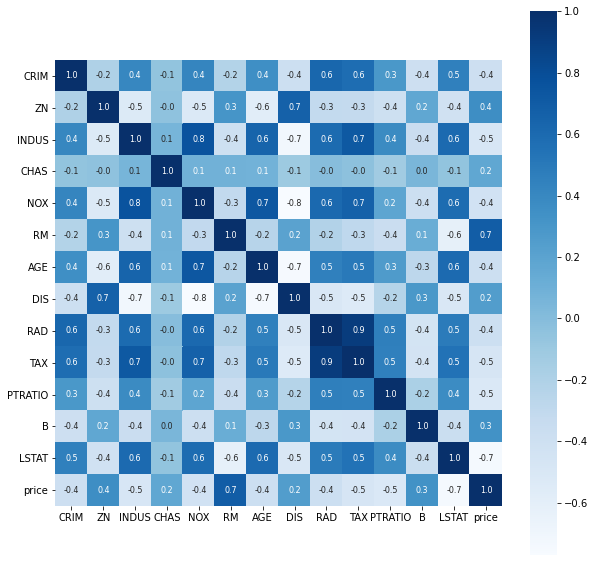
Splitting the data and Target
X = house_price_dataframe.drop(['price'], axis=1)
Y = house_price_dataframe['price']print(X)
print(Y)Output
        CRIM    ZN  INDUS  CHAS    NOX  ...  RAD    TAX  PTRATIO       B  LSTAT
0    0.00632  18.0   2.31   0.0  0.538  ...  1.0  296.0     15.3  396.90   4.98
1    0.02731   0.0   7.07   0.0  0.469  ...  2.0  242.0     17.8  396.90   9.14
2    0.02729   0.0   7.07   0.0  0.469  ...  2.0  242.0     17.8  392.83   4.03
3    0.03237   0.0   2.18   0.0  0.458  ...  3.0  222.0     18.7  394.63   2.94
4    0.06905   0.0   2.18   0.0  0.458  ...  3.0  222.0     18.7  396.90   5.33
..       ...   ...    ...   ...    ...  ...  ...    ...      ...     ...    ...
501  0.06263   0.0  11.93   0.0  0.573  ...  1.0  273.0     21.0  391.99   9.67
502  0.04527   0.0  11.93   0.0  0.573  ...  1.0  273.0     21.0  396.90   9.08
503  0.06076   0.0  11.93   0.0  0.573  ...  1.0  273.0     21.0  396.90   5.64
504  0.10959   0.0  11.93   0.0  0.573  ...  1.0  273.0     21.0  393.45   6.48
505  0.04741   0.0  11.93   0.0  0.573  ...  1.0  273.0     21.0  396.90   7.88

[506 rows x 13 columns]
0      24.0
1      21.6
2      34.7
3      33.4
… (8 more lines)
Splitting the data into Training data and Test data
X_train, X_test, Y_train, Y_test = train_test_split(X, Y, test_size = 0.2, random_state = 2)print(X.shape, X_train.shape, X_test.shape)Output
(506, 13) (404, 13) (102, 13)Model Training
XGBoost Regressor
# loading the model
model = XGBRegressor()# training the model with X_train
model.fit(X_train, Y_train)Output
[16:17:24] WARNING: /workspace/src/objective/regression_obj.cu:152: reg:linear is now deprecated in favor of reg:squarederror.Output
XGBRegressor(base_score=0.5, booster='gbtree', colsample_bylevel=1,
             colsample_bynode=1, colsample_bytree=1, gamma=0,
             importance_type='gain', learning_rate=0.1, max_delta_step=0,
             max_depth=3, min_child_weight=1, missing=None, n_estimators=100,
             n_jobs=1, nthread=None, objective='reg:linear', random_state=0,
             reg_alpha=0, reg_lambda=1, scale_pos_weight=1, seed=None,
             silent=None, subsample=1, verbosity=1)
Evaluation
Prediction on training data
# accuracy for prediction on training data
training_data_prediction = model.predict(X_train)print(training_data_prediction)Output
[23.360205  22.462858  20.84804   33.77895   15.333282  13.616525
 21.71274   15.175322  11.724756  21.836252  16.08508    7.52517
 31.094206  48.56228   32.623158  20.546066  22.177324  20.500404
 31.666502  20.551508  25.74269    8.247894  45.200817  22.069397
 20.698004  20.100042  19.873472  26.242834  23.39618   31.927258
 21.493471   9.280926  18.504272  21.87202   12.504413  10.578829
 13.054951  23.541336  19.164755  15.888303  23.768887  28.454714
 15.539753  18.049202  16.23671   14.08383   25.33273   17.575668
 49.566467  16.990675  21.738977  32.935143  16.125738  22.45393
 20.776966  20.042227  22.898897  38.124043  30.607079  32.607468
 20.919416  47.348038  14.524615   8.126455  19.581661   9.030508
 26.462107  17.69918   20.546162  46.312218  39.689137  34.387108
 22.11083   34.568977  24.873934  50.078335  14.5669775 20.525211
 20.62971   23.202105  49.514477  23.12061   24.795782  20.319666
 43.869396  17.110266  32.165016  34.75202    7.313497  20.309446
 18.038298  12.008462  24.216425  47.90671   37.94349   20.759708
 40.182804  18.249052  15.611586  26.39461   21.0571    20.421682
 18.377089  17.338768  21.223648  22.653662  17.560051  32.635715
… (50 more lines)# R squared error
score_1 = metrics.r2_score(Y_train, training_data_prediction)
# Mean Absolute Error
score_2 = metrics.mean_absolute_error(Y_train, training_data_prediction)
print("R squared error : ", score_1)
print('Mean Absolute Error : ', score_2)Output
R squared error :  0.9733349094832763
Mean Absolute Error :  1.145314053261634
Visualizing the actual Prices and predicted prices
plt.scatter(Y_train, training_data_prediction)
plt.xlabel("Actual Prices")
plt.ylabel("Predicted Prices")
plt.title("Actual Price vs Preicted Price")
plt.show()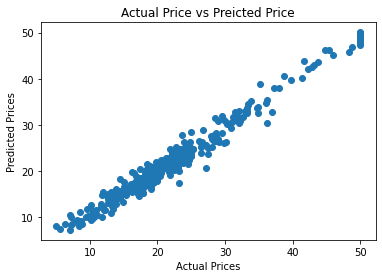
Prediction on Test Data
# accuracy for prediction on test data
test_data_prediction = model.predict(X_test)# R squared error
score_1 = metrics.r2_score(Y_test, test_data_prediction)
# Mean Absolute Error
score_2 = metrics.mean_absolute_error(Y_test, test_data_prediction)
print("R squared error : ", score_1)
print('Mean Absolute Error : ', score_2)Output
R squared error :  0.9115937697657654
Mean Absolute Error :  1.9922956859364223
Keep going: ← Lesson 29 · Lesson 31 → · Track it in the Self Guide
Finished this one?
Part of Self Guide · Stage 14: ML 2 — Maths & First Models. Progress is saved in this browser.



