Handling Missing Values
සැබෑ data වල නම් හැම වෙලාවෙම gaps තියෙනවා — වැඩ නොකළ sensor එකක්, හිස්ව තිබූ form එකක්. ඒක කෙලින්ම model එකකට දුන්නොත් crash වෙනවා, නැත්නම් ඊටත් වඩා නරකට වැරදි දෙයක් ඉගෙන ගන්නවා.
Real-world data almost always has gaps — a sensor that failed, a form left blank. Feed that straight into a model and it crashes, or worse, learns the wrong lesson.
Lesson 14 of 64 · Part 1 · Python & Data Basics · Data Pre-processing · bilingual notes (English + සිංහල)
Why this matters. Real-world data almost always has gaps — a sensor that failed, a form left blank. Feed that straight into a model and it crashes, or worse, learns the wrong lesson.
සිංහලෙන්: සැබෑ data වල නම් හැම වෙලාවෙම gaps තියෙනවා — වැඩ නොකළ sensor එකක්, හිස්ව තිබූ form එකක්. ඒක කෙලින්ම model එකකට දුන්නොත් crash වෙනවා, නැත්නම් ඊටත් වඩා නරකට වැරදි දෙයක් ඉගෙන ගන්නවා.
What you'll use this for. This is the very first thing you check on any new dataset, before any visualization or modeling.
සිංහලෙන්: Visualization එකකට හෝ modeling එකකට කලින්, ඕනම අලුත් dataset එකක බලන පළමුවෙනිම දේ මේකයි.
Key principles
- Deleting rows and filling values are different decisions with different costs. Drop a row and you lose that record entirely. Fill it with the average and you keep the row but add a guess — knowing which trade-off fits your data is the actual skill here.
Rows delete කරන එකයි values පුරවන එකයි වෙනස් decisions දෙකක්, වෙනස් costs එකක්
Walkthrough
Methods to Handle Missing Values:
- Imputation
- Dropping
Importing the libraries
import pandas as pd
import matplotlib.pyplot as plt
import seaborn as sns# loading the dataset to a Pandas DataFrame
dataset = pd.read_csv('/content/Placement_Dataset.csv')dataset.head()| sl_no | gender | ssc_p | ssc_b | hsc_p | hsc_b | hsc_s | … | |
|---|---|---|---|---|---|---|---|---|
| 0 | 1 | M | 67.00 | Others | 91.00 | Others | Commerce | … |
| 1 | 2 | M | 79.33 | Central | 78.33 | Others | Science | … |
| 2 | 3 | M | 65.00 | Central | 68.00 | Central | Arts | … |
| 3 | 4 | M | 56.00 | Central | 52.00 | Central | Science | … |
| 4 | 5 | M | 85.80 | Central | 73.60 | Central | Commerce | … |
dataset.shapeOutput
(215, 15)dataset.isnull().sum()Output
sl_no              0
gender             0
ssc_p              0
ssc_b              0
hsc_p              0
hsc_b              0
hsc_s              0
degree_p           0
degree_t           0
workex             0
etest_p            0
specialisation     0
mba_p              0
status             0
salary            67
dtype: int64
Central Tendencies:
- Mean
- Median
- Mode
# analyse the distribution of data in the salary
fig, ax = plt.subplots(figsize=(8,8))
sns.distplot(dataset.salary)
Output
/usr/local/lib/python3.7/dist-packages/seaborn/distributions.py:2557: FutureWarning: `distplot` is a deprecated function and will be removed in a future version
  warnings.warn(msg, FutureWarning)
Output
<matplotlib.axes._subplots.AxesSubplot at 0x7f503fe268d0>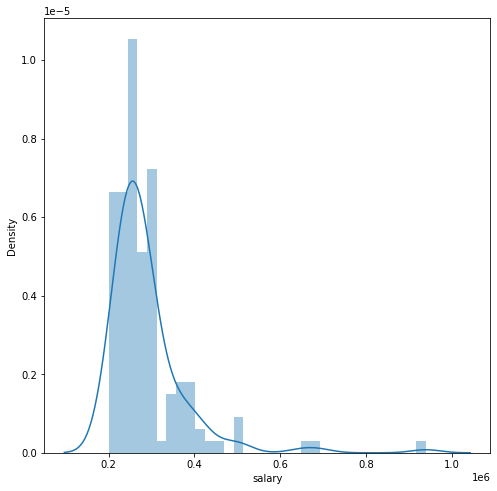
Replace the missing values with Median value
dataset['salary'].fillna(dataset['salary'].median(),inplace=True)dataset.isnull().sum()Output
sl_no             0
gender            0
ssc_p             0
ssc_b             0
hsc_p             0
hsc_b             0
hsc_s             0
degree_p          0
degree_t          0
workex            0
etest_p           0
specialisation    0
mba_p             0
status            0
salary            0
dtype: int64# filling missing values with Mean value:
# dataset['salary'].fillna(dataset['salary'].mean(),inplace=True)# filling missing values with Mean value:
# dataset['salary'].fillna(dataset['salary'].mode(),inplace=True)Dropping Method
salary_dataset = pd.read_csv('/content/Placement_Dataset.csv')salary_dataset.shapeOutput
(215, 15)salary_dataset.isnull().sum()Output
sl_no              0
gender             0
ssc_p              0
ssc_b              0
hsc_p              0
hsc_b              0
hsc_s              0
degree_p           0
degree_t           0
workex             0
etest_p            0
specialisation     0
mba_p              0
status             0
salary            67
dtype: int64# drop the missing values
salary_dataset = salary_dataset.dropna(how='any')salary_dataset.isnull().sum()Output
sl_no             0
gender            0
ssc_p             0
ssc_b             0
hsc_p             0
hsc_b             0
hsc_s             0
degree_p          0
degree_t          0
workex            0
etest_p           0
specialisation    0
mba_p             0
status            0
salary            0
dtype: int64salary_dataset.shapeOutput
(148, 15)Keep going: ← Lesson 13 · Lesson 15 → · Track it in the Self Guide
Finished this one?
Part of Self Guide · Stage 13: ML 1 — Python & Data Basics. Progress is saved in this browser.



