Accuracy score and Confusion Matrix
Accuracy එකට විතරක් රැවටෙන්න පුළුවන් (imbalanced-dataset පාඨම මතක ඇතිනේ). Confusion matrix එකෙන් model එකක් කරන වැරදි කුමන ආකාරයද කියලා හරියටම පෙන්නනවා — වැරදි කවදාවත් cost එකෙන් සමාන නෑ.
Accuracy alone can lie to you (remember the imbalanced-dataset lesson). A confusion matrix shows exactly which mistakes a model makes — and mistakes are rarely equal in cost.
Lesson 46 of 64 · Part 4 · Evaluating & Choosing Models · Model Evaluation · bilingual notes (English + සිංහල)
Why this matters. Accuracy alone can lie to you (remember the imbalanced-dataset lesson). A confusion matrix shows exactly which mistakes a model makes — and mistakes are rarely equal in cost.
සිංහලෙන්: Accuracy එකට විතරක් රැවටෙන්න පුළුවන් (imbalanced-dataset පාඨම මතක ඇතිනේ). Confusion matrix එකෙන් model එකක් කරන වැරදි කුමන ආකාරයද කියලා හරියටම පෙන්නනවා — වැරදි කවදාවත් cost එකෙන් සමාන නෑ.
What you'll use this for. Before you trust any classifier enough to deploy it, you look at its confusion matrix — this lesson is what makes that reflex automatic.
සිංහලෙන්: Classifier එකක් deploy කරන්න විශ්වාස කරන්නත් කලින්, ඒකේ confusion matrix එක බලනවා — ඒ reflex එක automatic කරන්නෙ මේ පාඩම.
Key principles
- False positives and false negatives are different failures with different real-world costs. In a cancer-screening model, a false negative (missing real cancer) is far more dangerous than a false positive (an unnecessary follow-up test) — the confusion matrix is what makes that visible.
False positives සහ false negatives, real-world cost එකෙන් වෙනස් failures දෙකක්
Walkthrough
Importing the Dependencies
import numpy as np
import pandas as pd
from sklearn.model_selection import train_test_split
from sklearn.linear_model import LogisticRegression
Data Collection and Processing
# loading the csv data to a Pandas DataFrame
heart_data = pd.read_csv('heart.csv')# print first 5 rows of the dataset
heart_data.head()| age | sex | cp | trestbps | chol | fbs | restecg | … | |
|---|---|---|---|---|---|---|---|---|
| 0 | 63 | 1 | 3 | 145 | 233 | 1 | 0 | … |
| 1 | 37 | 1 | 2 | 130 | 250 | 0 | 1 | … |
| 2 | 41 | 0 | 1 | 130 | 204 | 0 | 0 | … |
| 3 | 56 | 1 | 1 | 120 | 236 | 0 | 1 | … |
| 4 | 57 | 0 | 0 | 120 | 354 | 0 | 1 | … |
# print last 5 rows of the dataset
heart_data.tail()| age | sex | cp | trestbps | chol | fbs | restecg | … | |
|---|---|---|---|---|---|---|---|---|
| 298 | 57 | 0 | 0 | 140 | 241 | 0 | 1 | … |
| 299 | 45 | 1 | 3 | 110 | 264 | 0 | 1 | … |
| 300 | 68 | 1 | 0 | 144 | 193 | 1 | 1 | … |
| 301 | 57 | 1 | 0 | 130 | 131 | 0 | 1 | … |
| 302 | 57 | 0 | 1 | 130 | 236 | 0 | 0 | … |
# number of rows and columns in the dataset
heart_data.shape
Output
(303, 14)# getting some info about the data
heart_data.info()Output
<class 'pandas.core.frame.DataFrame'>
RangeIndex: 303 entries, 0 to 302
Data columns (total 14 columns):
 #   Column    Non-Null Count  Dtype
---  ------    --------------  -----
 0   age       303 non-null    int64
 1   sex       303 non-null    int64
 2   cp        303 non-null    int64
 3   trestbps  303 non-null    int64
 4   chol      303 non-null    int64
 5   fbs       303 non-null    int64
 6   restecg   303 non-null    int64
 7   thalach   303 non-null    int64
 8   exang     303 non-null    int64
 9   oldpeak   303 non-null    float64
 10  slope     303 non-null    int64
 11  ca        303 non-null    int64
 12  thal      303 non-null    int64
… (3 more lines)# checking for missing values
heart_data.isnull().sum()Output
age         0
sex         0
cp          0
trestbps    0
chol        0
fbs         0
restecg     0
thalach     0
exang       0
oldpeak     0
slope       0
ca          0
thal        0
target      0
dtype: int64# statistical measures about the data
heart_data.describe()| age | sex | cp | trestbps | chol | fbs | restecg | … | |
|---|---|---|---|---|---|---|---|---|
| count | 303.000000 | 303.000000 | 303.000000 | 303.000000 | 303.000000 | 303.000000 | 303.000000 | … |
| mean | 54.366337 | 0.683168 | 0.966997 | 131.623762 | 246.264026 | 0.148515 | 0.528053 | … |
| std | 9.082101 | 0.466011 | 1.032052 | 17.538143 | 51.830751 | 0.356198 | 0.525860 | … |
| min | 29.000000 | 0.000000 | 0.000000 | 94.000000 | 126.000000 | 0.000000 | 0.000000 | … |
| 25% | 47.500000 | 0.000000 | 0.000000 | 120.000000 | 211.000000 | 0.000000 | 0.000000 | … |
| 50% | 55.000000 | 1.000000 | 1.000000 | 130.000000 | 240.000000 | 0.000000 | 1.000000 | … |
… 2 more rows
# checking the distribution of Target Variable
heart_data['target'].value_counts()
Output
1    165
0    138
Name: target, dtype: int64
1 --> Defective Heart
0 --> Healthy Heart
Splitting the Features and Target
X = heart_data.drop(columns='target', axis=1)
Y = heart_data['target']print(X)Output
     age  sex  cp  trestbps  chol  fbs  restecg  thalach  exang  oldpeak  \
0     63    1   3       145   233    1        0      150      0      2.3
1     37    1   2       130   250    0        1      187      0      3.5
2     41    0   1       130   204    0        0      172      0      1.4
3     56    1   1       120   236    0        1      178      0      0.8
4     57    0   0       120   354    0        1      163      1      0.6
..   ...  ...  ..       ...   ...  ...      ...      ...    ...      ...
298   57    0   0       140   241    0        1      123      1      0.2
299   45    1   3       110   264    0        1      132      0      1.2
300   68    1   0       144   193    1        1      141      0      3.4
301   57    1   0       130   131    0        1      115      1      1.2
302   57    0   1       130   236    0        0      174      0      0.0

     slope  ca  thal
0        0   0     1
1        0   0     2
2        2   0     2
3        2   0     2
… (9 more lines)print(Y)Output
0      1
1      1
2      1
3      1
4      1
      ..
298    0
299    0
300    0
301    0
302    0
Name: target, Length: 303, dtype: int64
Splitting the Data into Training data & Test Data
X_train, X_test, Y_train, Y_test = train_test_split(X, Y, test_size=0.2, stratify=Y, random_state=2)print(X.shape, X_train.shape, X_test.shape)Output
(303, 13) (242, 13) (61, 13)Model Training
model = LogisticRegression(max_iter=1000)# training the LogisticRegression model with Training data
model.fit(X_train, Y_train)Output
LogisticRegression(max_iter=1000)Model Evaluation
Accuracy Score
from sklearn.metrics import accuracy_score# accuracy on training data
X_train_prediction = model.predict(X_train)
training_data_accuracy = accuracy_score(Y_train, X_train_prediction)
print(training_data_accuracy)Output
0.8553719008264463print('Accuracy on Training data : ', round(training_data_accuracy*100, 2), '%')Output
Accuracy on Training data : 85.54 %# accuracy on test data
X_test_prediction = model.predict(X_test)
test_data_accuracy = accuracy_score(Y_test, X_test_prediction)
print(test_data_accuracy)Output
0.8032786885245902print('Accuracy on Test data : ', round(test_data_accuracy*100, 2), '%')Output
Accuracy on Test data : 80.33 %Confuaion Matrix
from sklearn.metrics import confusion_matrixcf_matrix = confusion_matrix(Y_test, X_test_prediction)
print(cf_matrix)Output
[[22  6]
[ 6 27]]tn, fp, fn, tp = cf_matrix.ravel()
print(tn, fp, fn, tp)Output
22 6 6 27import seaborn as sns
sns.heatmap(cf_matrix, annot=True)Output
<matplotlib.axes._subplots.AxesSubplot at 0x7f2e02c0fcd0>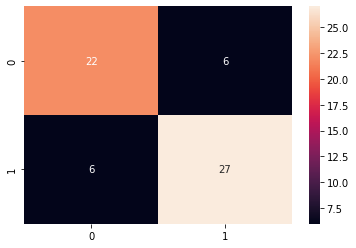
confusion matrix for multi class classification: https://colab.research.google.com/drive/17FViiMJbJXQ5s9GOW94emoHcCKUcYr3l?usp=sharing
Keep going: ← Lesson 45 · Lesson 47 → · Track it in the Self Guide
Finished this one?
Part of Self Guide · Stage 16: ML 4 — Evaluating & Choosing Models. Progress is saved in this browser.



