Seaborn Tutorial in Python
Seaborn දාන්නෙ data scientists හැම දාම group compare කරන්න පාවිච්චි කරන ඒ plots ම — box plots, heatmaps, pair plots — Matplotlib එකට වඩා code අඩුවෙන්.
Seaborn draws the exact plots data scientists use every day to compare groups — box plots, heatmaps, pair plots — with far less code than plain Matplotlib.
Lesson 12 of 64 · Part 1 · Python & Data Basics · Python Libraries · bilingual notes (English + සිංහල)
Why this matters. Seaborn draws the exact plots data scientists use every day to compare groups — box plots, heatmaps, pair plots — with far less code than plain Matplotlib.
සිංහලෙන්: Seaborn දාන්නෙ data scientists හැම දාම group compare කරන්න පාවිච්චි කරන ඒ plots ම — box plots, heatmaps, pair plots — Matplotlib එකට වඩා code අඩුවෙන්.
What you'll use this for. A correlation heatmap from Seaborn is often the fastest way to spot which features actually matter to your model before you even train it.
සිංහලෙන්: Model එකක් train කරන්නත් කලින්, ඇත්තටම වැදගත් features මොනවද කියලා ඉක්මනටම දකින්න පුළුවන් හොඳම විදිහ තමයි Seaborn correlation heatmap එක.
Key principles
- Built for DataFrames, not raw numbers. Pass a whole DataFrame and a column name — Seaborn handles the grouping and colouring for you, which Matplotlib makes you do by hand.
DataFrames සඳහා හදලා, raw numbers සඳහා නෙවෙයි
Walkthrough
Seaborn:
- Data Visualization Library
Importing the Libraries
import seaborn as sns
import matplotlib.pyplot as plt
import numpy as np
import pandas as pd
Note : Seaborn has some built-in datasets
# total bill vs tip dataset
tips = sns.load_dataset('tips')tips.head()| total_bill | tip | sex | smoker | day | time | size | |
|---|---|---|---|---|---|---|---|
| 0 | 16.99 | 1.01 | Female | No | Sun | Dinner | 2 |
| 1 | 10.34 | 1.66 | Male | No | Sun | Dinner | 3 |
| 2 | 21.01 | 3.50 | Male | No | Sun | Dinner | 3 |
| 3 | 23.68 | 3.31 | Male | No | Sun | Dinner | 2 |
| 4 | 24.59 | 3.61 | Female | No | Sun | Dinner | 4 |
# setting a theme for the plots
sns.set_theme()# visualize the data
sns.relplot(data=tips, x ='total_bill',y='tip',col='time',hue='smoker',style='smoker',size='size')Output
<seaborn.axisgrid.FacetGrid at 0x7f9218a58dd0>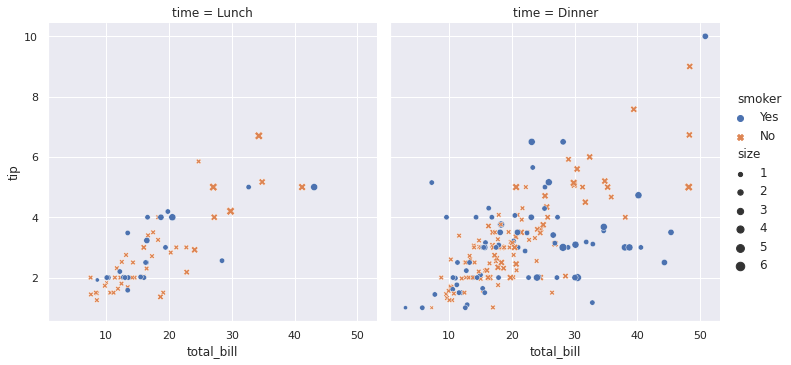
# load the iris dataset
iris = sns.load_dataset('iris')iris.head()| sepal_length | sepal_width | petal_length | petal_width | species | |
|---|---|---|---|---|---|
| 0 | 5.1 | 3.5 | 1.4 | 0.2 | setosa |
| 1 | 4.9 | 3.0 | 1.4 | 0.2 | setosa |
| 2 | 4.7 | 3.2 | 1.3 | 0.2 | setosa |
| 3 | 4.6 | 3.1 | 1.5 | 0.2 | setosa |
| 4 | 5.0 | 3.6 | 1.4 | 0.2 | setosa |
Scatter Plot
sns.scatterplot(x='sepal_length',y='petal_length',hue='species',data=iris)Output
<matplotlib.axes._subplots.AxesSubplot at 0x7f9217c554d0>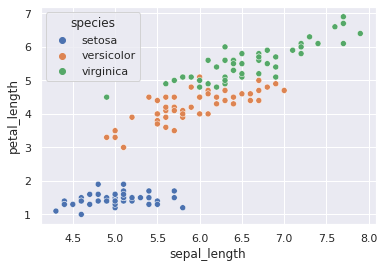
sns.scatterplot(x='sepal_length',y='petal_width',hue='species',data=iris)Output
<matplotlib.axes._subplots.AxesSubplot at 0x7f92184ca050>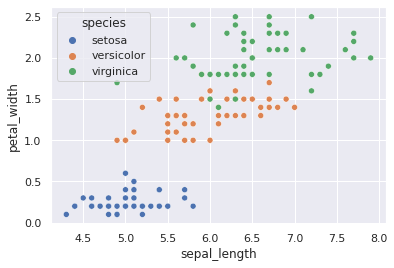
# loading the titanic dataset
titanic = sns.load_dataset('titanic')titanic.head()| survived | pclass | sex | age | sibsp | parch | fare | … | |
|---|---|---|---|---|---|---|---|---|
| 0 | 0 | 3 | male | 22.0 | 1 | 0 | 7.2500 | … |
| 1 | 1 | 1 | female | 38.0 | 1 | 0 | 71.2833 | … |
| 2 | 1 | 3 | female | 26.0 | 0 | 0 | 7.9250 | … |
| 3 | 1 | 1 | female | 35.0 | 1 | 0 | 53.1000 | … |
| 4 | 0 | 3 | male | 35.0 | 0 | 0 | 8.0500 | … |
titanic.shapeOutput
(891, 15)Count Plot
sns.countplot(x='class',data=titanic)Output
<matplotlib.axes._subplots.AxesSubplot at 0x7f9217b7ad90>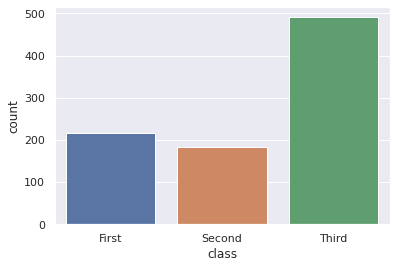
sns.countplot(x='survived',data=titanic)Output
<matplotlib.axes._subplots.AxesSubplot at 0x7f9217af4710>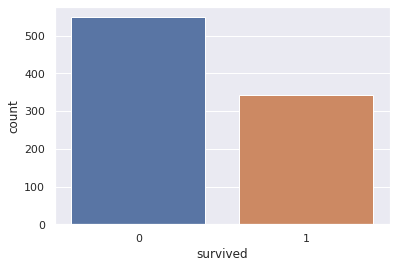
Bar Chart
sns.barplot(x='sex',y='survived',hue='class',data=titanic)Output
<matplotlib.axes._subplots.AxesSubplot at 0x7f9217a9ed50>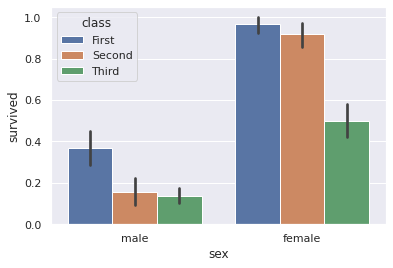
# house price dataset
from sklearn.datasets import load_boston
house_boston = load_boston()

house = pd.DataFrame(house_boston.data, columns=house_boston.feature_names)
house['PRICE'] = house_boston.targetprint(house_boston)Output
{'data': array([[6.3200e-03, 1.8000e+01, 2.3100e+00, ..., 1.5300e+01, 3.9690e+02,
        4.9800e+00],
       [2.7310e-02, 0.0000e+00, 7.0700e+00, ..., 1.7800e+01, 3.9690e+02,
        9.1400e+00],
       [2.7290e-02, 0.0000e+00, 7.0700e+00, ..., 1.7800e+01, 3.9283e+02,
        4.0300e+00],
       ...,
       [6.0760e-02, 0.0000e+00, 1.1930e+01, ..., 2.1000e+01, 3.9690e+02,
        5.6400e+00],
       [1.0959e-01, 0.0000e+00, 1.1930e+01, ..., 2.1000e+01, 3.9345e+02,
        6.4800e+00],
       [4.7410e-02, 0.0000e+00, 1.1930e+01, ..., 2.1000e+01, 3.9690e+02,
        7.8800e+00]]), 'target': array([24. , 21.6, 34.7, 33.4, 36.2, 28.7, 22.9, 27.1, 16.5, 18.9, 15. ,
       18.9, 21.7, 20.4, 18.2, 19.9, 23.1, 17.5, 20.2, 18.2, 13.6, 19.6,
       15.2, 14.5, 15.6, 13.9, 16.6, 14.8, 18.4, 21. , 12.7, 14.5, 13.2,
       13.1, 13.5, 18.9, 20. , 21. , 24.7, 30.8, 34.9, 26.6, 25.3, 24.7,
       21.2, 19.3, 20. , 16.6, 14.4, 19.4, 19.7, 20.5, 25. , 23.4, 18.9,
       35.4, 24.7, 31.6, 23.3, 19.6, 18.7, 16. , 22.2, 25. , 33. , 23.5,
… (41 more lines)house.head()| CRIM | ZN | INDUS | CHAS | NOX | RM | AGE | … | |
|---|---|---|---|---|---|---|---|---|
| 0 | 0.00632 | 18.0 | 2.31 | 0.0 | 0.538 | 6.575 | 65.2 | … |
| 1 | 0.02731 | 0.0 | 7.07 | 0.0 | 0.469 | 6.421 | 78.9 | … |
| 2 | 0.02729 | 0.0 | 7.07 | 0.0 | 0.469 | 7.185 | 61.1 | … |
| 3 | 0.03237 | 0.0 | 2.18 | 0.0 | 0.458 | 6.998 | 45.8 | … |
| 4 | 0.06905 | 0.0 | 2.18 | 0.0 | 0.458 | 7.147 | 54.2 | … |
Distribution Plot
sns.distplot(house['PRICE'])Output
/usr/local/lib/python3.7/dist-packages/seaborn/distributions.py:2557: FutureWarning: `distplot` is a deprecated function and will be removed in a future version
  warnings.warn(msg, FutureWarning)
Output
<matplotlib.axes._subplots.AxesSubplot at 0x7f9210bc1a50>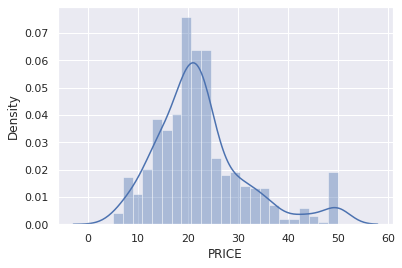
Correlation:
- Positive Correlation
- Negative Correlation
Heat Map
correlation = house.corr()# constructing a Heat Map
plt.figure(figsize=(10,10))
sns.heatmap(, cbar=True, square=True, fmt='.1f', annot=True, annot_kws={'size':8}, cmap='Blues')Output
<matplotlib.axes._subplots.AxesSubplot at 0x7f921123f750>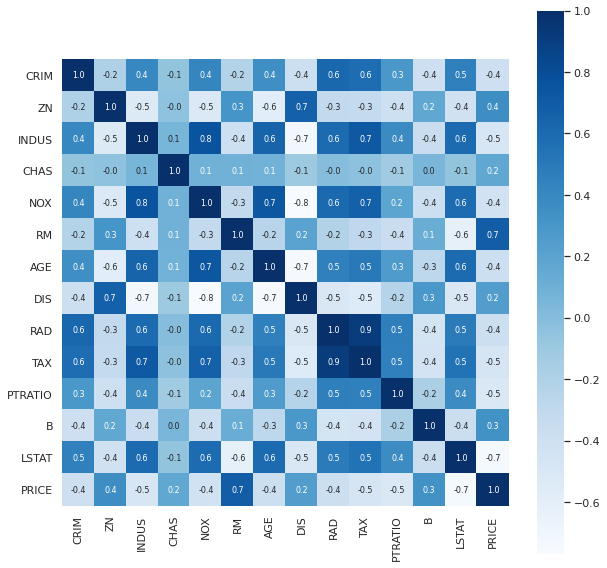
Keep going: ← Lesson 11 · Lesson 13 → · Track it in the Self Guide
Finished this one?
Part of Self Guide · Stage 13: ML 1 — Python & Data Basics. Progress is saved in this browser.



