Project 16 Calories Burnt Prediction
තවත් සම්පූර්ණ regression project එකක් — ඇත්තම fluency එකක් හදාගන්න, අලුත්, නොදන්නා dataset එකකට එකම workflow එක (clean, split, train, evaluate) හිතාමතාම නැවත කරනවා.
Another full regression project — deliberate repetition of the same workflow (clean, split, train, evaluate) on a fresh, unfamiliar dataset to build real fluency.
Lesson 50 of 64 · Part 4 · Evaluating & Choosing Models · Hands-on Projects · bilingual notes (English + සිංහල)
Why this matters. Another full regression project — deliberate repetition of the same workflow (clean, split, train, evaluate) on a fresh, unfamiliar dataset to build real fluency.
සිංහලෙන්: තවත් සම්පූර්ණ regression project එකක් — ඇත්තම fluency එකක් හදාගන්න, අලුත්, නොදන්නා dataset එකකට එකම workflow එක (clean, split, train, evaluate) හිතාමතාම නැවත කරනවා.
What you'll use this for. Fitness apps that estimate calories burnt from your workout stats use exactly this kind of regression model behind the scenes.
සිංහලෙන්: ඔයාගෙ workout stats වලින් calories burnt estimate කරන fitness apps, screen එකට පිටිපස්සෙන් වැඩ කරන්නෙ හරියටම මේ වගේ regression model එකකින්.
Key principles
- Fluency comes from repetition on unfamiliar data, not from memorizing one dataset. If you can run this same five-step pipeline on a dataset you've never seen before without looking anything up, that's the real signal you've learned the process, not just this one example.
Fluency එක ලැබෙන්නෙ නොදන්නා data එකට repetition එකෙන්, එක dataset එකක් memorize කරන එකෙන් නෙවෙයි
Walkthrough
Importing the Dependencies
import numpy as np
import pandas as pd
import matplotlib.pyplot as plt
import seaborn as sns
from sklearn.model_selection import train_test_split
from xgboost import XGBRegressor
from sklearn import metrics
Data Collection & Processing
# loading the data from csv file to a Pandas DataFrame
calories = pd.read_csv('/content/calories.csv')# print the first 5 rows of the dataframe
calories.head()| User_ID | Calories | |
|---|---|---|
| 0 | 14733363 | 231.0 |
| 1 | 14861698 | 66.0 |
| 2 | 11179863 | 26.0 |
| 3 | 16180408 | 71.0 |
| 4 | 17771927 | 35.0 |
exercise_data = pd.read_csv('/content/exercise.csv')exercise_data.head()| User_ID | Gender | Age | Height | Weight | Duration | Heart_Rate | Body_Temp | |
|---|---|---|---|---|---|---|---|---|
| 0 | 14733363 | male | 68 | 190.0 | 94.0 | 29.0 | 105.0 | 40.8 |
| 1 | 14861698 | female | 20 | 166.0 | 60.0 | 14.0 | 94.0 | 40.3 |
| 2 | 11179863 | male | 69 | 179.0 | 79.0 | 5.0 | 88.0 | 38.7 |
| 3 | 16180408 | female | 34 | 179.0 | 71.0 | 13.0 | 100.0 | 40.5 |
| 4 | 17771927 | female | 27 | 154.0 | 58.0 | 10.0 | 81.0 | 39.8 |
Combining the two Dataframes
calories_data = pd.concat([exercise_data, calories['Calories']], axis=1)calories_data.head()| User_ID | Gender | Age | Height | Weight | Duration | Heart_Rate | … | |
|---|---|---|---|---|---|---|---|---|
| 0 | 14733363 | male | 68 | 190.0 | 94.0 | 29.0 | 105.0 | … |
| 1 | 14861698 | female | 20 | 166.0 | 60.0 | 14.0 | 94.0 | … |
| 2 | 11179863 | male | 69 | 179.0 | 79.0 | 5.0 | 88.0 | … |
| 3 | 16180408 | female | 34 | 179.0 | 71.0 | 13.0 | 100.0 | … |
| 4 | 17771927 | female | 27 | 154.0 | 58.0 | 10.0 | 81.0 | … |
# checking the number of rows and columns
calories_data.shape
Output
(15000, 9)# getting some informations about the data
calories_data.info()Output
<class 'pandas.core.frame.DataFrame'>
RangeIndex: 15000 entries, 0 to 14999
Data columns (total 9 columns):
 #   Column      Non-Null Count  Dtype
---  ------      --------------  -----
 0   User_ID     15000 non-null  int64
 1   Gender      15000 non-null  object
 2   Age         15000 non-null  int64
 3   Height      15000 non-null  float64
 4   Weight      15000 non-null  float64
 5   Duration    15000 non-null  float64
 6   Heart_Rate  15000 non-null  float64
 7   Body_Temp   15000 non-null  float64
 8   Calories    15000 non-null  float64
dtypes: float64(6), int64(2), object(1)
memory usage: 1.0+ MB# checking for missing values
calories_data.isnull().sum()Output
User_ID       0
Gender        0
Age           0
Height        0
Weight        0
Duration      0
Heart_Rate    0
Body_Temp     0
Calories      0
dtype: int64
Data Analysis
# get some statistical measures about the data
calories_data.describe()| User_ID | Age | Height | Weight | Duration | Heart_Rate | Body_Temp | Calories | |
|---|---|---|---|---|---|---|---|---|
| count | 1.500000e+04 | 15000.000000 | 15000.000000 | 15000.000000 | 15000.000000 | 15000.000000 | 15000.000000 | 15000.000000 |
| mean | 1.497736e+07 | 42.789800 | 174.465133 | 74.966867 | 15.530600 | 95.518533 | 40.025453 | 89.539533 |
| std | 2.872851e+06 | 16.980264 | 14.258114 | 15.035657 | 8.319203 | 9.583328 | 0.779230 | 62.456978 |
| min | 1.000116e+07 | 20.000000 | 123.000000 | 36.000000 | 1.000000 | 67.000000 | 37.100000 | 1.000000 |
| 25% | 1.247419e+07 | 28.000000 | 164.000000 | 63.000000 | 8.000000 | 88.000000 | 39.600000 | 35.000000 |
| 50% | 1.499728e+07 | 39.000000 | 175.000000 | 74.000000 | 16.000000 | 96.000000 | 40.200000 | 79.000000 |
… 2 more rows
Data Visualization
sns.set()# plotting the gender column in count plot
sns.countplot(calories_data['Gender'])Output
/usr/local/lib/python3.7/dist-packages/seaborn/_decorators.py:43: FutureWarning: Pass the following variable as a keyword arg: x. From version 0.12, the only va
  FutureWarning
Output
<matplotlib.axes._subplots.AxesSubplot at 0x7fcbbd756110>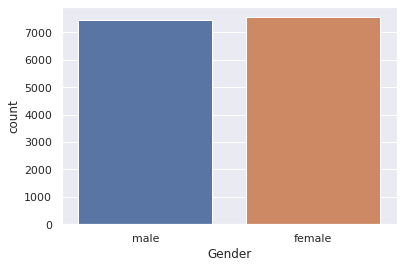
# finding the distribution of "Age" column
sns.distplot(calories_data['Age'])
Output
/usr/local/lib/python3.7/dist-packages/seaborn/distributions.py:2557: FutureWarning: `distplot` is a deprecated function and will be removed in a future version
  warnings.warn(msg, FutureWarning)
Output
<matplotlib.axes._subplots.AxesSubplot at 0x7fcbbd200550>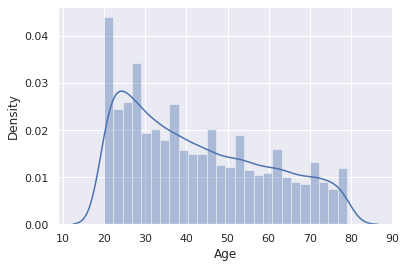
# finding the distribution of "Height" column
sns.distplot(calories_data['Height'])
Output
/usr/local/lib/python3.7/dist-packages/seaborn/distributions.py:2557: FutureWarning: `distplot` is a deprecated function and will be removed in a future version
  warnings.warn(msg, FutureWarning)
Output
<matplotlib.axes._subplots.AxesSubplot at 0x7fcbb1ed3d10>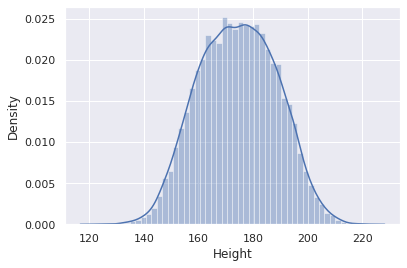
# finding the distribution of "Weight" column
sns.distplot(calories_data['Weight'])
Output
/usr/local/lib/python3.7/dist-packages/seaborn/distributions.py:2557: FutureWarning: `distplot` is a deprecated function and will be removed in a future version
  warnings.warn(msg, FutureWarning)
Output
<matplotlib.axes._subplots.AxesSubplot at 0x7fcbb1e2c190>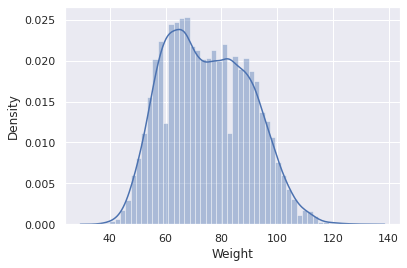
Finding the Correlation in the dataset
- Positive Correlation
- Negative Correlation
correlation = calories_data.corr()# constructing a heatmap to understand the correlation
plt.figure(figsize=(10,10))
sns.heatmap(correlation, cbar=True, square=True, fmt='.1f', annot=True, annot_kws={'size':8}, cmap='Blues')Output
<matplotlib.axes._subplots.AxesSubplot at 0x7fcbd5c75650>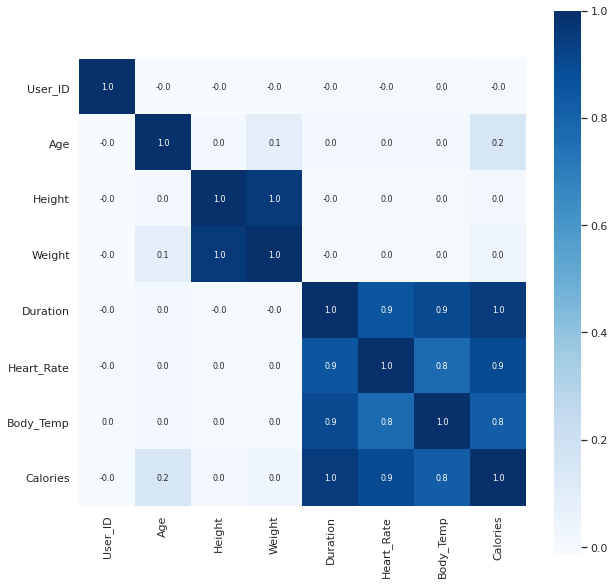
Converting the text data to numerical values
calories_data.replace({"Gender":{'male':0,'female':1}}, inplace=True)calories_data.head()| User_ID | Gender | Age | Height | Weight | Duration | Heart_Rate | … | |
|---|---|---|---|---|---|---|---|---|
| 0 | 14733363 | 0 | 68 | 190.0 | 94.0 | 29.0 | 105.0 | … |
| 1 | 14861698 | 1 | 20 | 166.0 | 60.0 | 14.0 | 94.0 | … |
| 2 | 11179863 | 0 | 69 | 179.0 | 79.0 | 5.0 | 88.0 | … |
| 3 | 16180408 | 1 | 34 | 179.0 | 71.0 | 13.0 | 100.0 | … |
| 4 | 17771927 | 1 | 27 | 154.0 | 58.0 | 10.0 | 81.0 | … |
Separating features and Target
X = calories_data.drop(columns=['User_ID','Calories'], axis=1)
Y = calories_data['Calories']print(X)Output
       Gender  Age  Height  Weight  Duration  Heart_Rate  Body_Temp
0           0   68   190.0    94.0      29.0       105.0       40.8
1           1   20   166.0    60.0      14.0        94.0       40.3
2           0   69   179.0    79.0       5.0        88.0       38.7
3           1   34   179.0    71.0      13.0       100.0       40.5
4           1   27   154.0    58.0      10.0        81.0       39.8
...       ...  ...     ...     ...       ...         ...        ...
14995       1   20   193.0    86.0      11.0        92.0       40.4
14996       1   27   165.0    65.0       6.0        85.0       39.2
14997       1   43   159.0    58.0      16.0        90.0       40.1
14998       0   78   193.0    97.0       2.0        84.0       38.3
14999       0   63   173.0    79.0      18.0        92.0       40.5

[15000 rows x 7 columns]print(Y)Output
0        231.0
1         66.0
2         26.0
3         71.0
4         35.0
         ...
14995     45.0
14996     23.0
14997     75.0
14998     11.0
14999     98.0
Name: Calories, Length: 15000, dtype: float64
Splitting the data into training data and Test data
X_train, X_test, Y_train, Y_test = train_test_split(X, Y, test_size=0.2, random_state=2)print(X.shape, X_train.shape, X_test.shape)Output
(15000, 7) (12000, 7) (3000, 7)Model Training
XGBoost Regressor
# loading the model
model = XGBRegressor()# training the model with X_train
model.fit(X_train, Y_train)Output
[10:06:32] WARNING: /workspace/src/objective/regression_obj.cu:152: reg:linear is now deprecated in favor of reg:squarederror.Output
XGBRegressor(base_score=0.5, booster='gbtree', colsample_bylevel=1,
             colsample_bynode=1, colsample_bytree=1, gamma=0,
             importance_type='gain', learning_rate=0.1, max_delta_step=0,
             max_depth=3, min_child_weight=1, missing=None, n_estimators=100,
             n_jobs=1, nthread=None, objective='reg:linear', random_state=0,
             reg_alpha=0, reg_lambda=1, scale_pos_weight=1, seed=None,
             silent=None, subsample=1, verbosity=1)
Evaluation
Prediction on Test Data
test_data_prediction = model.predict(X_test)print(test_data_prediction)Output
[129.06204 223.79721 39.181965 ... 145.59767 22.53474 92.29064 ]Mean Absolute Error
mae = metrics.mean_absolute_error(Y_test, test_data_prediction)print("Mean Absolute Error = ", mae)Output
Mean Absolute Error = 2.7159012502233186Keep going: ← Lesson 49 · Lesson 51 → · Track it in the Self Guide
Finished this one?
Part of Self Guide · Stage 16: ML 4 — Evaluating & Choosing Models. Progress is saved in this browser.



