DL Project 1 Breast Cancer Classification with NN
ඔයාගෙ පළවෙනි neural network එක — කලින් Logistic Regression එකෙන්ම විසඳපු ම classification problem එකම, දැන් ගොඩක් සංකීර්ණ patterns ඉගෙන ගන්න පුළුවන් model එකකින් විසඳනවා.
Your first neural network — the same classification problem you already solved with Logistic Regression, now solved by a model that can learn much more complex patterns.
Lesson 61 of 64 · Part 5 · Shipping Models to the World · DL 1. Breast Cancer Classification · bilingual notes (English + සිංහල)
Why this matters. Your first neural network — the same classification problem you already solved with Logistic Regression, now solved by a model that can learn much more complex patterns.
සිංහලෙන්: ඔයාගෙ පළවෙනි neural network එක — කලින් Logistic Regression එකෙන්ම විසඳපු ම classification problem එකම, දැන් ගොඩක් සංකීර්ණ patterns ඉගෙන ගන්න පුළුවන් model එකකින් විසඳනවා.
What you'll use this for. Comparing this neural network's accuracy directly against your earlier Logistic Regression result on the same data is the clearest way to feel what "deep learning" actually adds.
සිංහලෙන්: එකම data එකට, කලින් Logistic Regression result එකට, මේ neural network එකේ accuracy එක direct ව compare කරන එකයි, "deep learning" එකෙන් ඇත්තටම එකතු කරන්නෙ මොකද්ද කියලා දැනගන්න පැහැදිලිම විදිහ.
Key principles
- A neural network is layers of simple maths stacked together, not magic. Each neuron does something almost identical to Logistic Regression's weighted sum + activation — the "deep" part is simply stacking many of these together.
Neural network එකක් කියන්නෙ, magic එකක් නෙවෙයි, සරල maths layers එකට එකතු කරපු එකක්
Walkthrough
Breast Cancer Classification with a simple Neural Network (NN)
Previous videos:
- Brest Cancer Classification with Logistic Regression video: https://youtu.be/bFh1umUDaGc
- EDA video: https://youtu.be/imdS1LIlISY
- Data Visualization video: https://youtu.be/gFSerq21wo8
Importing the Dependencies
import numpy as np
import pandas as pd
import matplotlib.pyplot as plt
import sklearn.datasets
from sklearn.model_selection import train_test_split
Data Collection & Processing
# loading the data from sklearn
breast_cancer_dataset = sklearn.datasets.load_breast_cancer()print(breast_cancer_dataset)Output
{'data': array([[1.799e+01, 1.038e+01, 1.228e+02, ..., 2.654e-01, 4.601e-01,
        1.189e-01],
       [2.057e+01, 1.777e+01, 1.329e+02, ..., 1.860e-01, 2.750e-01,
        8.902e-02],
       [1.969e+01, 2.125e+01, 1.300e+02, ..., 2.430e-01, 3.613e-01,
        8.758e-02],
       ...,
       [1.660e+01, 2.808e+01, 1.083e+02, ..., 1.418e-01, 2.218e-01,
        7.820e-02],
       [2.060e+01, 2.933e+01, 1.401e+02, ..., 2.650e-01, 4.087e-01,
        1.240e-01],
       [7.760e+00, 2.454e+01, 4.792e+01, ..., 0.000e+00, 2.871e-01,
        7.039e-02]]), 'target': array([0, 0, 0, 0, 0, 0, 0, 0, 0, 0, 0, 0, 0, 0, 0, 0, 0, 0, 0, 1, 1, 1,
       0, 0, 0, 0, 0, 0, 0, 0, 0, 0, 0, 0, 0, 0, 0, 1, 0, 0, 0, 0, 0, 0,
       0, 0, 1, 0, 1, 1, 1, 1, 1, 0, 0, 1, 0, 0, 1, 1, 1, 1, 0, 1, 0, 0,
       1, 1, 1, 1, 0, 1, 0, 0, 1, 0, 1, 0, 0, 1, 1, 1, 0, 0, 1, 0, 0, 0,
       1, 1, 1, 0, 1, 1, 0, 0, 1, 1, 1, 0, 0, 1, 1, 1, 1, 0, 1, 1, 0, 1,
       1, 1, 1, 1, 1, 1, 1, 0, 0, 0, 1, 0, 0, 1, 1, 1, 0, 0, 1, 0, 1, 0,
… (29 more lines)# loading the data to a data frame
data_frame = pd.DataFrame(breast_cancer_dataset.data, columns = breast_cancer_dataset.feature_names)# print the first 5 rows of the dataframe
data_frame.head()| mean radius | mean texture | mean perimeter | mean area | mean smoothness | mean compactness | mean concavity | … | |
|---|---|---|---|---|---|---|---|---|
| 0 | 17.99 | 10.38 | 122.80 | 1001.0 | 0.11840 | 0.27760 | 0.3001 | … |
| 1 | 20.57 | 17.77 | 132.90 | 1326.0 | 0.08474 | 0.07864 | 0.0869 | … |
| 2 | 19.69 | 21.25 | 130.00 | 1203.0 | 0.10960 | 0.15990 | 0.1974 | … |
| 3 | 11.42 | 20.38 | 77.58 | 386.1 | 0.14250 | 0.28390 | 0.2414 | … |
| 4 | 20.29 | 14.34 | 135.10 | 1297.0 | 0.10030 | 0.13280 | 0.1980 | … |
# adding the 'target' column to the data frame
data_frame['label'] = breast_cancer_dataset.target# print last 5 rows of the dataframe
data_frame.tail()| mean radius | mean texture | mean perimeter | mean area | mean smoothness | mean compactness | mean concavity | … | |
|---|---|---|---|---|---|---|---|---|
| 564 | 21.56 | 22.39 | 142.00 | 1479.0 | 0.11100 | 0.11590 | 0.24390 | … |
| 565 | 20.13 | 28.25 | 131.20 | 1261.0 | 0.09780 | 0.10340 | 0.14400 | … |
| 566 | 16.60 | 28.08 | 108.30 | 858.1 | 0.08455 | 0.10230 | 0.09251 | … |
| 567 | 20.60 | 29.33 | 140.10 | 1265.0 | 0.11780 | 0.27700 | 0.35140 | … |
| 568 | 7.76 | 24.54 | 47.92 | 181.0 | 0.05263 | 0.04362 | 0.00000 | … |
# number of rows and columns in the dataset
data_frame.shape
Output
(569, 31)# getting some information about the data
data_frame.info()Output
<class 'pandas.core.frame.DataFrame'>
RangeIndex: 569 entries, 0 to 568
Data columns (total 31 columns):
 #   Column                   Non-Null Count  Dtype
---  ------                   --------------  -----
 0   mean radius              569 non-null    float64
 1   mean texture             569 non-null    float64
 2   mean perimeter           569 non-null    float64
 3   mean area                569 non-null    float64
 4   mean smoothness          569 non-null    float64
 5   mean compactness         569 non-null    float64
 6   mean concavity           569 non-null    float64
 7   mean concave points      569 non-null    float64
 8   mean symmetry            569 non-null    float64
 9   mean fractal dimension   569 non-null    float64
 10  radius error             569 non-null    float64
 11  texture error            569 non-null    float64
 12  perimeter error          569 non-null    float64
… (20 more lines)# checking for missing values
data_frame.isnull().sum()Output
mean radius                0
mean texture               0
mean perimeter             0
mean area                  0
mean smoothness            0
mean compactness           0
mean concavity             0
mean concave points        0
mean symmetry              0
mean fractal dimension     0
radius error               0
texture error              0
perimeter error            0
area error                 0
smoothness error           0
compactness error          0
concavity error            0
concave points error       0
… (14 more lines)# statistical measures about the data
data_frame.describe()| mean radius | mean texture | mean perimeter | mean area | mean smoothness | mean compactness | mean concavity | … | |
|---|---|---|---|---|---|---|---|---|
| count | 569.000000 | 569.000000 | 569.000000 | 569.000000 | 569.000000 | 569.000000 | 569.000000 | … |
| mean | 14.127292 | 19.289649 | 91.969033 | 654.889104 | 0.096360 | 0.104341 | 0.088799 | … |
| std | 3.524049 | 4.301036 | 24.298981 | 351.914129 | 0.014064 | 0.052813 | 0.079720 | … |
| min | 6.981000 | 9.710000 | 43.790000 | 143.500000 | 0.052630 | 0.019380 | 0.000000 | … |
| 25% | 11.700000 | 16.170000 | 75.170000 | 420.300000 | 0.086370 | 0.064920 | 0.029560 | … |
| 50% | 13.370000 | 18.840000 | 86.240000 | 551.100000 | 0.095870 | 0.092630 | 0.061540 | … |
… 2 more rows
# checking the distribution of Target Varibale
data_frame['label'].value_counts()
Output
1    357
0    212
Name: label, dtype: int64
1 --> Benign
0 --> Malignant
data_frame.groupby('label').mean()| mean radius | mean texture | mean perimeter | mean area | mean smoothness | mean compactness | mean concavity | … | |
|---|---|---|---|---|---|---|---|---|
| label | … | |||||||
| 0 | 17.462830 | 21.604906 | 115.365377 | 978.376415 | 0.102898 | 0.145188 | 0.160775 | … |
| 1 | 12.146524 | 17.914762 | 78.075406 | 462.790196 | 0.092478 | 0.080085 | 0.046058 | … |
Separating the features and target
X = data_frame.drop(columns='label', axis=1)
Y = data_frame['label']print(X)Output
     mean radius  mean texture  mean perimeter  mean area  mean smoothness  \
0          17.99         10.38          122.80     1001.0          0.11840
1          20.57         17.77          132.90     1326.0          0.08474
2          19.69         21.25          130.00     1203.0          0.10960
3          11.42         20.38           77.58      386.1          0.14250
4          20.29         14.34          135.10     1297.0          0.10030
..           ...           ...             ...        ...              ...
564        21.56         22.39          142.00     1479.0          0.11100
565        20.13         28.25          131.20     1261.0          0.09780
566        16.60         28.08          108.30      858.1          0.08455
567        20.60         29.33          140.10     1265.0          0.11780
568         7.76         24.54           47.92      181.0          0.05263

     mean compactness  mean concavity  mean concave points  mean symmetry  \
0             0.27760         0.30010              0.14710         0.2419
1             0.07864         0.08690              0.07017         0.1812
2             0.15990         0.19740              0.12790         0.2069
3             0.28390         0.24140              0.10520         0.2597
… (61 more lines)print(Y)Output
0      0
1      0
2      0
3      0
4      0
      ..
564    0
565    0
566    0
567    0
568    1
Name: label, Length: 569, dtype: int64
Splitting the data into training data & Testing data
X_train, X_test, Y_train, Y_test = train_test_split(X, Y, test_size=0.2, random_state=2)print(X.shape, X_train.shape, X_test.shape)Output
(569, 30) (455, 30) (114, 30)Standardize the data
from sklearn.preprocessing import StandardScalerscaler = StandardScaler()
X_train_std = scaler.fit_transform(X_train)
X_test_std = scaler.transform(X_test)Building the Neural Network
# importing tensorflow and Keras
import tensorflow as tf
tf.random.set_seed(3)
from tensorflow import keras# setting up the layers of Neural Network
model = keras.Sequential([
keras.layers.Flatten(input_shape=(30,)),
keras.layers.Dense(20, activation='relu'),
keras.layers.Dense(2, activation='sigmoid')
])# compiling the Neural Network
model.compile(optimizer='adam',
loss='sparse_categorical_crossentropy',
metrics=['accuracy'])# training the Meural Network
history = model.fit(X_train_std, Y_train, validation_split=0.1, epochs=10)Output
Epoch 1/10
13/13 [==============================] - 1s 14ms/step - loss: 0.7669 - accuracy: 0.4474 - val_loss: 0.5547 - val_accuracy: 0.7174
Epoch 2/10
13/13 [==============================] - 0s 3ms/step - loss: 0.5273 - accuracy: 0.7824 - val_loss: 0.3855 - val_accuracy: 0.9348
Epoch 3/10
13/13 [==============================] - 0s 4ms/step - loss: 0.3908 - accuracy: 0.8949 - val_loss: 0.2902 - val_accuracy: 0.9565
Epoch 4/10
13/13 [==============================] - 0s 3ms/step - loss: 0.3127 - accuracy: 0.9169 - val_loss: 0.2331 - val_accuracy: 0.9565
Epoch 5/10
13/13 [==============================] - 0s 4ms/step - loss: 0.2630 - accuracy: 0.9340 - val_loss: 0.1975 - val_accuracy: 0.9565
Epoch 6/10
13/13 [==============================] - 0s 4ms/step - loss: 0.2302 - accuracy: 0.9364 - val_loss: 0.1726 - val_accuracy: 0.9783
Epoch 7/10
13/13 [==============================] - 0s 4ms/step - loss: 0.2047 - accuracy: 0.9413 - val_loss: 0.1544 - val_accuracy: 0.9783
Epoch 8/10
13/13 [==============================] - 0s 3ms/step - loss: 0.1853 - accuracy: 0.9413 - val_loss: 0.1409 - val_accuracy: 0.9565
Epoch 9/10
13/13 [==============================] - 0s 4ms/step - loss: 0.1697 - accuracy: 0.9462 - val_loss: 0.1298 - val_accuracy: 0.9565
… (2 more lines)
Visualizing accuracy and loss
plt.plot(history.history['accuracy'])
plt.plot(history.history['val_accuracy'])

plt.title('model accuracy')
plt.ylabel('accuracy')
plt.xlabel('epoch')

plt.legend(['training data', 'validation data'], loc = 'lower right')
Output
<matplotlib.legend.Legend at 0x7fcf3ff52450>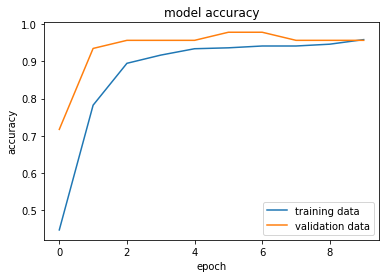
plt.plot(history.history['loss'])
plt.plot(history.history['val_loss'])

plt.title('model loss')
plt.ylabel('loss')
plt.xlabel('epoch')

plt.legend(['training data', 'validation data'], loc = 'upper right')
Output
<matplotlib.legend.Legend at 0x7fcf409fbcd0>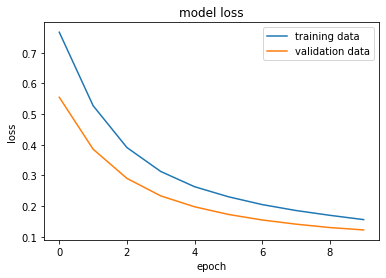
Accuracy of the model on test data
loss, accuracy = model.evaluate(X_test_std, Y_test)
print(accuracy)
Output
4/4 [==============================] - 0s 5ms/step - loss: 0.1693 - accuracy: 0.9386
0.9385964870452881print(X_test_std.shape)
print(X_test_std[0])Output
(114, 30)
[-0.04462793 -1.41612656 -0.05903514 -0.16234067  2.0202457  -0.11323672
  0.18500609  0.47102419  0.63336386  0.26335737  0.53209124  2.62763999
  0.62351167  0.11405261  1.01246781  0.41126289  0.63848593  2.88971815
 -0.41675911  0.74270853 -0.32983699 -1.67435595 -0.36854552 -0.38767294
0.32655007 -0.74858917 -0.54689089 -0.18278004 -1.23064515 -0.6268286 ]Y_pred = model.predict(X_test_std)print(Y_pred.shape)
print(Y_pred[0])Output
(114, 2)
[0.24822891 0.537705 ]print(X_test_std)Output
[[-0.04462793 -1.41612656 -0.05903514 ... -0.18278004 -1.23064515
  -0.6268286 ]
 [ 0.24583601 -0.06219797  0.21802678 ...  0.54129749  0.11047691
   0.0483572 ]
 [-1.26115925 -0.29051645 -1.26499659 ... -1.35138617  0.269338
  -0.28231213]
 ...
 [ 0.72709489  0.45836817  0.75277276 ...  1.46701686  1.19909344
   0.65319961]
 [ 0.25437907  1.33054477  0.15659489 ... -1.29043534 -2.22561725
  -1.59557344]
 [ 0.84100232 -0.06676434  0.8929529  ...  2.15137705  0.35629355
0.37459546]]print(Y_pred)Output
[[2.48228908e-01 5.37705004e-01]
 [5.04756272e-01 5.95336974e-01]
 [3.67398351e-01 9.86996770e-01]
 [9.29620504e-01 2.29299068e-04]
 [5.93764186e-01 4.93302941e-01]
 [8.53436947e-01 1.02660358e-02]
 [2.81091124e-01 6.12119973e-01]
 [4.79383349e-01 9.91485417e-01]
 [4.34603453e-01 9.51259434e-01]
 [6.34022474e-01 9.53936636e-01]
 [4.83262986e-01 6.63963675e-01]
 [3.86232853e-01 9.23828781e-01]
 [2.77723640e-01 7.82129407e-01]
 [3.78485560e-01 8.21216226e-01]
 [4.91592646e-01 9.53726530e-01]
 [7.36154735e-01 1.57864958e-01]
 [4.71651524e-01 9.74555612e-01]
 [2.54375935e-01 8.85443091e-01]
… (96 more lines)
model.predict() gives the prediction probability of each class for that data point
#  argmax function

my_list = [0.25, 0.56]

index_of_max_value = np.argmax(my_list)
print(my_list)
print(index_of_max_value)
Output
[0.25, 0.56]
1# converting the prediction probability to class labels
Y_pred_labels = [np.argmax(i) for i in Y_pred]
print(Y_pred_labels)Output
[1, 1, 1, 0, 0, 0, 1, 1, 1, 1, 1, 1, 1, 1, 1, 0, 1, 1, 1, 0, 0, 1, 1, 1, 1, 0, 1, 1, 0, 0, 1, 1, 1, 0, 0, 1, 1, 1, 1, 1, 0, 0, 1, 1, 0, 1, 1, 1, 0, 0, 1, 0, 1, Building the predictive system
input_data = (11.76,21.6,74.72,427.9,0.08637,0.04966,0.01657,0.01115,0.1495,0.05888,0.4062,1.21,2.635,28.47,0.005857,0.009758,0.01168,0.007445,0.02406,0.001769,12.98,25.72,82.98,516.5,0.1085,0.08615,0.05523,0.03715,0.2433,0.06563)

# change the input_data to a numpy array
input_data_as_numpy_array = np.asarray(input_data)

# reshape the numpy array as we are predicting for one data point
input_data_reshaped = input_data_as_numpy_array.reshape(1,-1)

# standardizing the input data
input_data_std = scaler.transform(input_data_reshaped)

prediction = model.predict(input_data_std)
print(prediction)

prediction_label = [np.argmax(prediction)]
print(prediction_label)

if(prediction_label[0] == 0):
  print('The tumor is Malignant')

else:
  print('The tumor is Benign')
Output
[[0.42537233 0.9805447 ]]
[1]
The tumor is Benign
Output
/usr/local/lib/python3.7/dist-packages/sklearn/base.py:451: UserWarning: X does not have valid feature names, but StandardScaler was fitted with feature names
  "X does not have valid feature names, but"
Keep going: ← Lesson 60 · Lesson 62 → · Track it in the Self Guide
Finished this one?
Part of Self Guide · Stage 17: ML 5 — Shipping Models to the World. Progress is saved in this browser.



