Matplotlib Tutorial in Python
Numbers විතරක් බැලුවම pattern ගොඩක් හංගිලා තියෙනවා — plot එකක් බැලුවම එකපාරටම පේනවා, skewed distribution එකක්, outlier එකක්, කාලයත් එක්ක වෙනස්වීමක්.
Numbers alone hide patterns that a single glance at a plot reveals instantly — a skewed distribution, an outlier, a trend over time.
Lesson 11 of 64 · Part 1 · Python & Data Basics · Python Libraries · bilingual notes (English + සිංහල)
Why this matters. Numbers alone hide patterns that a single glance at a plot reveals instantly — a skewed distribution, an outlier, a trend over time.
සිංහලෙන්: Numbers විතරක් බැලුවම pattern ගොඩක් හංගිලා තියෙනවා — plot එකක් බැලුවම එකපාරටම පේනවා, skewed distribution එකක්, outlier එකක්, කාලයත් එක්ක වෙනස්වීමක්.
What you'll use this for. Before you trust any dataset enough to train a model on it, you plot it first — this is that step.
සිංහලෙන්: Model එකක් train කරන්න dataset එකක් විශ්වාස කරන්නත් කලින්, ඒක plot කරලා බලනවා — ඒ step එක තමයි මේක.
Key principles
- A plot is a sanity check, not decoration. If a "price" column plots as a straight vertical line at zero, something's wrong with your data — you'd never notice that from
.describe()alone.
Plot එකක් කියන්නෙ sanity check එකක්, decoration එකක් නෙවෙයි
Walkthrough
Matplotlib:
- Useful for making Plots
# importing matplotlib library
import matplotlib.pyplot as plt# import numpy to get data for our plots
import numpy as npx = np.linspace(0,10,100)
y = np.sin(x)
z = np.cos(x)print(x)Output
[ 0.          0.1010101   0.2020202   0.3030303   0.4040404   0.50505051
  0.60606061  0.70707071  0.80808081  0.90909091  1.01010101  1.11111111
  1.21212121  1.31313131  1.41414141  1.51515152  1.61616162  1.71717172
  1.81818182  1.91919192  2.02020202  2.12121212  2.22222222  2.32323232
  2.42424242  2.52525253  2.62626263  2.72727273  2.82828283  2.92929293
  3.03030303  3.13131313  3.23232323  3.33333333  3.43434343  3.53535354
  3.63636364  3.73737374  3.83838384  3.93939394  4.04040404  4.14141414
  4.24242424  4.34343434  4.44444444  4.54545455  4.64646465  4.74747475
  4.84848485  4.94949495  5.05050505  5.15151515  5.25252525  5.35353535
  5.45454545  5.55555556  5.65656566  5.75757576  5.85858586  5.95959596
  6.06060606  6.16161616  6.26262626  6.36363636  6.46464646  6.56565657
  6.66666667  6.76767677  6.86868687  6.96969697  7.07070707  7.17171717
  7.27272727  7.37373737  7.47474747  7.57575758  7.67676768  7.77777778
  7.87878788  7.97979798  8.08080808  8.18181818  8.28282828  8.38383838
  8.48484848  8.58585859  8.68686869  8.78787879  8.88888889  8.98989899
  9.09090909  9.19191919  9.29292929  9.39393939  9.49494949  9.5959596
9.6969697 9.7979798 9.8989899 10. ]print(y)Output
[ 0.          0.10083842  0.20064886  0.2984138   0.39313661  0.48385164
  0.56963411  0.64960951  0.72296256  0.78894546  0.84688556  0.8961922
  0.93636273  0.96698762  0.98775469  0.99845223  0.99897117  0.98930624
  0.96955595  0.93992165  0.90070545  0.85230712  0.79522006  0.73002623
  0.65739025  0.57805259  0.49282204  0.40256749  0.30820902  0.21070855
  0.11106004  0.01027934 -0.09060615 -0.19056796 -0.28858706 -0.38366419
 -0.47483011 -0.56115544 -0.64176014 -0.7158225  -0.7825875  -0.84137452
 -0.89158426 -0.93270486 -0.96431712 -0.98609877 -0.99782778 -0.99938456
 -0.99075324 -0.97202182 -0.94338126 -0.90512352 -0.85763861 -0.80141062
 -0.73701276 -0.66510151 -0.58640998 -0.50174037 -0.41195583 -0.31797166
 -0.22074597 -0.12126992 -0.0205576   0.0803643   0.18046693  0.27872982
  0.37415123  0.46575841  0.55261747  0.63384295  0.7086068   0.77614685
  0.83577457  0.8868821   0.92894843  0.96154471  0.98433866  0.99709789
  0.99969234  0.99209556  0.97438499  0.94674118  0.90944594  0.86287948
  0.8075165   0.74392141  0.6727425   0.59470541  0.51060568  0.42130064
  0.32770071  0.23076008  0.13146699  0.03083368 -0.07011396 -0.17034683
-0.26884313 -0.36459873 -0.45663749 -0.54402111]print(z)Output
[ 1.          0.99490282  0.97966323  0.95443659  0.91948007  0.87515004
  0.8218984   0.76026803  0.69088721  0.61446323  0.53177518  0.44366602
  0.35103397  0.25482335  0.15601496  0.0556161  -0.04534973 -0.14585325
 -0.24486989 -0.34139023 -0.43443032 -0.52304166 -0.60632092 -0.68341913
 -0.75355031 -0.81599952 -0.87013012 -0.91539031 -0.95131866 -0.97754893
 -0.9938137  -0.99994717 -0.9958868  -0.981674   -0.95745366 -0.92347268
 -0.88007748 -0.82771044 -0.76690542 -0.69828229 -0.6225406  -0.54045251
 -0.45285485 -0.36064061 -0.26474988 -0.16616018 -0.06587659  0.03507857
  0.13567613  0.23489055  0.33171042  0.4251487   0.51425287  0.59811455
  0.67587883  0.74675295  0.8100144   0.86501827  0.91120382  0.94810022
  0.97533134  0.99261957  0.99978867  0.99676556  0.98358105  0.96036956
  0.9273677   0.88491192  0.83343502  0.77346177  0.70560358  0.63055219
  0.54907273  0.46199582  0.37020915  0.27464844  0.17628785  0.07613012
 -0.0248037  -0.12548467 -0.2248864  -0.32199555 -0.41582217 -0.50540974
 -0.58984498 -0.66826712 -0.7398767  -0.8039437  -0.859815   -0.90692104
 -0.94478159 -0.97301068 -0.99132055 -0.99952453 -0.99753899 -0.98538417
 -0.96318398 -0.93116473 -0.88965286 -0.83907153]
Plotting the data
# sine wave
plt.plot(x,y)
plt.show()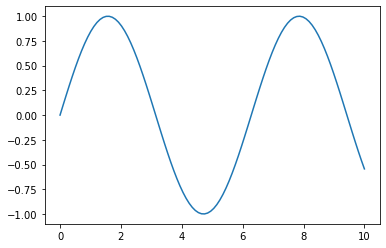
# cosine wave
plt.plot(x,z)
plt.show()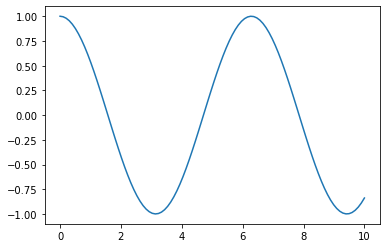
# adding title, x-axis & y-axis labels
plt.plot(x,y)
plt.xlabel('angle')
plt.ylabel('sine value')
plt.title('sine wave')
plt.show()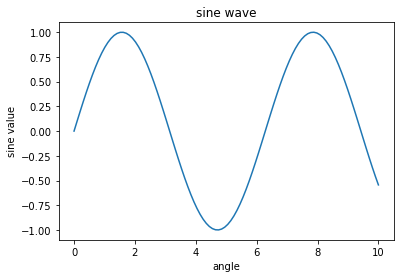
# parabola
x = np.linspace(-10,10,20)
y = x**2
plt.plot(x,y)
plt.show()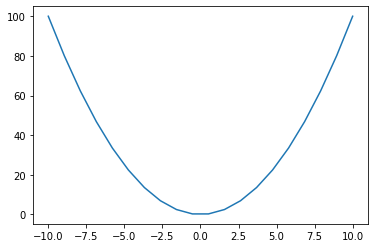
plt.plot(x, y, 'r+')
plt.show()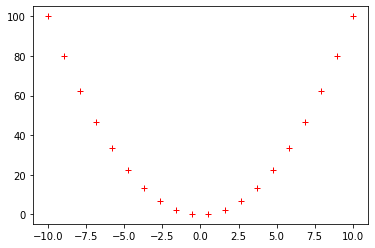
plt.plot(x, y, 'g.')
plt.show()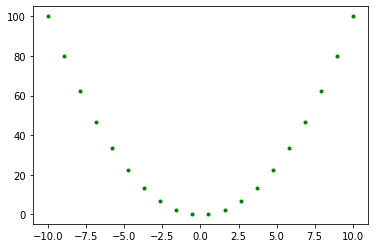
plt.plot(x, y, 'rx')
plt.show()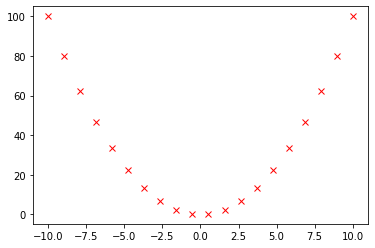
x = np.linspace(-5,5,50)
plt.plot(x, np.sin(x), 'g-')
plt.plot(x, np.cos(x), 'r--')
plt.show()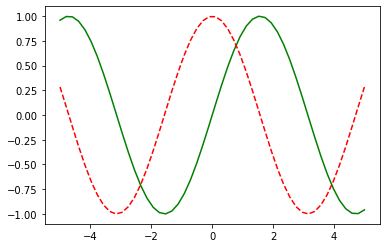
Bar Plot
fig = plt.figure()
ax = fig.add_axes([0,0,1,1])
languages = ['English','French','Spanish','Latin','German']
people = [100, 50, 150, 40, 70]
ax.bar(languages, people)
plt.xlabel('LANGUAGES')
plt.ylabel('NUMBER OF PEOPLE')
plt.show()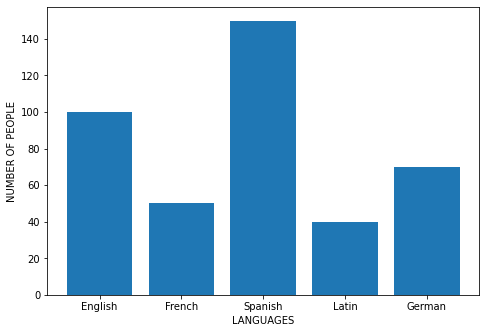
Pie Chart
fig1 = plt.figure()
ax = fig1.add_axes([0,0,1,1])
languages = ['English','French','Spanish','Latin','German']
people = [100, 50, 150, 40, 70]
ax.pie(people, labels=languages, autopct='%1.1f%%')
plt.show()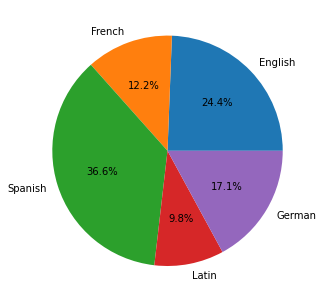
Scatter Plot
x = np.linspace(0,10,30)
y = np.sin(x)
z = np.cos(x)
fig2 = plt.figure()
ax = fig2.add_axes([0,0,1,1])
ax.scatter(x,y,color='g')
ax.scatter(x,z,color='b')
plt.show()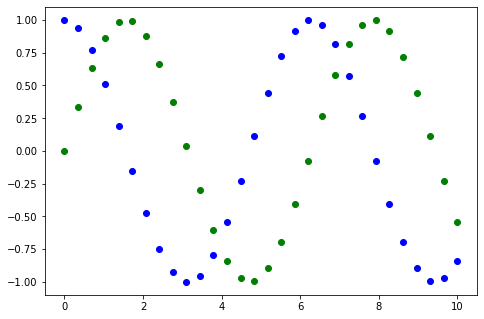
3D Scatter Plot
fig3 = plt.figure()
ax = plt.axes(projection='3d')
z = 20 * np.random.random(100)
x = np.sin(z)
y = np.cos(z)
ax.scatter(x,y,z,c=z,cmap='Blues')
plt.show()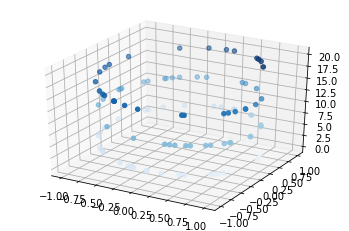
Keep going: ← Lesson 10 · Lesson 12 → · Track it in the Self Guide
Finished this one?
Part of Self Guide · Stage 13: ML 1 — Python & Data Basics. Progress is saved in this browser.



