Project 6 Loan Status Prediction
සිව්වෙනි සම්පූර්ණ project එක, numeric සහ categorical features මිශ්ර වුන dataset එකක් — course එකෙන් එළියේදි ඔයාට හම්බුවෙන ඇත්තම, අවුල් සහගත data shape එකමයි.
A fourth complete project, on a dataset with a mix of numeric and categorical features together — exactly the messy, real shape of data you'll meet outside a course.
Lesson 31 of 64 · Part 2 · Maths & First Models · Hands-on Projects · bilingual notes (English + සිංහල)
Why this matters. A fourth complete project, on a dataset with a mix of numeric and categorical features together — exactly the messy, real shape of data you'll meet outside a course.
සිංහලෙන්: සිව්වෙනි සම්පූර්ණ project එක, numeric සහ categorical features මිශ්ර වුන dataset එකක් — course එකෙන් එළියේදි ඔයාට හම්බුවෙන ඇත්තම, අවුල් සහගත data shape එකමයි.
What you'll use this for. This is the same core problem banks solve every day: given an applicant's details, should this loan be approved?
සිංහලෙන්: Banks දවසින් දවස විසඳන core problem එකමයි මේක: applicant කෙනෙකුගෙ details බලලා, මේ loan එක approve කරන්නද?
Key principles
- Categorical and numeric columns need different pre-processing before they can sit in the same matrix. You'll encode the categorical columns (like Part 1's label encoding) and standardize the numeric ones — a mix that shows up constantly in real datasets.
Categorical සහ numeric columns, එකම matrix එකේ ඉන්න කලින් වෙනස් pre-processing එකක් ඕන
Walkthrough
Importing the Dependencies
import numpy as np
import pandas as pd
import seaborn as sns
from sklearn.model_selection import train_test_split
from sklearn import svm
from sklearn.metrics import accuracy_score
Data Collection and Processing
# loading the dataset to pandas DataFrame
loan_dataset = pd.read_csv('/content/dataset.csv')type(loan_dataset)Output
pandas.core.frame.DataFrame# printing the first 5 rows of the dataframe
loan_dataset.head()| Loan_ID | Gender | Married | Dependents | Education | Self_Employed | ApplicantIncome | … | |
|---|---|---|---|---|---|---|---|---|
| 0 | LP001002 | Male | No | 0 | Graduate | No | 5849 | … |
| 1 | LP001003 | Male | Yes | 1 | Graduate | No | 4583 | … |
| 2 | LP001005 | Male | Yes | 0 | Graduate | Yes | 3000 | … |
| 3 | LP001006 | Male | Yes | 0 | Not Graduate | No | 2583 | … |
| 4 | LP001008 | Male | No | 0 | Graduate | No | 6000 | … |
# number of rows and columns
loan_dataset.shape
Output
(614, 13)# statistical measures
loan_dataset.describe()| ApplicantIncome | CoapplicantIncome | LoanAmount | Loan_Amount_Term | Credit_History | |
|---|---|---|---|---|---|
| count | 614.000000 | 614.000000 | 592.000000 | 600.00000 | 564.000000 |
| mean | 5403.459283 | 1621.245798 | 146.412162 | 342.00000 | 0.842199 |
| std | 6109.041673 | 2926.248369 | 85.587325 | 65.12041 | 0.364878 |
| min | 150.000000 | 0.000000 | 9.000000 | 12.00000 | 0.000000 |
| 25% | 2877.500000 | 0.000000 | 100.000000 | 360.00000 | 1.000000 |
| 50% | 3812.500000 | 1188.500000 | 128.000000 | 360.00000 | 1.000000 |
… 2 more rows
# number of missing values in each column
loan_dataset.isnull().sum()
Output
Loan_ID               0
Gender               13
Married               3
Dependents           15
Education             0
Self_Employed        32
ApplicantIncome       0
CoapplicantIncome     0
LoanAmount           22
Loan_Amount_Term     14
Credit_History       50
Property_Area         0
Loan_Status           0
dtype: int64# dropping the missing values
loan_dataset = loan_dataset.dropna()# number of missing values in each column
loan_dataset.isnull().sum()Output
Loan_ID              0
Gender               0
Married              0
Dependents           0
Education            0
Self_Employed        0
ApplicantIncome      0
CoapplicantIncome    0
LoanAmount           0
Loan_Amount_Term     0
Credit_History       0
Property_Area        0
Loan_Status          0
dtype: int64# label encoding
loan_dataset.replace({"Loan_Status":{'N':0,'Y':1}},inplace=True)# printing the first 5 rows of the dataframe
loan_dataset.head()| Loan_ID | Gender | Married | Dependents | Education | Self_Employed | ApplicantIncome | … | |
|---|---|---|---|---|---|---|---|---|
| 1 | LP001003 | Male | Yes | 1 | Graduate | No | 4583 | … |
| 2 | LP001005 | Male | Yes | 0 | Graduate | Yes | 3000 | … |
| 3 | LP001006 | Male | Yes | 0 | Not Graduate | No | 2583 | … |
| 4 | LP001008 | Male | No | 0 | Graduate | No | 6000 | … |
| 5 | LP001011 | Male | Yes | 2 | Graduate | Yes | 5417 | … |
# Dependent column values
loan_dataset['Dependents'].value_counts()
Output
0     274
2      85
1      80
3+     41
Name: Dependents, dtype: int64# replacing the value of 3+ to 4
loan_dataset = loan_dataset.replace(to_replace='3+', value=4)# dependent values
loan_dataset['Dependents'].value_counts()Output
0    274
2     85
1     80
4     41
Name: Dependents, dtype: int64
Data Visualization
# education & Loan Status
sns.countplot(x='Education',hue='Loan_Status',data=loan_dataset)
Output
<matplotlib.axes._subplots.AxesSubplot at 0x7f60020a91d0>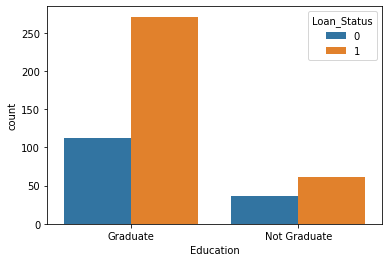
# marital status & Loan Status
sns.countplot(x='Married',hue='Loan_Status',data=loan_dataset)
Output
<matplotlib.axes._subplots.AxesSubplot at 0x7f6000f5a650>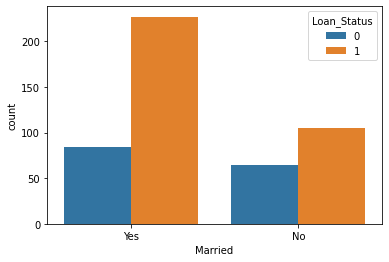
# convert categorical columns to numerical values
loan_dataset.replace({'Married':{'No':0,'Yes':1},'Gender':{'Male':1,'Female':0},'Self_Employed':{'No':0,'Yes':1},
'Property_Area':{'Rural':0,'Semiurban':1,'Urban':2},'Education':{'Graduate':1,'Not Graduate':0}},inplace=True)loan_dataset.head()| Loan_ID | Gender | Married | Dependents | Education | Self_Employed | ApplicantIncome | … | |
|---|---|---|---|---|---|---|---|---|
| 1 | LP001003 | 1 | 1 | 1 | 1 | 0 | 4583 | … |
| 2 | LP001005 | 1 | 1 | 0 | 1 | 1 | 3000 | … |
| 3 | LP001006 | 1 | 1 | 0 | 0 | 0 | 2583 | … |
| 4 | LP001008 | 1 | 0 | 0 | 1 | 0 | 6000 | … |
| 5 | LP001011 | 1 | 1 | 2 | 1 | 1 | 5417 | … |
# separating the data and label
X = loan_dataset.drop(columns=['Loan_ID','Loan_Status'],axis=1)
Y = loan_dataset['Loan_Status']print(X)
print(Y)Output
     Gender  Married  ... Credit_History  Property_Area
1         1        1  ...            1.0              0
2         1        1  ...            1.0              2
3         1        1  ...            1.0              2
4         1        0  ...            1.0              2
5         1        1  ...            1.0              2
..      ...      ...  ...            ...            ...
609       0        0  ...            1.0              0
610       1        1  ...            1.0              0
611       1        1  ...            1.0              2
612       1        1  ...            1.0              2
613       0        0  ...            0.0              1

[480 rows x 11 columns]
1      0
2      1
3      1
4      1
… (8 more lines)
Train Test Split
X_train, X_test,Y_train,Y_test = train_test_split(X,Y,test_size=0.1,stratify=Y,random_state=2)print(X.shape, X_train.shape, X_test.shape)Output
(480, 11) (432, 11) (48, 11)Training the model:
Support Vector Machine Model
classifier = svm.SVC(kernel='linear')#training the support Vector Macine model
classifier.fit(X_train,Y_train)Output
SVC(C=1.0, break_ties=False, cache_size=200, class_weight=None, coef0=0.0,
    decision_function_shape='ovr', degree=3, gamma='scale', kernel='linear',
    max_iter=-1, probability=False, random_state=None, shrinking=True,
    tol=0.001, verbose=False)
Model Evaluation
# accuracy score on training data
X_train_prediction = classifier.predict(X_train)
training_data_accuray = accuracy_score(X_train_prediction,Y_train)print('Accuracy on training data : ', training_data_accuray)Output
Accuracy on training data : 0.7986111111111112# accuracy score on training data
X_test_prediction = classifier.predict(X_test)
test_data_accuray = accuracy_score(X_test_prediction,Y_test)print('Accuracy on test data : ', test_data_accuray)Output
Accuracy on test data : 0.8333333333333334Making a predictive system
Keep going: ← Lesson 30 · Lesson 32 → · Track it in the Self Guide
Finished this one?
Part of Self Guide · Stage 14: ML 2 — Maths & First Models. Progress is saved in this browser.



