Project 13 Customer Segmentation using K Means Clustering
මේ වෙනකම් හදපු projects ඔක්කොම, ඉගෙන ගන්න labeled answers තිබුනා. මේකේ නම් නෑ — K-Means එකෙන් data එකේ තියෙන hidden groups තනියම හොයාගන්නවා, ඒක ඇත්තටම වෙනස් වර්ගයේ learning එකක්.
Every project so far had labeled answers to learn from. This one doesn't — K-Means finds hidden groups in data on its own, which is a genuinely different kind of learning.
Lesson 49 of 64 · Part 4 · Evaluating & Choosing Models · Hands-on Projects · bilingual notes (English + සිංහල)
Why this matters. Every project so far had labeled answers to learn from. This one doesn't — K-Means finds hidden groups in data on its own, which is a genuinely different kind of learning.
සිංහලෙන්: මේ වෙනකම් හදපු projects ඔක්කොම, ඉගෙන ගන්න labeled answers තිබුනා. මේකේ නම් නෑ — K-Means එකෙන් data එකේ තියෙන hidden groups තනියම හොයාගන්නවා, ඒක ඇත්තටම වෙනස් වර්ගයේ learning එකක්.
What you'll use this for. Businesses use exactly this to group customers by behaviour (big spenders, occasional buyers, etc.) without anyone manually labeling a single customer.
සිංහලෙන්: Ekekwa customer කෙනෙකුවත් අතින් label කරන්නෙ නැතුව, behaviour අනුව customers group කරන්න (loku spenders, occasional buyers ආදිය) businesses පාවිච්චි කරන්නෙ හරියටම මේකයි.
Key principles
- Unsupervised learning finds structure, it doesn't confirm a hypothesis. K-Means will always find some clusters, even in random noise — the elbow method (choosing the right number of clusters) is what keeps the result meaningful rather than arbitrary.
Unsupervised learning එකෙන් structure එකක් හොයනවා, hypothesis එකක් confirm කරන්නෙ නෑ
Walkthrough
Importing the Dependencies
import numpy as np
import pandas as pd
import matplotlib.pyplot as plt
import seaborn as sns
from sklearn.cluster import KMeans
Data Collection & Analysis
# loading the data from csv file to a Pandas DataFrame
customer_data = pd.read_csv('/content/Mall_Customers.csv')# first 5 rows in the dataframe
customer_data.head()| CustomerID | Gender | Age | Annual Income (k$) | Spending Score (1-100) | |
|---|---|---|---|---|---|
| 0 | 1 | Male | 19 | 15 | 39 |
| 1 | 2 | Male | 21 | 15 | 81 |
| 2 | 3 | Female | 20 | 16 | 6 |
| 3 | 4 | Female | 23 | 16 | 77 |
| 4 | 5 | Female | 31 | 17 | 40 |
# finding the number of rows and columns
customer_data.shape
Output
(200, 5)# getting some informations about the dataset
customer_data.info()Output
<class 'pandas.core.frame.DataFrame'>
RangeIndex: 200 entries, 0 to 199
Data columns (total 5 columns):
 #   Column                  Non-Null Count  Dtype
---  ------                  --------------  -----
 0   CustomerID              200 non-null    int64
 1   Gender                  200 non-null    object
 2   Age                     200 non-null    int64
 3   Annual Income (k$)      200 non-null    int64
 4   Spending Score (1-100)  200 non-null    int64
dtypes: int64(4), object(1)
memory usage: 7.9+ KB# checking for missing values
customer_data.isnull().sum()Output
CustomerID                0
Gender                    0
Age                       0
Annual Income (k$)        0
Spending Score (1-100)    0
dtype: int64
Choosing the Annual Income Column & Spending Score column
X = customer_data.iloc[:,[3,4]].valuesprint(X)Output
[[ 15  39]
 [ 15  81]
 [ 16   6]
 [ 16  77]
 [ 17  40]
 [ 17  76]
 [ 18   6]
 [ 18  94]
 [ 19   3]
 [ 19  72]
 [ 19  14]
 [ 19  99]
 [ 20  15]
 [ 20  77]
 [ 20  13]
 [ 20  79]
 [ 21  35]
 [ 21  66]
… (182 more lines)
Choosing the number of clusters
WCSS -> Within Clusters Sum of Squares
# finding wcss value for different number of clusters

wcss = []

for i in range(1,11):
  kmeans = KMeans(n_clusters=i, init='k-means++', random_state=42)
  kmeans.fit(X)

wcss.append(kmeans.inertia_)# plot an elbow graph
sns.set()
plt.plot(range(1,11), wcss)
plt.title('The Elbow Point Graph')
plt.xlabel('Number of Clusters')
plt.ylabel('WCSS')
plt.show()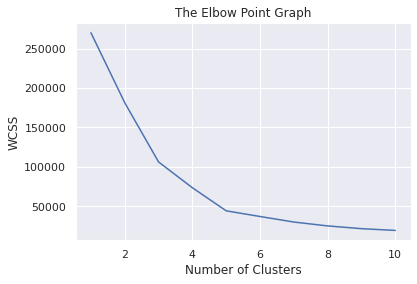
Optimum Number of Clusters = 5
Training the k-Means Clustering Model
kmeans = KMeans(n_clusters=5, init='k-means++', random_state=0)

# return a label for each data point based on their cluster
Y = kmeans.fit_predict(X)

print(Y)
Output
[3 1 3 1 3 1 3 1 3 1 3 1 3 1 3 1 3 1 3 1 3 1 3 1 3 1 3 1 3 1 3 1 3 1 3 1 3
 1 3 1 3 1 3 0 3 1 0 0 0 0 0 0 0 0 0 0 0 0 0 0 0 0 0 0 0 0 0 0 0 0 0 0 0 0
 0 0 0 0 0 0 0 0 0 0 0 0 0 0 0 0 0 0 0 0 0 0 0 0 0 0 0 0 0 0 0 0 0 0 0 0 0
 0 0 0 0 0 0 0 0 0 0 0 0 2 4 2 0 2 4 2 4 2 0 2 4 2 4 2 4 2 4 2 0 2 4 2 4 2
 4 2 4 2 4 2 4 2 4 2 4 2 4 2 4 2 4 2 4 2 4 2 4 2 4 2 4 2 4 2 4 2 4 2 4 2 4
 2 4 2 4 2 4 2 4 2 4 2 4 2 4 2]
5 Clusters - 0, 1, 2, 3, 4
Visualizing all the Clusters
# plotting all the clusters and their Centroids

plt.figure(figsize=(8,8))
plt.scatter(X[Y==0,0], X[Y==0,1], s=50, c='green', label='Cluster 1')
plt.scatter(X[Y==1,0], X[Y==1,1], s=50, c='red', label='Cluster 2')
plt.scatter(X[Y==2,0], X[Y==2,1], s=50, c='yellow', label='Cluster 3')
plt.scatter(X[Y==3,0], X[Y==3,1], s=50, c='violet', label='Cluster 4')
plt.scatter(X[Y==4,0], X[Y==4,1], s=50, c='blue', label='Cluster 5')

# plot the centroids
plt.scatter(kmeans.cluster_centers_[:,0], kmeans.cluster_centers_[:,1], s=100, c='cyan', label='Centroids')

plt.title('Customer Groups')
plt.xlabel('Annual Income')
plt.ylabel('Spending Score')
plt.show()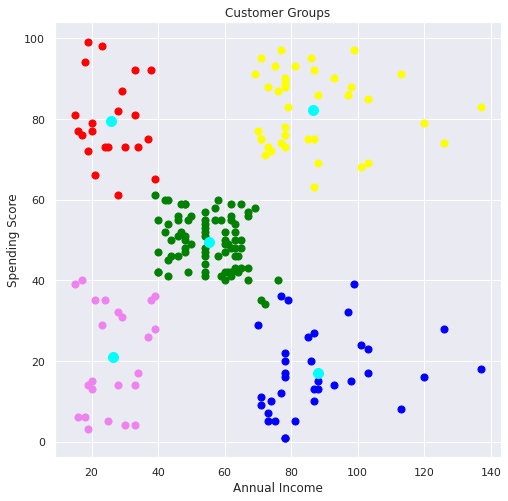
Keep going: ← Lesson 48 · Lesson 50 → · Track it in the Self Guide
Finished this one?
Part of Self Guide · Stage 16: ML 4 — Evaluating & Choosing Models. Progress is saved in this browser.



