Networking 08 — How the Internet Works, End to End
Seventeen short chapters from the history of the internet to DNS in depth and the commands to see it all yourself.
These notes began as two handwritten notebooks for COM 3401 — Data Communication and Networking at Rajarata University. I OCR'd them, rewrote them in English, and paired every section with a Sinhala explanation so the concept comes first and the English terms stay intact for the exam. Diagrams are redrawn as vector graphics.
A short history of the internet
අන්තර්ජාලයේ කෙටි ඉතිහාසය
From a Cold War panic to four computers in California, and why the design decisions of 1969 are still visible in every packet you send.සීතල යුද්ධ භීතියක සිට කැලිෆෝනියාවේ පරිගණක හතරක් දක්වා සහ 1969 සැලසුම් තීරණ ඔබ යවන සෑම පැකට්ටුවකම තවමත් දෘශ්යමාන වන්නේ ඇයි.
In October 1957 the Soviet Union launched Sputnik, the first artificial satellite. The United States, which had expected to be first, responded by creating the Advanced Research Projects Agency, ARPA, inside its Department of Defense, with a brief to make sure it was never surprised by a technology again.
සිංහලෙන්: 1957 ඔක්තෝම්බර් මාසයේදී සෝවියට් සංගමය විසින් පළමු කෘතිම චන්ද්රිකාව වන ස්පුට්නික් දියත් කරන ලදී. පළමුවැන්නා වීමට අපේක්ෂා කළ එක්සත් ජනපදය ප්රතිචාර දැක්වූයේ එහි ආරක්ෂක දෙපාර්තමේන්තුව තුළ උසස් පර්යේෂණ ව්යාපෘති ඒජන්සිය, ARPA නිර්මාණය කිරීමෙනි.
ARPA funded research at universities scattered across the country, and those universities owned very expensive computers that could not easily be shared. The practical problem was mundane: a researcher at one site wanted to run a program on a machine at another. The solution to that mundane problem became the internet.
සිංහලෙන්: රට පුරා විසිරී ඇති විශ්ව විද්යාලවල පර්යේෂණ සඳහා ARPA අරමුදල් සපයනු ලැබූ අතර එම විශ්ව විද්යාල සතුව පහසුවෙන් බෙදාගත නොහැකි ඉතා මිල අධික පරිගණක තිබුණි. ප්රායෝගික ගැටලුව ලෞකික විය: එක් වෙබ් අඩවියක පර්යේෂකයෙකුට තවත් යන්ත්රයක වැඩසටහනක් ක්රියාත්මක කිරීමට අවශ්ය විය. ඒ ලෞකික ගැටලුවට විසඳුම අන්තර්ජාලය බවට පත් විය.
The idea that made it possible
The telephone network of the day worked by circuit switching. A call reserved a physical path end to end for its entire duration, whether anyone was speaking or not. That is excellent for a conversation and terrible for a computer, which sends a burst of data and then thinks for a minute.
සිංහලෙන්: එදා දුරකථන ජාලය ක්රියා කළේ පරිපථ මාරු කිරීමෙනි. ඇමතුමක් කිසිවකු කතා කළත් නැතත් එහි සම්පූර්ණ කාලය සඳහා භෞතික මාර්ගයක් වෙන් කර ඇත. එය සංවාදයක් සඳහා විශිෂ්ට වන අතර පරිගණකයකට භයානක ය, එය දත්ත පිපිරීමක් යවා විනාඩියකට සිතන්න.
The alternative, developed independently by Paul Baran in America and Donald Davies in Britain, was packet switching: chop the message into small pieces, address each one separately, and let each piece find its own way through a shared network. No path is reserved, so the network's capacity is shared by everyone who happens to be sending at that instant, and if a link fails the pieces simply take another route.
සිංහලෙන්: ඇමරිකාවේ පෝල් බරන් සහ බ්රිතාන්යයේ ඩොනල්ඩ් ඩේවිස් විසින් ස්වාධීනව සංවර්ධනය කරන ලද විකල්පය වූයේ පැකට් මාරු කිරීමයි: පණිවිඩය කුඩා කැබලිවලට කපා, එක් එක් වෙන වෙනම අමතන්න, සහ හවුල් ජාලයක් හරහා සෑම කැබැල්ලකටම තමන්ගේම මාර්ගය සොයා ගැනීමට ඉඩ දෙන්න. මාර්ගයක් වෙන් කර නැත, එබැවින් ජාලයේ ධාරිතාව එම මොහොතේ යැවීමට සිදු වන සෑම දෙනාටම බෙදාගනු ලබන අතර, සබැඳියක් අසාර්ථක වුවහොත් කෑලි වෙනත් මාර්ගයක් ගනී.
Every idea in this site descends from that one decision. Packets, headers, addressing, routing, fragmentation, sequence numbers, retransmission and congestion control all exist because the pieces travel independently and may be lost, delayed, duplicated or reordered on the way.
සිංහලෙන්: මෙම වෙබ් අඩවියේ සෑම අදහසක්ම එම එක් තීරණයකින් පැවත එන්නකි. පැකට්, ශීර්ෂ, ලිපින, මාර්ගගත කිරීම, ඛණ්ඩනය, අනුක්රමික අංක, නැවත සම්ප්රේෂණය සහ තදබදය පාලනය යන සියල්ල පවතිනුයේ කෑලි ස්වාධීනව ගමන් කරන නිසාත්, මඟදී නැති වී, ප්රමාද වීමට, අනුපිටපත් කිරීමට හෝ නැවත ඇණවුම් කිරීමටත් ඉඩ ඇත.
ARPANET, 1969
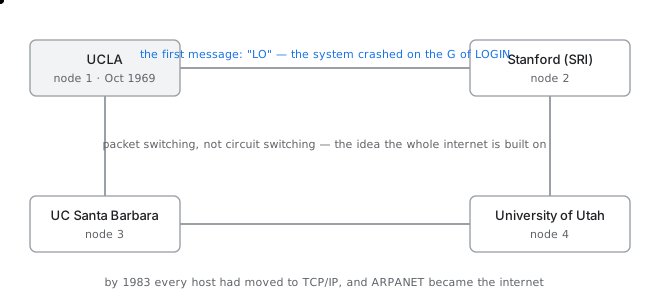
ARPANET, 1969 — the whole internet was four computers and three links
The first ARPANET link connected UCLA to Stanford Research Institute on 29 October 1969. The first message was intended to be the word LOGIN. The system crashed after two characters, so the first thing ever sent across the ancestor of the internet was the word LO. Two more nodes were added that year, at UC Santa Barbara and the University of Utah, and the entire network was four computers.
සිංහලෙන්: පළමු ARPANET සබැඳිය UCLA 1969 ඔක්තෝබර් 29 වන දින Stanford Research Institute වෙත සම්බන්ධ කළේය. පළමු පණිවිඩය LOGIN යන වචනය විය. පද්ධතිය අක්ෂර දෙකකට පසු බිඳ වැටුණු අතර, එබැවින් අන්තර්ජාලයේ මුතුන් මිත්තන් හරහා එවන ලද පළමු දෙය වූයේ LO යන වචනයයි. එම වසරේ UC Santa Barbara සහ Utah විශ්ව විද්යාලයේ තවත් නෝඩ් දෙකක් එකතු කරන ලද අතර මුළු ජාලයම පරිගණක හතරක් විය.
The milestones that still matter
| Year | What happened | Why it still matters |
|---|---|---|
| 1969 | ARPANET's first four nodes | packet switching proved to work at all |
| 1971 | Ray Tomlinson sends the first network email | the @ sign, chosen because it was unused |
| 1973 | Cerf and Kahn design TCP | the split into TCP and IP came later, in 1978 |
| 1983 | Flag day: every host moves to TCP/IP | the last time the whole internet changed at once |
| 1983 | DNS introduced | replaced one hosts file copied between machines |
| 1989 | Tim Berners-Lee proposes the web at CERN | the internet gets a use for non-specialists |
| 1993 | Mosaic browser released | images inline with text; usage explodes |
| 1998 | ICANN formed | names and numbers get a custodian |
Who decides what the rules are
Nobody owns the internet, which raises an obvious question: who decides how it works? The answer is a set of open bodies whose output is documents rather than products.
සිංහලෙන්: අන්තර්ජාලය කිසිවෙකුට අයිති නැත, එය පැහැදිලි ප්රශ්නයක් මතු කරයි: එය ක්රියා කරන ආකාරය තීරණය කරන්නේ කවුද? පිළිතුර නිෂ්පාදන වලට වඩා ලේඛන ප්රතිදානය වන විවෘත ශරීර සමූහයකි.
- The Internet Engineering Task Force writes the technical standards. Anyone may participate, and membership is simply turning up. Its standards are published as Requests for Comments, or RFCs, a name that survives from when they genuinely were requests for comment.
- The Internet Society is the parent organisation that provides the legal and financial home for that work.
- ICANN, the Internet Corporation for Assigned Names and Numbers, manages the root of the domain name system and the allocation of address space to the five regional registries.
සිංහලෙන්: - අන්තර්ජාල ඉංජිනේරු කාර්ය සාධක බලකාය තාක්ෂණික ප්රමිතීන් ලියයි. ඕනෑම කෙනෙකුට සහභාගී විය හැකි අතර, සාමාජිකත්වය සරලව හැරෙමින් පවතී. එහි ප්රමිතීන් ප්රකාශන සඳහා ඉල්ලීම් හෝ RFC ලෙස ප්රකාශයට පත් කරනු ලැබේ, ඒවා සත්ය වශයෙන්ම අදහස් දැක්වීම සඳහා ඉල්ලීම් වූ දා සිට පවතින නමකි.
- අන්තර්ජාල සමිතිය යනු එම කාර්යය සඳහා නීතිමය සහ මූල්ය නිවස සපයන මව් සංවිධානයයි.
- ICANN, පවරා ඇති නම් සහ අංක සඳහා වන අන්තර්ජාල සංස්ථාව, වසම් නාම පද්ධතියේ මූලය සහ කලාපීය ලේඛන පහ සඳහා ලිපින ඉඩ වෙන් කිරීම කළමනාකරණය කරයි.
An RFC number never changes and is never reissued, so a protocol is identified by its number for ever. RFC 791 is IPv4, RFC 793 is TCP, RFC 2616 and its successors are HTTP. When a standard is revised the new document gets a new number and formally obsoletes the old one, which is why you will sometimes see a protocol described by four numbers at once.
සිංහලෙන්: RFC අංකයක් කිසිවිටෙක වෙනස් නොවන අතර නැවත නිකුත් නොකෙරේ, එබැවින් ප්රොටෝකෝලයක් සදහටම එහි අංකයෙන් හඳුනාගනු ලැබේ. RFC 791 යනු IPv4, RFC 793 යනු TCP, RFC 2616 වන අතර එහි අනුප්රාප්තිකයින් HTTP වේ. සම්මතයක් සංශෝධනය කළ විට නව ලේඛනයට නව අංකයක් ලැබෙන අතර පැරණි එක විධිමත් ලෙස යල්පැන යයි, එම නිසා ඔබට සමහර විට එකවර අංක හතරකින් විස්තර කර ඇති ප්රොටෝකෝලයක් පෙනෙනු ඇත.
What goes wrongවැරදෙන තැන
The common misconception is that the internet was built to survive a nuclear war. The engineers involved have repeatedly said that survivability was a property of the design rather than its purpose, and that the actual purpose was sharing expensive computers between funded researchers. The robustness is real, but it was a consequence of packet switching, not the reason for it.
සිංහලෙන්: සාමාන්ය දුර්මතය නම් අන්තර්ජාලය ගොඩනඟා ඇත්තේ න්යෂ්ටික යුද්ධයකින් බේරීමට බව ය. ඊට සම්බන්ධ ඉංජිනේරුවන් නැවත නැවතත් පවසා ඇත්තේ පැවැත්ම එහි අරමුණට වඩා නිර්මාණයේ දේපළක් බවත්, සැබෑ අරමුණ අරමුදල් ලත් පර්යේෂකයන් අතර මිල අධික පරිගණක බෙදාගැනීම බවත්ය. ශක්තිමත් බව සැබෑ ය, නමුත් එය පැකට් මාරු කිරීමේ ප්රතිවිපාකයක් මිස එයට හේතුව නොවේ.
The World Wide Web
වර්ල්ඩ් වයිඩ් වෙබ්
The internet is the road network; the web is one kind of traffic on it. Confusing the two is the most common mistake in the whole subject.අන්තර්ජාලය මාර්ග ජාලයයි; වෙබ් යනු එහි එක් ආකාරයක ගමනාගමනයකි. මේ දෙක පටලවා ගැනීම සමස්ත විෂයෙහිම බහුලව දක්නට ලැබෙන වරදකි.
The internet existed for twenty years before the web. Email, file transfer and remote login all worked, and all of them were used daily by people who had never heard the phrase world wide web, because it did not exist.
සිංහලෙන්: අන්තර්ජාලය බිහිවීමට පෙර වසර විස්සක් පුරාවට අන්තර්ජාලය පැවතුනි. විද්යුත් තැපෑල, ගොනු හුවමාරුව සහ දුරස්ථ පිවිසුම යන සියල්ල ක්රියාත්මක වූ අතර, ඒ සියල්ල දිනපතා භාවිත කළේ ලෝක ව්යාප්ත වෙබ් යන වාක්ය ඛණ්ඩය කිසි දිනෙක අසා නැති අය විසින් එය නොපවතින බැවිනි.
In 1989 Tim Berners-Lee, working at CERN, wrote a proposal for a system to link documents together so that a reference in one paper could be followed directly to the paper it cited. His supervisor's written comment on the proposal was, famously, that it was vague but exciting. By 1991 the first website was running, and it was a page explaining what the world wide web was.
සිංහලෙන්: 1989 දී CERN හි සේවය කරන ටිම් බර්නර්ස්-ලී, එක් පත්රිකාවක සඳහනක් සෘජුවම එය උපුටා දක්වන පත්රිකාවට අනුගමනය කළ හැකි පරිදි ලේඛන එකට සම්බන්ධ කිරීමේ පද්ධතියක් සඳහා යෝජනාවක් ලිවීය. යෝජනාව පිළිබඳ ඔහුගේ අධීක්ෂකගේ ලිඛිත අදහස වූයේ, එය නොපැහැදිලි නමුත් උද්යෝගිමත් බවය. 1991 වන විට පළමු වෙබ් අඩවිය ක්රියාත්මක වූ අතර එය ලෝක ව්යාප්ත වෙබ් යනු කුමක්දැයි පැහැදිලි කරන පිටුවකි.
The three inventions
The web is not one thing but three, and each of them is still in use every time you open a page.
සිංහලෙන්: වෙබ් යනු එකක් නොව තුනක් වන අතර, ඔබ පිටුවක් විවෘත කරන සෑම අවස්ථාවකම ඒ සෑම එකක්ම තවමත් භාවිතයේ පවතී.
- A way to name a resource, which is the URL. Every document, image, video and script anywhere in the world has a unique name of this form.
- A way to request it, which is HTTP. A client asks for a named resource and a server returns it, along with a status code saying how it went.
- A way to write a document that refers to others, which is HTML. The critical element is the hyperlink, which turns a collection of separate documents into a single connected space.
සිංහලෙන්: - URL එක වන සම්පතක් නම් කිරීමට ක්රමයක්. ලෝකයේ ඕනෑම තැනක ඇති සෑම ලේඛනයක්, රූපයක්, වීඩියෝ සහ ස්ක්රිප්ට් එකකටම මෙම පෝරමයේ අනන්ය නමක් ඇත.
- එය ඉල්ලීමට ක්රමයක්, එනම් HTTP. සේවාලාභියෙකු නම් කළ සම්පතක් ඉල්ලා සිටින අතර සේවාදායකයක් එය ආපසු ලබා දෙයි, එය ගිය ආකාරය සඳහන් තත්ව කේතයක් ද සමඟින්.
- HTML යනු අන් අය වෙත යොමු වන ලේඛනයක් ලිවීමේ ක්රමයක්. තීරනාත්මක අංගය වන්නේ හයිපර්ලින්ක් වන අතර එය වෙනම ලේඛන එකතුවක් තනි සම්බන්ධිත අවකාශයක් බවට පත් කරයි.
Internet and web are not the same thing
Two different things, often confused
| The internet | The world wide web | |
|---|---|---|
| What it is | a network of networks | a service that runs on it |
| Born | 1969 | 1991 |
| Made of | cables, routers, addresses | URLs, HTTP, HTML |
| Other users | email, FTP, SSH, DNS, games, video calls | browsers only |
| Analogy | the road network | one company's delivery service using it |
Email is carried by the internet and is not part of the web. A video call, a software update, a bank's card authorisation and a DNS query are all internet traffic and none of them is web traffic. The web is simply the most visible service, which is why its name is often used for the whole thing.
සිංහලෙන්: විද්යුත් තැපෑල අන්තර්ජාලය මගින් ගෙන යන අතර එය වෙබයේ කොටසක් නොවේ. වීඩියෝ ඇමතුමක්, මෘදුකාංග යාවත්කාලීන කිරීමක්, බැංකුවක කාඩ්පත් අවසරය සහ DNS විමසුමක් අන්තර්ජාල ගමනාගමනය වන අතර ඒ කිසිවක් වෙබ් ගමනාගමනය නොවේ. වෙබය සරලවම වඩාත්ම දෘශ්යමාන සේවාව වන අතර, එහි නම බොහෝ විට සමස්ත දේ සඳහාම භාවිතා වන්නේ එබැවිනි.
Then search had to be invented
The early web had no search. You navigated by following links from pages you already knew, and the alternative was a hand-maintained directory, which is what Yahoo originally was: human beings categorising websites into a hierarchy by hand.
සිංහලෙන්: මුල් වෙබයට සෙවීමක් නොතිබුණි. ඔබ දැනටමත් දැන සිටි පිටු වලින් සබැඳි අනුගමනය කිරීමෙන් ඔබ සංචාලනය කර ඇති අතර, විකල්පය අතින් නඩත්තු කරන ලද නාමාවලියකි, එය Yahoo මුලින් විය: මිනිසුන් විසින් වෙබ් අඩවි ධුරාවලියකට වර්ගීකරණය කරන්නේ අතින්.
That approach worked while there were thousands of sites and failed completely once there were millions. Automated crawling and indexing replaced it, and the ranking problem — deciding which of ten thousand matching pages to show first — turned out to be the hard part, which is the problem PageRank was designed to solve by treating a link as a vote.
සිංහලෙන්: අඩවි දහස් ගණනක් තිබියදී එම ප්රවේශය ක්රියාත්මක වූ අතර මිලියන ගණනක් වූ පසු සම්පූර්ණයෙන්ම අසාර්ථක විය. ස්වයංක්රීය බඩගා යාම සහ සුචිගත කිරීම එය ප්රතිස්ථාපනය කරන ලද අතර, ශ්රේණිගත කිරීමේ ගැටලුව - පළමුව පෙන්විය යුතු ගැළපෙන පිටු දසදහසකින් කුමක් දැයි තීරණය කිරීම - දුෂ්කර කොටස බවට පත් විය, එය සබැඳියක් ඡන්දයක් ලෙස සැලකීමෙන් විසඳීමට PageRank නිර්මාණය කර ඇති ගැටලුවයි.
What goes wrongවැරදෙන තැන
Saying the internet is the web is the mistake, but there is a subtler one: assuming that because a service opens in a browser it must be the web. A browser today runs WebSockets, WebRTC video calls and QUIC connections, which use the browser as a container but are not HTTP request and response at all.
සිංහලෙන්: අන්තර්ජාලය වෙබ් යැයි කීම වරදකි, නමුත් එහි සියුම් එකක් තිබේ: බ්රවුසරයක සේවාවක් විවෘත වන නිසා එය වෙබ් විය යුතු යැයි උපකල්පනය කරයි. බ්රවුසරයක් අද WebSockets, WebRTC වීඩියෝ ඇමතුම් සහ QUIC සම්බන්ධතා ධාවනය කරයි, බ්රවුසරය බහාලුමක් ලෙස භාවිත කරන නමුත් HTTP ඉල්ලීම සහ ප්රතිචාරය කිසිසේත්ම නොවේ.
How the world is physically wired
ලෝකය භෞතිකව සම්බන්ධ වී ඇති ආකාරය
There is no cloud. There are about 550 cables on the sea floor, and a map of where they come ashore explains most of the internet's politics.වලාකුළක් නැත. මුහුදු පත්ලේ කේබල් 550ක් පමණ තිබෙන අතර, ඒවා ගොඩබිමට පැමිණෙන සිතියමක් අන්තර්ජාලයේ දේශපාලනයේ බොහෝ දේ පැහැදිලි කරයි.
Roughly 99 percent of all intercontinental data travels through submarine fibre optic cables lying on the ocean floor. Satellites carry the remainder, and they matter for places cable cannot reach, but they are not how the internet crosses an ocean.
සිංහලෙන්: සියලුම අන්තර් මහද්වීපික දත්ත වලින් දළ වශයෙන් සියයට 99ක් ගමන් කරන්නේ සාගර පත්ලේ ඇති සබ්මැරීන් ෆයිබර් ඔප්ටික් කේබල් හරහාය. චන්ද්රිකා ඉතිරිය රැගෙන යන අතර, කේබල්රැහැන්වලට ළඟා විය නොහැකි ස්ථාන සඳහා ඒවා වැදගත් වේ, නමුත් ඒවා අන්තර්ජාලය සාගරයක් තරණය කරන ආකාරය නොවේ.
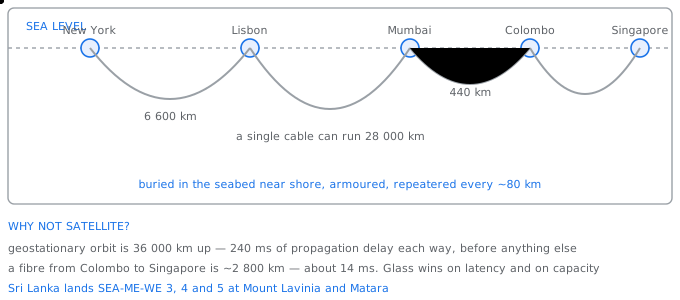
The internet is not in the cloud — it is on the sea floor, in about 550 cables
What a cable actually is
A deep-sea cable is about the thickness of a garden hose and contains a small number of fibre pairs — often eight — surrounded by steel wire for strength, a copper conductor to carry power, and a waterproof polyethylene sheath. Near the shore, where trawlers and anchors are the danger, it is much thicker and is ploughed into the seabed. In deep water it simply lies on the bottom.
සිංහලෙන්: ගැඹුරු මුහුදේ කේබලයක් උද්යාන හෝස් එකක ඝනකම වන අතර තන්තු යුගල කුඩා සංඛ්යාවක් අඩංගු වේ - බොහෝ විට අටක් - ශක්තිය සඳහා වානේ කම්බි, බලය ගෙන යාමට තඹ සන්නායකයක් සහ ජල ආරක්ෂිත පොලිඑතිලීන් කොපුවකින් වට කර ඇත. ට්රෝලර් යාත්රා සහ නැංගුරම් අනතුරුදායක වෙරළ ආසන්නයේ, එය වඩා ඝනකමින් යුක්ත වන අතර මුහුදු පත්ලට සීසෑවේ. ගැඹුරු ජලයේ එය හුදෙක් පතුලේ පිහිටා ඇත.
The copper conductor exists to power repeaters spaced roughly every 80 kilometres, which amplify the optical signal without converting it back to electricity. A transatlantic cable is therefore also a very long, very high voltage power line.
සිංහලෙන්: දළ වශයෙන් සෑම කිලෝමීටර 80 කට වරක්ම රිපීටර් බල ගැන්වීම සඳහා තඹ සන්නායකය පවතින අතර, එය නැවත විදුලිය බවට පරිවර්තනය නොකර දෘශ්ය සංඥාව විස්තාරණය කරයි. එබැවින් අත්ලාන්තික් සාගරයේ කේබලයක් ද ඉතා දිගු, ඉතා ඉහළ වෝල්ටීයතා විදුලි රැහැනකි.
- Capacity is measured in tens of terabits per second per cable, and a single modern cable can carry more than the entire internet did in 2005.
- Cables break constantly, roughly 150 to 200 times a year worldwide, overwhelmingly from fishing gear and ship anchors rather than sharks. Repair ships haul the cable up, splice it and drop it back.
- This is why every serious network buys capacity on more than one cable system, and why a country served by a single cable is one anchor away from being offline.
සිංහලෙන්: - එක් කේබලයකට ධාරිතාව තත්පරයකට ටෙරාබිට් දස ගණනකින් මනිනු ලබන අතර, එක් නවීන කේබලයකට 2005 දී මුළු අන්තර්ජාලයට වඩා වැඩි ප්රමාණයක්රැගෙන යා හැකිය.
- ලොව පුරා වසරකට 150 ත් 200 ත් අතර වාර ගණනක් කේබල් නිරන්තරයෙන් කැඩී යයි, මෝරුන්ට වඩා ධීවර ආම්පන්න සහ නැව් නැංගුරම් වලින්. අළුත්වැඩියා කරන නැව් කේබලය ඉහළට ඇදගෙන ගොස් එය කොටස් කර ආපසු ඇද දමයි.
- සෑම බැරෑරුම් ජාලයක්ම කේබල් පද්ධති එකකට වඩා වැඩි ධාරිතාවක් මිලට ගන්නේ මේ නිසා සහ තනි කේබලයකින් සේවා සපයන රටක් නොබැඳිව සිටීමට එක් නැංගුරමක් දුරින් සිටින්නේ මන්ද යන්නයි.
Where Sri Lanka sits
Sri Lanka is connected by the SEA-ME-WE family of cables, which run from South East Asia through the Middle East to Western Europe, landing at Mount Lavinia and Matara, together with the Bharat Lanka cable to India. Its position on the Asia to Europe route is the reason a country of its size has direct international capacity at all.
සිංහලෙන්: අග්නිදිග ආසියාවේ සිට මැදපෙරදිග හරහා බටහිර යුරෝපය දක්වා දිවෙන SEA-ME-WE කේබල් පවුලෙන් ශ්රී ලංකාව සම්බන්ධ වී, ගල්කිස්සට සහ මාතරට ගොඩබස්වන අතර භාරත් ලංකා කේබලය ඉන්දියාවට ද සම්බන්ධ වේ. ආසියාවේ සිට යුරෝපය දක්වා මාර්ගයෙහි එහි පිහිටීම එහි ප්රමාණයේ රටකට සෘජු ජාත්යන්තර ධාරිතාවක් තිබීමට හේතුවයි.
This geography is visible in latency. A packet from Colombo to Singapore travels a few thousand kilometres of glass and takes tens of milliseconds. A packet from Colombo to a server in the United States crosses two or three cable systems and is limited by the speed of light in fibre, which is about two thirds of the speed of light in vacuum. No amount of bandwidth reduces that delay.
සිංහලෙන්: මෙම භූගෝලය ප්රමාදයේ දෘශ්යමාන වේ. කොළඹ සිට සිංගප්පූරුවට පැකට්ටුවක් වීදුරු කිලෝමීටර් දහස් ගණනක් ගමන් කර මිලි තත්පර දස ගණනක් ගත වේ. කොළඹ සිට ඇමරිකා එක්සත් ජනපදයේ සර්වරයක් දක්වා පැකට්ටුවක් කේබල් පද්ධති දෙකක් හෝ තුනක් හරහා යන අතර රික්තයේ ආලෝකයේ වේගයෙන් තුනෙන් දෙකක පමණ වන තන්තු වල ආලෝකයේ වේගය සීමා වේ. කිසිම කලාප පළලක් එම ප්රමාදය අඩු නොකරයි.
The tiers above your provider
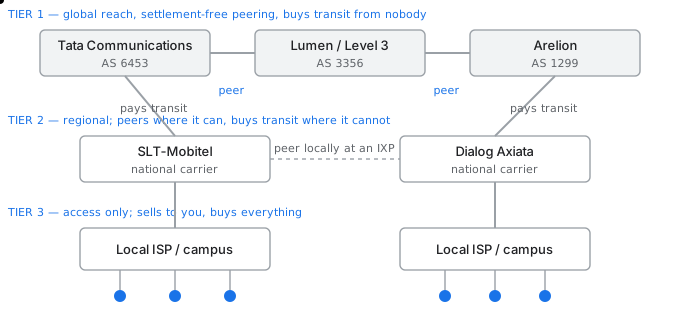
Tier 1 networks peer with each other and pay nobody; everyone else buys transit from someone above
Networks are classified by who they have to pay. A tier 1 network can reach every destination on the internet without paying anyone for transit, because it exchanges traffic with the other tier 1 networks under settlement-free peering agreements. There are only a handful of them.
සිංහලෙන්: ගෙවිය යුතු අය අනුව ජාල වර්ගීකරණය කර ඇත. 1 වන ස්ථරයේ ජාලයකට සංක්රමණ සඳහා කිසිවෙකුට ගෙවීමකින් තොරව අන්තර්ජාලයේ සෑම ගමනාන්තයකටම ළඟා විය හැකිය, මන්ද එය බේරුම්-රහිත සමානකම් ගිවිසුම් යටතේ අනෙකුත් ස්ථර 1 ජාල සමඟ ගමනාගමනය හුවමාරු කර ගන්නා බැවිනි. ඒවායින් ඇත්තේ අතළොස්සක් පමණි.
A tier 2 network peers where it can, usually at an internet exchange point where many networks meet in one building, and buys transit from a tier 1 network for everything it cannot reach by peering. A tier 3 network sells access to end users and buys everything.
සිංහලෙන්: ස්ථර 2 ජාලයක්, සාමාන්යයෙන් එක් ගොඩනැඟිල්ලක බොහෝ ජාල හමුවන අන්තර්ජාල හුවමාරු ස්ථානයකදී, තමන්ට හැකි තැන සම වයසේ මිතුරන් දෙස බලයි, සහ පීරීමෙන් ළඟා විය නොහැකි සෑම දෙයක් සඳහාම ස්ථර 1 ජාලයකින් සංක්රමණය මිලදී ගනී. ස්ථර 3 ජාලයක් අවසාන පරිශීලකයින්ට ප්රවේශය විකුණන අතර සියල්ල මිලදී ගනී.
This structure is why traffic between two people in the same city can leave the country and come back. If their two providers do not peer locally, the only path between them runs through whichever upstream networks they both buy from, and that path may be thousands of kilometres long. Local internet exchange points exist specifically to prevent this.
සිංහලෙන්: එකම නගරයේ පුද්ගලයින් දෙදෙනෙකු අතර ගමනාගමනය රට හැර ගොස් ආපසු පැමිණිය හැක්කේ මෙම ව්යුහය නිසාය. ඔවුන්ගේ සපයන්නන් දෙදෙනා දේශීයව සොයා නොබලන්නේ නම්, ඔවුන් අතර ඇති එකම මාර්ගය ඔවුන් දෙදෙනා මිලදී ගන්නා කුමන උඩුගං ජාලයක් හරහාද දිවෙන අතර එම මාර්ගය කිලෝමීටර දහස් ගණනක් දිග විය හැක. මෙය වැළැක්වීම සඳහා දේශීය අන්තර්ජාල හුවමාරු ස්ථාන විශේෂයෙන් පවතී.
What goes wrongවැරදෙන තැන
The phrase in the cloud encourages people to think of the internet as placeless. It is not. Every byte you receive has a physical path with an owner, a length and a latency, and when a single cable is cut near Egypt — where an unusual number of Asia–Europe cables converge — a large part of two continents notices.
සිංහලෙන්: වලාකුළෙහි ඇති වාක්ය ඛණ්ඩය අන්තර්ජාලය ස්ථාන රහිත යැයි සිතීමට මිනිසුන්ට දිරිගන්වයි. එහෙම නෙවෙයි. ඔබට ලැබෙන සෑම බයිටයකටම හිමිකරුවෙකු සමඟ භෞතික මාර්ගයක්, දිගක් සහ ප්රමාදයක් ඇති අතර, ඊජිප්තුව ආසන්නයේ තනි කේබලයක් කැපූ විට - අසාමාන්ය ආසියා-යුරෝපීය කේබල් සංඛ්යාවක් අභිසාරී වන විට - මහාද්වීප දෙකක විශාල කොටසක් දැනුම් දෙයි.
Bits, bytes and what your speed actually means
බිට්, බයිට් සහ ඔබේ වේගය සැබවින්ම අදහස් කරන දේ
Why a 100 Mbps connection downloads a 1 GB file in 80 seconds and not in 10, and why that is not your provider cheating.100 Mbps සම්බන්ධතාවයක් 1 GB ගොනුවක් තත්පර 80 කින් සහ 10 කින් බාගත කරන්නේ ඇයි, සහ එය ඔබේ සැපයුම්කරු වංචා නොකරන්නේ ඇයි.
Network speeds are quoted in bits per second and file sizes are quoted in bytes. There are eight bits in a byte, so the two differ by a factor of eight, and almost every complaint about a connection being slower than advertised begins here.
සිංහලෙන්: ජාල වේගය තත්පරයට බිටු වලින් උපුටා දක්වන අතර ගොනු ප්රමාණය බයිට් වලින් උපුටා දක්වා ඇත. බයිට් එකක බිටු අටක් ඇත, එබැවින් දෙක අට ගුණයකින් වෙනස් වන අතර ප්රචාරණයට වඩා මන්දගාමී සම්බන්ධතාවයක් පිළිබඳ සෑම පැමිණිල්ලක්ම පාහේ මෙතැනින් ආරම්භ වේ.
The conversion, done once
1 byte = 8 bits

connection  100 Mbps   = 100 000 000 bits per second
                       = 12 500 000 bytes per second
                       = 12.5 MB/s

a 1 GB file = 1 000 000 000 bytes
            = 1 000 / 12.5
            = 80 seconds at full rate

note the capital and lowercase b:
   Mb  = megabit    (what your ISP sells)
   MB  = megabyte   (what your file manager shows)
The notation is unforgiving and entirely consistent: a lowercase b is a bit and an uppercase B is a byte. Mbps is megabits per second, MB/s is megabytes per second, and the second is eight times the first.
සිංහලෙන්: අංකනය සමාව නොදෙන සහ සම්පූර්ණයෙන්ම අනුකූල වේ: කුඩා අකුරු b යනු බිට් සහ විශාල B යනු බයිටයකි. Mbps යනු තත්පරයට මෙගාබිට්, MB/s තත්පරයට මෙගාබයිට්, සහ දෙවැන්න පළමු වරට අට ගුණයකි.
Why you never see the full rate
- Protocol overhead. Every 1500 byte packet carries 20 bytes of IP header and 20 of TCP header, plus Ethernet framing, so about 5 percent of the bits on the wire are not your file.
- The slowest link wins. Your connection is only as fast as the narrowest point between you and the server, which is frequently the server's own upload capacity rather than your download capacity.
- Latency limits a single connection. On a long path, TCP's window may not be large enough to keep the pipe full, so one download uses a fraction of the link while four parallel downloads use all of it.
- Shared capacity. An access network is shared between subscribers, so the rate you are sold is a maximum rather than a guarantee, unless you have bought a committed rate, which businesses do and households almost never do.
සිංහලෙන්: - ප්රොටෝකෝලය උඩින්. සෑම බයිට් 1500 පැකට්ටුවකම IP ශීර්ෂයේ බයිට් 20 ක් සහ TCP ශීර්ෂයේ 20 ක් සහ ඊතර්නෙට්රාමු කිරීම ද ඇත, එබැවින් වයර් මත ඇති බිටු වලින් සියයට 5 ක් පමණ ඔබේ ගොනුව නොවේ.
- මන්දගාමී සබැඳිය ජය ගනී. ඔබගේ සබැඳුම වේගවත් වන්නේ ඔබ සහ සේවාදායකය අතර ඇති පටුම ලක්ෂ්යය තරම් වන අතර, එය ඔබගේ බාගැනීමේ හැකියාවට වඩා නිතර සේවාදායකයගේම උඩුගත කිරීමේ හැකියාව වේ.
- ප්රමාදය තනි සම්බන්ධතාවයක් සීමා කරයි. දිගු මාර්ගයකදී, TCP හි කවුළුව නළය පිරී තබා ගැනීමට ප්රමාණවත් නොවිය හැක, එබැවින් එක් බාගත කිරීමක් සබැඳියේ කොටසක් භාවිතා කරන අතර සමාන්තර බාගැනීම් හතරක් ඒ සියල්ල භාවිතා කරයි.
- හවුල් ධාරිතාව. ප්රවේශ ජාලයක් ග්රාහකයින් අතර බෙදා ගනු ලැබේ, එබැවින් ඔබ විකුණනු ලබන අනුපාතය සහතිකයකට වඩා උපරිම වේ, ඔබ කැපවූ ගාස්තුවක් මිල දී ගෙන නොමැති නම්, ව්යාපාර කරන සහ කුටුම්භ කිසිවිටෙකත් නොකරනු ඇත.
Upload, download and why they differ
Most consumer connections are asymmetric: far more capacity downstream than upstream, because historically people consumed far more than they produced. A 100 down and 20 up service is typical.
සිංහලෙන්: බොහෝ පාරිභෝගික සම්බන්ධතා අසමමිතික ය: ඉතිහාසගතව මිනිසුන් තමන් නිෂ්පාදනය කරන ප්රමාණයට වඩා බොහෝ වැඩි ප්රමාණයක් පරිභෝජනය කළ නිසා, උඩුගං බලා වඩා පහළ ධාරිතාවය. 100 පහළ සහ 20 ඉහළ සේවාවක් සාමාන්ය වේ.
That asymmetry is invisible until you do something that pushes data outward: a video call, a cloud backup, or hosting anything. It is also why a large upload can make an entire household's browsing feel broken, since the acknowledgments for everyone's downloads have to squeeze out through the same saturated upstream.
සිංහලෙන්: ඔබ දත්ත පිටතට තල්ලු කරන දෙයක් කරන තෙක් එම අසමමිතිය නොපෙනේ: වීඩියෝ ඇමතුමක්, වලාකුළු උපස්ථයක් හෝ ඕනෑම දෙයක් සත්කාරකත්වය. සෑම කෙනෙකුගේම බාගැනීම් සඳහා පිළිගැනීම් එකම සංතෘප්ත උඩුගත කිරීම හරහා මිරිකා හැරීමට සිදු වන බැවින් විශාල උඩුගත කිරීමක් මුළු පවුලකම බ්රවුස් කිරීම බිඳී ගිය හැඟීමක් ඇති කළ හැක්කේ එබැවිනි.
Bandwidth, throughput and latency
Three different quantities people call speed
| Term | What it measures | Unit | Improved by |
|---|---|---|---|
| Bandwidth | the capacity of the link | bits per second | buying a faster link |
| Throughput | what you actually achieve | bits per second | fixing whatever the bottleneck is |
| Latency | delay for one round trip | milliseconds | a shorter physical path; nothing else |
| Jitter | variation in that delay | milliseconds | queue management, priority |
Bandwidth and latency are independent, and confusing them is the reason people are disappointed by upgrades. Doubling your bandwidth halves the time to move a large file and does nothing at all for the responsiveness of a page made of many small requests, because that is governed by round trips.
සිංහලෙන්: කලාප පළල සහ ප්රමාදය ස්වාධීන වන අතර, ඒවා ව්යාකූල කිරීම මිනිසුන් වැඩි දියුණු කිරීම්වලින් කලකිරීමට හේතුවයි. ඔබගේ කලාප පළල දෙගුණ කිරීම විශාල ගොනුවක් ගෙනයාමට ගතවන කාලය අඩකින් අඩු කරන අතර බොහෝ කුඩා ඉල්ලීම් වලින් සාදන ලද පිටුවක ප්රතිචාර දැක්වීම සඳහා කිසිවක් නොකරයි, මන්ද එය වට සංචාර මගින් පාලනය වේ.
What goes wrongවැරදෙන තැන
The classic support call is a customer with a 300 Mbps connection reporting 35 MB/s downloads and demanding an explanation. 35 MB/s is 280 Mbps, which is the connection working almost perfectly. The customer was comparing megabytes to megabits.
සිංහලෙන්: සම්භාව්ය සහාය ඇමතුම යනු 300 Mbps සම්බන්ධතාවයක් ඇති පාරිභෝගිකයෙකු වන අතර 35 MB/s බාගැනීම් වාර්තා කරන අතර පැහැදිලි කිරීමක් ඉල්ලා සිටී. 35 MB/s යනු 280 Mbps වේ, එනම් සම්බන්ධතාවය සම්පූර්ණයෙන්ම පාහේ ක්රියා කරයි. පාරිභෝගිකයා මෙගාබයිට් හා මෙගාබිට් සංසන්දනය කරමින් සිටියේය.
Client–server and peer-to-peer
Client–server සහ peer-to-peer
Two ways of arranging who talks to whom, and the reason one of them scales by getting busier.කවුරුන් සමඟ කතා කරන්නේද යන්න පිළියෙළ කිරීමේ ක්රම දෙකක් සහ ඔවුන්ගෙන් එක් අයෙකු කාර්යබහුල වීමෙන් පරිමාණය වීමට හේතුව.
Every network application has to decide where the work and the data live. There are two classical answers, and most real systems are a hybrid of them.
සිංහලෙන්: සෑම ජාල යෙදුමක්ම කාර්යය සහ දත්ත ජීවත් වන ස්ථානය තීරණය කළ යුතුය. සම්භාව්ය පිළිතුරු දෙකක් ඇති අතර බොහෝ සැබෑ පද්ධති ඒවායේ දෙමුහුන් වේ.
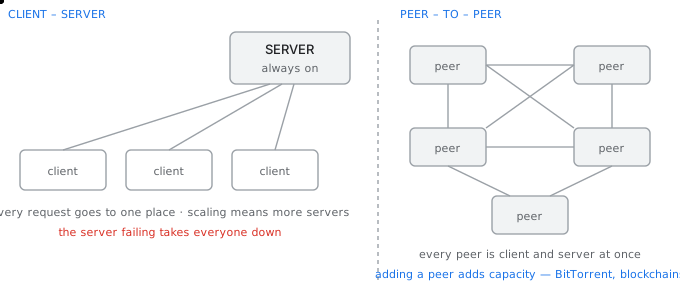
Client–server concentrates everything on one side; peer-to-peer makes every participant both
Client–server
One party, the server, runs continuously, has a stable address, and waits. The other, the client, starts when a person opens it, has whatever address it was given, and initiates. The client always speaks first, which is why a server needs a fixed address and a client does not.
සිංහලෙන්: එක් පාර්ශ්වයක්, සේවාදායකය, අඛණ්ඩව ධාවනය වන අතර, ස්ථාවර ලිපිනයක් ඇති අතර, බලා සිටියි. අනෙක, සේවාදායකයා, පුද්ගලයෙකු එය විවෘත කරන විට, එය ලබා දුන් ඕනෑම ලිපිනයක් ඇති විට සහ ආරම්භ කරන විට ආරම්භ වේ. සේවාදායකයා සෑම විටම පළමුව කථා කරයි, එබැවින් සේවාදායකයකට ස්ථාවර ලිපිනයක් අවශ්ය වන අතර සේවාදායකයාට එසේ නොවේ.
- Everything is in one place, so backups, security and updates are administered once.
- The server is a single point of failure and a single point of congestion, which is why real services put many servers behind one address with a load balancer.
- Capacity must be provisioned in advance for the peak, and the peak is usually many times the average — which is what makes a flash sale or an exam results day hard.
සිංහලෙන්: - සෑම දෙයක්ම එක තැනක ඇත, එබැවින් උපස්ථ, ආරක්ෂාව සහ යාවත්කාලීන එක් වරක් පරිපාලනය කෙරේ.
- සේවාදායකය යනු අසාර්ථක වීමේ තනි ලක්ෂ්යයක් සහ තදබදයේ තනි ලක්ෂ්යයකි, එම නිසා සැබෑ සේවාවන් බර සමතුලිතයක් සහිත එක් ලිපිනයක් පිටුපස බොහෝ සේවාදායකයන් තබයි.
- උපරිමය සඳහා ධාරිතාව කල්තියා සැපයිය යුතු අතර, උච්චය සාමාන්යයෙන් සාමාන්යයෙන් බොහෝ ගුණයක් වේ - එය ෆ්ලෑෂ් අලෙවියක් හෝ විභාග ප්රතිඵල දිනයක් දුෂ්කර කරයි.
A data centre is simply this arrangement taken to its conclusion: tens of thousands of servers, redundant power, redundant cooling, multiple providers, and a stable block of addresses. The reason companies rent space in one rather than running a server in an office is availability and bandwidth, not processing power.
සිංහලෙන්: දත්ත මධ්යස්ථානයක් යනු සරලවම එහි නිගමනයට ගෙන ඇති මෙම විධිවිධානයයි: දස දහස් ගණන් සේවාදායකයන්, අතිරික්ත බලය, අතිරික්ත සිසිලනය, බහු සපයන්නන් සහ ස්ථාවර ලිපින සමූහයකි. සමාගම් කාර්යාලයක සේවාදායකයක් ක්රියාත්මක කරනවාට වඩා එකකින් ඉඩක් කුලියට ගැනීමට හේතුව ලබා ගැනීමේ හැකියාව සහ කලාප පළල මිස සැකසුම් බලය නොවේ.
Peer-to-peer
There is no permanent server. Every participant is both client and server, requesting what it lacks and serving what it has. The property that follows is unusual and valuable: each new participant brings capacity as well as demand, so the system gets stronger as it gets busier, which is the exact opposite of a client–server system.
සිංහලෙන්: ස්ථිර සේවාදායකයක් නොමැත. සෑම සහභාගිවන්නෙක්ම සේවාලාභියා සහ සේවාදායකයා වන අතර, තමාට නොමැති දේ ඉල්ලා සිටින අතර එහි ඇති දේට සේවය කරයි. පහත දැක්වෙන දේපල අසාමාන්ය සහ වටිනා ය: සෑම නව සහභාගිවන්නෙකුම ධාරිතාව මෙන්ම ඉල්ලුමද ගෙන එයි, එබැවින් එය කාර්යබහුල වන විට පද්ධතිය ශක්තිමත් වේ, එය සේවාදායක-සේවාදායක පද්ධතියකට හරියටම ප්රතිවිරුද්ධ වේ.
BitTorrent is the clearest example. A file is split into pieces with a hash for each; a peer that has finished downloading a piece immediately begins uploading it to others. The more people want a file, the faster it moves. A tracker or a distributed hash table helps peers find each other, which is the small piece of centralisation most practical peer-to-peer systems retain.
සිංහලෙන්: BitTorrent යනු පැහැදිලිම උදාහරණයයි. ගොනුවක් එක් එක් හෑෂ් සමඟ කැබලිවලට බෙදී ඇත; කෑල්ලක් බාගත කිරීම අවසන් කළ සම වයසේ මිතුරෙකු වහාම එය අන් අයට උඩුගත කිරීමට පටන් ගනී. මිනිසුන්ට ගොනුවක් අවශ්ය වන තරමට එය වේගයෙන් චලනය වේ. ට්රැකර් එකක් හෝ බෙදා හරින ලද හැෂ් වගුවක් සම වයසේ මිතුරන්ට එකිනෙකා සොයා ගැනීමට උපකාර කරයි, එය මධ්යගත කිරීමේ කුඩා කොටස වන අතර එය බොහෝ ප්රායෝගික සම වයසේ සිට සම වයස් පද්ධති රඳවා තබා ගනී.
- It is resilient, because no single machine's failure removes the content.
- It is hard to control, which is both its political appeal and the reason it is associated with copyright disputes.
- It is hard to guarantee, since nothing obliges any peer to stay online, so it is unsuitable when a specific piece of data must be available at a specific moment.
සිංහලෙන්: - එය ප්රත්යස්ථ වේ, මන්ද කිසිදු යන්ත්රයක අසාර්ථක වීමක් අන්තර්ගතය ඉවත් නොකරයි.
- එය පාලනය කිරීම දුෂ්කර ය, එය එහි දේශපාලන ආයාචනය සහ එය ප්රකාශන හිමිකම් ආරවුල් සමඟ සම්බන්ධ වීමට හේතුවයි.
- ඕනෑම සම වයසේ මිතුරෙකු සමඟ සබැඳිව සිටීමට කිසිවක් බැඳී නොසිටින බැවින් සහතික කිරීම අපහසුය, එබැවින් නිශ්චිත මොහොතක නිශ්චිත දත්ත කැබැල්ලක් තිබිය යුතු විට එය නුසුදුසුය.
Where each one belongs
Choosing between them
| Requirement | Choose | Because |
|---|---|---|
| Authoritative, consistent data | client–server | one place decides what is true |
| Distributing a large popular file | peer-to-peer | capacity grows with demand |
| Guaranteed availability | client–server | someone is contractually responsible |
| Resisting a single point of control | peer-to-peer | there is nothing to switch off |
| Low latency to a known endpoint | client–server | a peer may be anywhere |
| Live video to millions | hybrid, via a CDN | servers at the edge, near the viewers |
What goes wrongවැරදෙන තැන
The trap in a peer-to-peer design is assuming peers behave. Real peers disconnect mid-transfer, lie about what they have, and take without giving, which is why BitTorrent needed tit-for-tat choking to force reciprocity. Any design that assumes cooperation without enforcing it fails as soon as it becomes popular enough to be worth abusing.
සිංහලෙන්: සම වයසේ මිතුරන්ගේ නිර්මාණයක උගුල වන්නේ සම වයසේ මිතුරන් හැසිරේ යැයි උපකල්පනය කිරීමයි. සැබෑ සම වයසේ මිතුරන් අතර මාරුවීම් විසන්ධි කරයි, ඔවුන් සතුව ඇති දේ ගැන බොරු කියයි, සහ නොදී ලබා ගනී, ඒ නිසා අන්යෝන්ය බව බල කිරීමට BitTorrent හට tit-for-tat choking අවශ්ය විය. එය බලාත්මක නොකර සහයෝගීතාවය උපකල්පනය කරන ඕනෑම නිර්මාණයක් අපයෝජනය කිරීමට තරම් ජනප්රිය වූ වහාම අසාර්ථක වේ.
Program, process, thread and socket
වැඩසටහන, ක්රියාවලිය, thread සහ socket
Four words that are used interchangeably in conversation and mean four precisely different things when a packet arrives.සංවාදයේදී එකිනෙකට වෙනස් වචන හතරක් භාවිතා කරන අතර පැකට්ටුවක් පැමිණි විට හරියටම වෙනස් කරුණු හතරක් අදහස් වේ.
When data arrives at your machine, the operating system has to deliver it to exactly one place. Understanding what that place is requires four terms to be kept apart.
සිංහලෙන්: ඔබගේ යන්ත්රයට දත්ත පැමිණි විට, මෙහෙයුම් පද්ධතිය එය හරියටම එක් ස්ථානයකට ලබා දිය යුතුය. එම ස්ථානය කුමක්දැයි වටහා ගැනීම සඳහා කොන්දේසි හතරක් වෙන් කර තැබිය යුතුය.
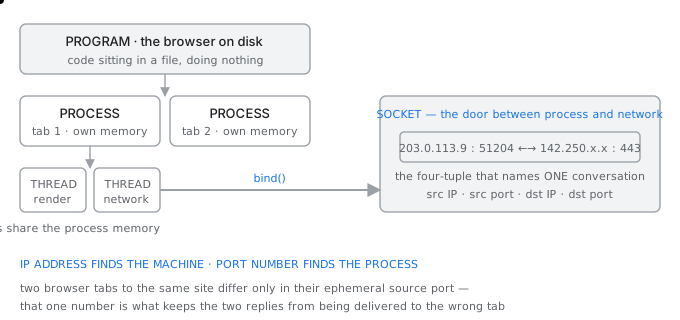
From program down to port — how the network finds one conversation inside one machine
The four, precisely
| Term | What it is | Has its own | Example |
|---|---|---|---|
| Program | code sitting in a file | nothing; it is not running | the browser on disk |
| Process | a running instance of a program | memory space, file handles, PID | one browser tab |
| Thread | one line of execution in a process | stack and registers only | the tab's network thread |
| Socket | an endpoint of one connection | a four-tuple, a buffer | this tab's link to the server |
Why threads share and processes do not
Two processes have separate memory, so one crashing cannot corrupt the other, and communicating between them requires the operating system's help. Two threads inside one process share all of its memory, so communication is free and a bug in one can destroy the other's data.
සිංහලෙන්: ක්රියාවලි දෙකකට වෙනම මතකයක් ඇත, එබැවින් එක් බිඳවැටීමකින් අනෙක දූෂණය කළ නොහැකි අතර ඒවා අතර සන්නිවේදනය සඳහා මෙහෙයුම් පද්ධතියේ සහාය අවශ්ය වේ. එක් ක්රියාවලියක් තුළ ඇති නූල් දෙකක් එහි සියලු මතකය බෙදා ගනී, එබැවින් සන්නිවේදනය නොමිලේ වන අතර එකක ඇති දෝෂයක් අනෙකාගේ දත්ත විනාශ කළ හැකිය.
That trade is why a modern browser runs each tab as a separate process rather than a thread: a page that crashes should take down one tab and not the browser, and a malicious page should not be able to read another site's memory. The cost is memory, which is why browsers use so much of it.
සිංහලෙන්: නවීන බ්රවුසරයක් ත්රෙඩ් එකකට වඩා වෙනම ක්රියාවලියක් ලෙස සෑම ටැබයක්ම ක්රියාත්මක කරන්නේ එබැවිනි: බිඳ වැටෙන පිටුවක් බ්රවුසරය නොව එක් ටැබ් එකක් ඉවත් කළ යුතු අතර අනිෂ්ට පිටුවකට වෙනත් වෙබ් අඩවියක මතකයක් කියවීමට නොහැකි විය යුතුය. පිරිවැය මතකය, බ්රව්සර් එය බොහෝ දේ භාවිතා කරන්නේ එබැවිනි.
The socket is the door
A socket is the interface between a process and the network. The process writes bytes into it and reads bytes out of it, and the operating system deals with everything below. It is the point at which the abstraction of the layers becomes concrete for a programmer.
සිංහලෙන්: සොකට් එකක් යනු ක්රියාවලියක් සහ ජාලයක් අතර ඇති අතුරු මුහුණතයි. මෙම ක්රියාවලිය එය තුලට බයිට් ලියන අතර එයින් බයිට් කියවනු ලබන අතර මෙහෙයුම් පද්ධතිය පහත සියල්ල සමඟ කටයුතු කරයි. ක්රමලේඛකයෙකු සඳහා ස්ථර වල වියුක්ත කිරීම කොන්ක්රීට් බවට පත්වන ලක්ෂ්යය එයයි.
What identifies one TCP connection
a socket is named by a four-tuple:

   source IP      source port      destination IP    destination port
   203.0.113.9  : 51204      ->    142.250.1.14    : 443

two tabs open to the same site:
   203.0.113.9 : 51204  ->  142.250.1.14 : 443
   203.0.113.9 : 51205  ->  142.250.1.14 : 443
                ^^^^^
   identical except for the source port — that alone keeps the
   two replies from being delivered to the wrong tab

UDP needs only a two-tuple (destination IP + port), because it has
no connection to keep track of
This is the precise mechanism behind demultiplexing. The network layer delivered the packet to the machine using the IP address; the transport layer delivers it to the socket using the ports; the socket belongs to one process; the process hands it to one thread.
සිංහලෙන්: demultiplexing පිටුපස ඇති නිවැරදි යාන්ත්රණය මෙයයි. ජාල ස්තරය IP ලිපිනය භාවිතයෙන් පැකට්ටුව යන්ත්රයට ලබා දුන්නේය; ප්රවාහන ස්තරය එය වරායන් භාවිතයෙන් සොකට් වෙත ලබා දෙයි; සොකට් එක ක්රියාවලියකට අයත් වේ; ක්රියාවලිය එය එක් නූල් එකකට භාර දෙයි.
What goes wrongවැරදෙන තැන
A server that runs out of sockets does not report running out of sockets. It reports being unable to accept connections, or it simply becomes very slow, because the operating system is scanning a table of tens of thousands of entries in TIME_WAIT. The cause is usually connections being opened and closed per request instead of being reused.
සිංහලෙන්: සොකට් අවසන් වූ සේවාදායකයක් සොකට් අවසන් වී ඇති බව වාර්තා නොකරයි. මෙහෙයුම් පද්ධතිය TIME_WAIT තුළ ඇතුළත් කිරීම් දස දහස් ගණනක වගුවක් පරිලෝකනය කරන බැවින් සම්බන්ධතා පිළිගැනීමට නොහැකි බව එය වාර්තා කරයි, නැතහොත් එය ඉතා මන්දගාමී වේ. හේතුව සාමාන්යයෙන් සම්බන්ධතා නැවත භාවිතා කිරීම වෙනුවට ඉල්ලීමකට අනුව විවෘත කිරීම සහ වසා දැමීමයි.
Ports in depth
Port අංක ගැඹුරින්
Sixty-five thousand numbers, divided into three ranges by convention, and the ephemeral range that makes multiple connections possible.සංඛ්යා හැට පන්දහසක්, සම්මුතිය අනුව පරාස තුනකට බෙදා ඇති අතර බහු සම්බන්ධතා ඇති කරවන අකාලික පරාසය.
A port number is a 16 bit field, so there are 2 to the power 16, that is 65 536, of them, numbered 0 to 65535. They exist once per protocol, so TCP port 80 and UDP port 80 are different things entirely.
සිංහලෙන්: වරාය අංකයක් යනු බිටු 16 ක්ෂේත්රයකි, එබැවින් බලය 16 සිට 2 දක්වා ඇත, එනම් 65 536, ඒවායින් අංක 0 සිට 65535 දක්වා. ඒවා ප්රොටෝකෝලයකට වරක් පවතී, එබැවින් TCP port 80 සහ UDP port 80 සම්පූර්ණයෙන්ම වෙනස් දේවල් වේ.
The three ranges
| Range | Name | Who assigns | Use |
|---|---|---|---|
| 0 – 1023 | well known / system | IANA | standard services; binding needs privilege |
| 1024 – 49151 | registered / user | IANA on request | specific applications, e.g. databases |
| 49152 – 65535 | dynamic / ephemeral | the operating system | the client side of every connection |
Why a client does not need a fixed port
A server must listen on a port everybody already knows, because a client with no prior arrangement has to be able to reach it. That is the entire reason well known ports exist: HTTP is on 80 because a browser must be able to guess.
සිංහලෙන්: සර්වරයක් දැනටමත් සියලු දෙනා දන්නා වරායකට සවන් දිය යුතුය, මන්ද පූර්ව විධිවිධානයක් නොමැති සේවාදායකයෙකුට එය වෙත ළඟා විය යුතුය. සුප්රසිද්ධ වරායන් පවතින සම්පූර්ණ හේතුව එයයි: බ්රවුසරයකට අනුමාන කළ හැකි නිසා HTTP 80 මත පවතී.
A client has the opposite requirement. Nobody ever initiates a connection to it, so its port only has to be unique on its own machine for the life of the connection. The operating system therefore picks an unused number from the ephemeral range, uses it, and returns it to the pool when the connection closes.
සිංහලෙන්: සේවාදායකයකුට ප්රතිවිරුද්ධ අවශ්යතාවක් ඇත. කිසිවකු එයට සම්බන්ධයක් කිසිදා ආරම්භ කරන්නේ නැත, එබැවින් එහි වරාය සම්බන්ධතාවයේ ආයු කාලය සඳහා එහි ම යන්ත්රයේ පමණක් අනන්ය විය යුතුය. එබැවින් මෙහෙයුම් පද්ධතිය එෆීමරල් පරාසයෙන් භාවිත නොකළ අංකයක් තෝරා, එය භාවිතා කර, සම්බන්ධතාවය වැසෙන විට එය සංචිතයට ආපසු ලබා දෙයි.
What this limits
ephemeral range on Linux, by default:  32768 - 60999
   = 28 232 available ports

one client machine talking to ONE destination IP and port
   -> at most 28 232 simultaneous connections

but the limit is per four-tuple, so to a DIFFERENT destination
the same source ports can be reused:
   203.0.113.9:40000 -> 10.0.0.1:443   valid
   203.0.113.9:40000 -> 10.0.0.2:443   also valid

this is why a busy proxy exhausts ports toward one backend
long before it exhausts them overall
Ports worth memorising
| Port | Service | Transport | Note |
|---|---|---|---|
| 20, 21 | FTP data, FTP control | TCP | two connections, which is why NAT struggles |
| 22 | SSH, SFTP, SCP | TCP | encrypted remote shell |
| 23 | Telnet | TCP | unencrypted; effectively obsolete |
| 25 | SMTP | TCP | server to server mail |
| 53 | DNS | UDP and TCP | UDP for queries, TCP for large answers and zone transfers |
| 67, 68 | DHCP server, client | UDP | broadcast, so a relay is needed across subnets |
| 80 | HTTP | TCP | |
| 110, 143 | POP3, IMAP4 | TCP | pulling mail |
| 161 | SNMP | UDP | network monitoring |
| 443 | HTTPS, and QUIC over UDP | TCP and UDP | HTTP/3 uses UDP 443 |
| 3306, 5432 | MySQL, PostgreSQL | TCP | should never face the internet |
| 3389 | RDP | TCP | a very common attack target |
What goes wrongවැරදෙන තැන
Binding a service to a port below 1024 requires privilege on Unix, which is why web servers historically started as root and then dropped privileges. Running an entire application as root so it can use port 80 is the wrong fix; putting a reverse proxy on 80 in front of an unprivileged application on 8080 is the right one.
සිංහලෙන්: 1024 ට අඩු තොටකට සේවාවක් බැඳීමට Unix මත වරප්රසාද අවශ්ය වේ, එම නිසා වෙබ් සේවාදායකයන් ඓතිහාසිකව root ලෙස ආරම්භ කර පසුව වරප්රසාද අතහැර දැමීය. සම්පූර්ණ යෙදුමක් root ලෙස ධාවනය කිරීම නිසා එයට port 80 භාවිතා කළ හැකි වීම වැරදි විසඳුමකි; 8080 හි වරප්රසාද රහිත යෙදුමක් ඉදිරිපිට 80 හි ප්රතිලෝම ප්රොක්සියක් තැබීම නිවැරදි එකකි.
Anatomy of a URL
URL එකක ව්යුහය
Six parts, read by four different pieces of software, and only three of them ever reach the server.කොටස් හයක්, විවිධ මෘදුකාංග කොටස් හතරකින් කියවන අතර, ඒවායින් තුනක් පමණක් සේවාදායකය වෙත ළඟා වේ.
A uniform resource locator names one resource anywhere in the world. Its parts are consumed by different things at different moments, and knowing which is which explains several otherwise confusing behaviours.
සිංහලෙන්: ඒකාකාර සම්පත් ස්ථානගත කරන්නෙකු ලෝකයේ ඕනෑම තැනක එක් සම්පතක් නම් කරයි. එහි කොටස් විවිධ අවස්ථා වලදී විවිධ දේ විසින් පරිභෝජනය කරනු ලබන අතර, වෙනත් ආකාරයකින් ව්යාකූල හැසිරීම් කිහිපයක් පැහැදිලි කරන්නේ කුමක්දැයි දැන ගැනීම.
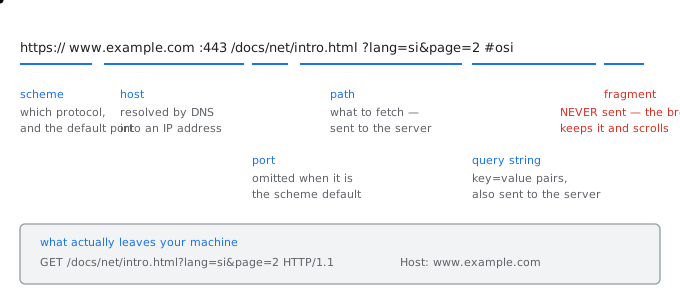
Every part of a URL is read by a different thing — and only one of them reaches the server
Who reads which part
| Part | Example | Read by | Sent to the server? |
|---|---|---|---|
| Scheme | https:// | the browser | no — it decides which protocol to speak |
| Host | www.example.com | DNS, then the browser | yes, in the Host header |
| Port | :443 | the browser | no — it decides where to connect |
| Path | /docs/net/intro.html | the server | yes, in the request line |
| Query | ?lang=si&page=2 | the server application | yes, in the request line |
| Fragment | #osi | the browser only | NEVER sent |
The fragment never leaves your machine
Everything after the hash is handled entirely by the browser, which fetches the document and then scrolls to the element with that identifier. The server never learns which section you jumped to, which is occasionally useful for privacy and frequently confusing for anyone trying to log which part of a page people read.
සිංහලෙන්: හැෂ් වලින් පසු සියල්ල සම්පුර්ණයෙන්ම හසුරුවන්නේ බ්රවුසරය, එය ලේඛනය ලබාගෙන පසුව එම හැඳුනුම්කාරකය සමඟ මූලද්රව්ය වෙත අනුචලනය කරයි. සේවාදායකයා කිසිවිටෙක ඔබ පැන්නේ කුමන කොටසටදැයි ඉගෙන නොගනී, එය විටින් විට පුද්ගලිකත්වය සඳහා ප්රයෝජනවත් වන අතර මිනිසුන් කියවන පිටුවක කුමන කොටස ලොග් කිරීමට උත්සාහ කරන ඕනෑම කෙනෙකුට නිතර ව්යාකූල වේ.
It is also why single page applications originally put their routing in the fragment: changing it navigates within the page without causing a new request at all.
සිංහලෙන්: තනි පිටු යෙදුම් මුලින් ඛණ්ඩනයට ඔවුන්ගේ මාර්ගගත කිරීම් තැබුවේ එබැවිනි: එය වෙනස් කිරීම නව ඉල්ලීමක් ඇති නොකර පිටුව තුළ සැරිසැරීම.
The Host header, and why one address serves many sites
DNS resolves the host name to an address and the browser connects to it, at which point the host name would ordinarily be forgotten. But thousands of websites share one server and one address, so the server must be told which one was asked for. HTTP/1.1 made the Host header mandatory for exactly this reason.
සිංහලෙන්: DNS විසින් ධාරක නාමය ලිපිනයකට විසඳන අතර බ්රවුසරය එයට සම්බන්ධ කරයි, එම අවස්ථාවේදී ධාරක නාමය සාමාන්යයෙන් අමතක වනු ඇත. නමුත් වෙබ් අඩවි දහස් ගණනක් එක් සේවාදායකයක් සහ එක් ලිපිනයක් බෙදාහදා ගනී, එබැවින් ඉල්ලා සිටියේ කුමක්දැයි සේවාදායකයට පැවසිය යුතුය. HTTP/1.1 ධාරක ශීර්ෂය අනිවාර්ය කළේ හරියටම මේ හේතුව නිසා ය.
What the browser actually sends
you type      https://www.example.com/docs/intro.html?lang=si#osi

DNS resolves  www.example.com  ->  93.184.216.34
browser opens TCP to 93.184.216.34 port 443, then TLS

and sends:
   GET /docs/intro.html?lang=si HTTP/1.1
   Host: www.example.com

note: the scheme, the port and the fragment are all absent.
the server learns the path, the query and the host name — nothing else
from the URL.
Encoding, and why spaces become %20
A URL may only contain a restricted set of characters, because several characters already have structural meaning: the slash separates path segments, the question mark starts the query, the ampersand separates parameters and the hash starts the fragment.
සිංහලෙන්: අක්ෂර කිහිපයකට දැනටමත් ව්යුහාත්මක අර්ථයක් ඇති නිසා URL එකක අඩංගු විය හැක්කේ සීමා කළ අක්ෂර සමූහයක් පමණි: slash මඟින් මාර්ග ඛණ්ඩ වෙන් කරයි, ප්රශ්න ලකුණ විමසුම ආරම්භ කරයි, ඇම්පර්සන්ඩ් මඟින් පරාමිති වෙන් කරයි සහ හැෂ් විසින් ඛණ්ඩනය ආරම්භ කරයි.
Anything else is percent-encoded as a percent sign followed by the byte's hexadecimal value. A space becomes %20, an ampersand inside a value becomes %26, and a Sinhala character, being several bytes in UTF-8, becomes several percent-encoded bytes. Failing to encode a value that contains an ampersand is one of the most common sources of a parameter silently splitting into two.
සිංහලෙන්: වෙනත් ඕනෑම දෙයක් සියයට-කේතනය කර ඇත්තේ බයිටයේ ෂඩ් දශම අගයෙන් පසුව සියයට ලකුණක් ලෙස ය. ඉඩක් %20 බවටත්, අගයක් තුළ ඇති ඇම්පර්සන්ඩ් %26 බවටත්, UTF-8 හි බයිට් කිහිපයක් වන සිංහල අක්ෂරයක් සියයට-කේතන ලද බයිට් කිහිපයක් බවටත් පත් වේ. ඇම්පර්සන්ඩ් අඩංගු අගයක් සංකේතනය කිරීමට අපොහොසත් වීම පරාමිතියක් නිශ්ශබ්දව දෙකට බෙදීමේ වඩාත් පොදු මූලාශ්රවලින් එකකි.
What goes wrongවැරදෙන තැන
Putting anything sensitive in the query string is a persistent mistake. Query strings are written to server logs, stored in browser history, and sent in the Referer header to whatever site you click through to next. A password or a session token in a URL has been recorded in at least three places before the page has finished loading.
සිංහලෙන්: විමසුම් තන්තුවට සංවේදී ඕනෑම දෙයක් තැබීම නිරන්තර වරදකි. විමසුම් තන්තු සේවාදායක ලොගවලට ලියා, බ්රව්සර් ඉතිහාසයේ ගබඩා කර, ඔබ ඊළඟට ක්ලික් කරන ඕනෑම අඩවියකට යොමුකරු ශීර්ෂය තුළ යවනු ලැබේ. පිටුව පූරණය වීම අවසන් වීමට පෙර URL එකක මුරපදයක් හෝ සැසි ටෝකනයක් අවම වශයෙන් ස්ථාන තුනක වාර්තා කර ඇත.
DNS in depth
DNS ගැඹුරින්
The largest distributed database in the world, and the eight steps between typing a name and opening a connection.ලොව විශාලතම බෙදා හරින ලද දත්ත ගබඩාව, සහ නමක් ටයිප් කිරීම සහ සම්බන්ධතාවයක් විවෘත කිරීම අතර පියවර අටයි.
DNS turns a name into an address. It is worth stating what it replaced: a single file called HOSTS.TXT, maintained by hand at one institute, which every machine on the network downloaded periodically. That worked for hundreds of hosts and became impossible at thousands, which is why DNS was designed in 1983 to be hierarchical and delegated.
සිංහලෙන්: DNS නමක් ලිපිනයක් බවට පත් කරයි. එය ප්රතිස්ථාපනය කළේ කුමක් දැයි සඳහන් කිරීම වටී: HOSTS.TXT නම් තනි ගොනුවක්, එක් ආයතනයක අතින් නඩත්තු කරනු ලැබේ, ජාලයේ සෑම යන්ත්රයක්ම වරින් වර බාගත කරයි. එය සත්කාරක සිය ගණනක් සඳහා ක්රියා කළ අතර දහස් ගණනකට නොහැකි විය, එබැවින් 1983 දී ධූරාවලි සහ පැවරීම සඳහා DNS නිර්මාණය කරන ලදී.
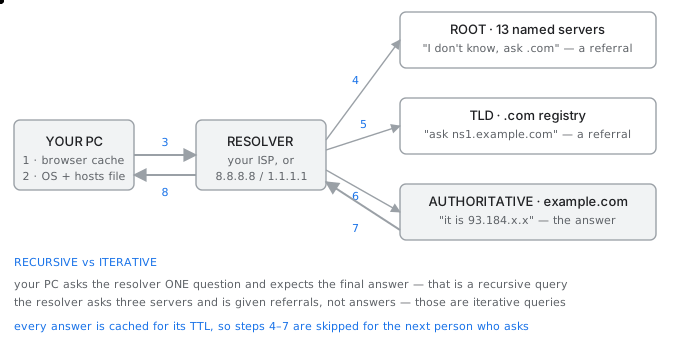
Eight steps from a name to an address — and steps 3 to 7 happen only on a cache miss
The hierarchy
A domain name is read right to left, and each step to the left is a delegation from the level before it. The rightmost part, which is invisible, is the root.
සිංහලෙන්: ඩොමේන් නාමයක් දකුණේ සිට වමට කියවනු ලබන අතර, වමට යන සෑම පියවරක්ම ඊට පෙර මට්ටමේ සිට නියෝජිත පිරිසක් වේ. අදෘශ්යමාන දකුණු පස කොටස මුල වේ.
Reading www.example.com backwards
   .                    root       — 13 named server identities worldwide
   com                  TLD        — operated by the .com registry
   example.com          domain     — delegated to whoever registered it
   www.example.com      host       — a record inside that zone

types of TLD:
   gTLD    .com .org .net .info    generic
   ccTLD   .lk .in .uk .jp         country code
   new     .app .dev .google       since 2013, anyone with the money

the 13 root 'servers' are 13 ADDRESSES, not 13 machines:
   each is hundreds of physical servers worldwide sharing one
   address by anycast routing, so you reach the nearest copy
Recursive and iterative queries
Your computer makes one query and expects a final answer. That is a recursive query, and the resolver accepts the obligation to do the work. The resolver then makes a series of iterative queries, in which each server it asks replies with a referral to a server closer to the answer rather than with the answer itself.
සිංහලෙන්: ඔබේ පරිගණකය එක් විමසුමක් කර අවසන් පිළිතුරක් බලාපොරොත්තු වේ. එය ප්රත්යාවර්තී විමසුමක් වන අතර, විසඳන්නා කාර්යය කිරීමට ඇති වගකීම පිළිගනී. එවිට නිරාකරණය කරන්නා පුනරාවර්තන විමසුම් මාලාවක් කරයි, එය අසන සෑම සේවාදායකයක්ම පිළිතුර සමඟ නොව පිළිතුරට සමීප සේවාදායකයක් වෙත යොමු කිරීමකින් පිළිතුරු දෙයි.
The root does not know where example.com is. It knows where .com is. The .com registry does not know the address of www.example.com; it knows which name servers are authoritative for example.com. Only that last server actually holds the record. No server anywhere holds the whole database, which is the entire design.
සිංහලෙන්: example.com තියෙන්නේ කොහෙද කියලා root දන්නේ නැහැ. ඒක දන්නවා.com තියෙන්නේ කොහෙද කියලා..com රෙජිස්ට්රිය www.example.com හි ලිපිනය නොදනී; උදාහරණයක් ලෙස, කුමන නම් සේවාදායකයන් බලයලත් දැයි එය දනී. එම අවසාන සේවාදායකය පමණක් වාර්තාව තබා ඇත. කිසිම සේවාදායකයක් කොතැනකවත් සම්පූර්ණ දත්ත සමුදාය රඳවා නොගනී, එනම් සම්පූර්ණ සැලසුමයි.
Caching is what makes it fast
The eight step walk happens rarely. Every answer carries a time to live, and every resolver along the way caches it for that long, so the second person on the same network to ask for the same name gets the answer in a millisecond from a local cache.
සිංහලෙන්: පියවර අටක් ඇවිදීම කලාතුරකින් සිදු වේ. සෑම පිළිතුරකටම ජීවත් වීමට කාලයක් ඇති අතර, මඟ දිගේ ඇති සෑම විසදුමක්ම එය එතරම් කාලයක් හැඹිලිගත කරයි, එබැවින් එකම ජාලයේ එකම නම ඉල්ලා සිටින දෙවන පුද්ගලයාට දේශීය හැඹිලියකින් මිලි තත්පරයකින් පිළිතුර ලැබේ.
The time to live is therefore a trade. A long one, say 24 hours, means excellent performance and means that a change to your records takes a day to be seen everywhere. A short one, say 60 seconds, means you can move a service quickly and means far more queries. Before a planned migration, the standard practice is to lower the TTL days in advance, migrate, then raise it again.
සිංහලෙන්: එබැවින් ජීවත් වීමට කාලය වෙළඳාමකි. දිගු එකක්, පැය 24 ක් කියන්න, විශිෂ්ට කාර්ය සාධනයක් අදහස් වන අතර එයින් අදහස් වන්නේ ඔබේ වාර්තාවල වෙනසක් සෑම තැනකම දැකීමට දිනක් ගත වන බවයි. කෙටි එකක්, තත්පර 60ක් කියන්න, එයින් අදහස් කරන්නේ ඔබට සේවාවක් ඉක්මනින් ගෙන යා හැකි අතර බොහෝ විමසුම් අදහස් වේ. සැලසුම්ගත සංක්රමණයකට පෙර, සම්මත පිළිවෙත වන්නේ TTL දිනට පෙර අඩු කිරීම, සංක්රමණය කිරීම, පසුව එය නැවත ඉහළ දැමීමයි.
Record types you will meet
| Type | Maps | Example |
|---|---|---|
| A | name to IPv4 address | example.com → 93.184.216.34 |
| AAAA | name to IPv6 address | example.com → 2606:2800:220:1:: |
| CNAME | name to another name | www → example.com |
| MX | domain to mail server, with priority | example.com → mail.example.com |
| NS | zone to its authoritative servers | example.com → ns1.example.com |
| TXT | arbitrary text | SPF, domain verification |
| PTR | address back to a name | reverse lookup |
| SOA | the zone's authority and timers | one per zone |
What goes wrongවැරදෙන තැන
Because the answer is cached everywhere, a DNS mistake outlives its correction. If you publish a wrong address with a 24 hour TTL and fix it a minute later, resolvers that picked up the wrong answer keep serving it for the rest of the day and there is nothing you can do to recall it. Lower the TTL before you change anything, not after.
සිංහලෙන්: පිළිතුර සෑම තැනකම හැඹිලිගත කර ඇති නිසා, DNS දෝෂයක් එහි නිවැරදි කිරීම ඉක්මවා යයි. ඔබ පැය 24 TTL සමඟ වැරදි ලිපිනයක් ප්රකාශ කර විනාඩියකට පසුව එය නිවැරදි කළහොත්, වැරදි පිළිතුර ලබා ගත් නිරාකරණය කරන්නන් එය දවසේ ඉතිරි කාලය සඳහා සේවය කරන අතර ඔබට එය සිහිපත් කිරීමට කිසිවක් කළ නොහැක. ඔබ කිසිවක් වෙනස් කිරීමට පෙර TTL පහත් කරන්න, පසුව නොවේ.
The presentation and session layers
ඉදිරිපත් කිරීමේ සහ සැසි ස්ථර
The two OSI layers that TCP/IP does not have, what they were for, and where their work actually happens today.TCP/IP හි නොමැති OSI ස්ථර දෙක, ඒවා කුමක් සඳහාද, සහ ඔවුන්ගේ වැඩ අද ඇත්තටම සිදුවන්නේ කොතැනද.
The OSI model has seven layers and TCP/IP has four or five. The difference is almost entirely layers six and five — presentation and session — which TCP/IP folds into the application layer. They are worth understanding anyway, because the work they describe still has to be done by somebody.
සිංහලෙන්: OSI මාදිලියේ ස්ථර හතක් ඇති අතර TCP/IP හි හතරක් හෝ පහක් ඇත. වෙනස සම්පූර්ණයෙන්ම පාහේ හය සහ පහ - ඉදිරිපත් කිරීම සහ සැසිය - යෙදුම් ස්ථරයට TCP/IP නැමෙයි. ඔවුන් කෙසේ හෝ තේරුම් ගැනීම වටී, මන්ද ඔවුන් විස්තර කරන කාර්යය තවමත් යමෙකු විසින් කළ යුතු බැවිනි.
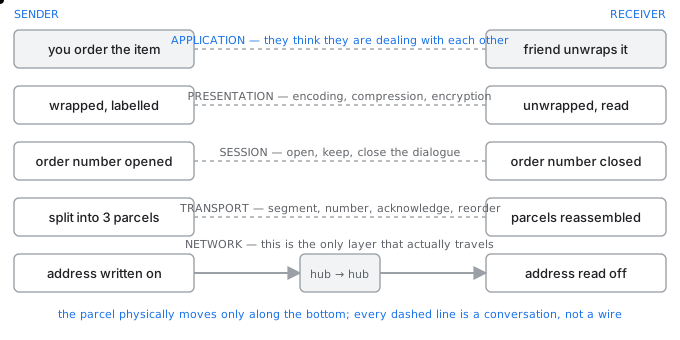
The parcel analogy — each layer only talks to its own counterpart, and trusts the layer below
The presentation layer
This layer is concerned with the form of the data rather than its delivery. Its job is to make sure that what the receiving application reads means the same thing as what the sending application wrote, which is not automatic when two machines disagree about how to represent things.
සිංහලෙන්: මෙම ස්තරය එහි බෙදා හැරීමට වඩා දත්තවල ස්වරූපය ගැන සැලකිලිමත් වේ. එහි කර්තව්යය නම්, ලැබෙන අයදුම්පත්රය කියවන දෙය, යවන යෙදුම ලියා ඇති දෙයට සමාන බව සහතික කර ගැනීමයි, එය යන්ත්ර දෙකක් දේවල් නිරූපණය කරන්නේ කෙසේද යන්න පිළිබඳව එකඟ නොවන විට ස්වයංක්රීය නොවේ.
- Translation. The sender's internal representation is converted to a common form on the wire and back again. Historically this meant ASCII against EBCDIC; today it means character encodings such as UTF-8, byte order, and serialisation formats such as JSON or Protocol Buffers.
- Compression. Reducing the number of bytes before transmission, which trades processor time for bandwidth. HTTP's gzip and Brotli content encodings are exactly this.
- Encryption. Transforming the data so that only the intended recipient can read it. TLS sits precisely here in the OSI view, between the application and the transport.
සිංහලෙන්: - පරිවර්තනය. යවන්නාගේ අභ්යන්තර නිරූපණය වයරය මත සහ නැවත නැවතත් පොදු ස්වරූපයකට පරිවර්තනය වේ. ඓතිහාසික වශයෙන් මෙයින් අදහස් කළේ EBCDIC ට එරෙහිව ASCII; අද එය අදහස් කරන්නේ UTF-8 වැනි අක්ෂර කේතීකරණ, බයිට් අනුපිළිවෙල සහ JSON හෝ ප්රොටෝකෝල බෆර වැනි අනුක්රමික ආකෘති.
- සම්පීඩනය. කලාප පළල සඳහා ප්රොසෙසර කාලය වෙළඳාම් කරන සම්ප්රේෂණයට පෙර බයිට් ගණන අඩු කිරීම. HTTP හි gzip සහ Brotli අන්තර්ගත කේතීකරණ හරියටම මෙයයි.
- සංකේතනය. අපේක්ෂිත ලබන්නාට පමණක් කියවිය හැකි පරිදි දත්ත පරිවර්තනය කිරීම. TLS නිශ්චිතවම මෙහි OSI දර්ශනයේ, යෙදුම සහ ප්රවාහනය අතර වේ.
In a modern stack all three are done inside the application or a library it calls. When your browser negotiates TLS and receives a gzip-compressed UTF-8 document, it is performing every presentation layer function, without there being a layer called presentation anywhere in the code.
සිංහලෙන්: නවීන ස්ටැක් එකක මේ තුනම සිදු කරනු ලබන්නේ යෙදුම හෝ එය හඳුන්වන පුස්තකාලයක් තුළය. ඔබගේ බ්රවුසරය TLS සාකච්ඡා කර gzip-සම්පීඩිත UTF-8 ලේඛනයක් ලබා ගන්නා විට, එය කේතයේ කොතැනකවත් ඉදිරිපත් කිරීම නමින් ස්තරයක් නොමැතිව, සෑම ඉදිරිපත් කිරීමේ ස්ථර කාර්යයක් ඉටු කරයි.
The session layer
This layer manages the dialogue: opening it, keeping track of it, and closing it cleanly. Its distinctive contributions are things TCP does not provide.
සිංහලෙන්: මෙම ස්තරය සංවාදය කළමනාකරණය කරයි: එය විවෘත කිරීම, එය නිරීක්ෂණය කිරීම සහ එය පිරිසිදුව වසා දැමීම. එහි සුවිශේෂී දායකත්වය වන්නේ TCP ලබා නොදෙන දේවල් ය.
- Dialogue control, deciding whether the two sides take turns or speak simultaneously.
- Synchronisation, inserting checkpoints into a long transfer so that a failure resumes from the last checkpoint rather than from the beginning. Transferring a two hour file and restarting it from zero after a break is the problem this solves.
- Session establishment and teardown, including the authentication and authorisation that decide whether a session may exist at all.
සිංහලෙන්: - දෙපාර්ශවය මාරුවෙන් මාරුවට කතා කරනවාද නැතිනම් එකවර කතා කරනවාද යන්න තීරණය කිරීම සංවාද පාලනය.
- සමමුහුර්තකරණය, දිගු මාරුවකට මුරපොල ඇතුල් කිරීම, එවිට අසාර්ථක වීමක් ආරම්භයේ සිට නොව අවසාන මුරපොලෙන් නැවත ආරම්භ වේ. පැය දෙකක ගොනුවක් මාරු කිරීම සහ විවේකයකින් පසු බිංදුවෙන් නැවත ආරම්භ කිරීම මෙය විසඳන ගැටළුවයි.
- සැසියක් පැවතිය හැකිද යන්න තීරණය කරන සත්යාපනය සහ අවසරය ඇතුළුව, සැසි පිහිටුවීම සහ ඉරා දැමීම.
Today this is handled by application protocols and by tokens. A web session is a cookie or a bearer token, not a transport concept; resumable uploads are implemented with range requests; and TLS session resumption avoids repeating a handshake. The functions survived; the layer did not.
සිංහලෙන්: අද මෙය යෙදුම් ප්රොටෝකෝල සහ ටෝකන මගින් හසුරුවනු ලැබේ. වෙබ් සැසියක් යනු ප්රවාහන සංකල්පයක් නොව කුකියක් හෝ දරන්නාගේ සංකේතයකි; නැවත ආරම්භ කළ හැකි උඩුගත කිරීම් පරාසයක ඉල්ලීම් සමඟ ක්රියාත්මක වේ; සහ TLS සැසිය නැවත ආරම්භ කිරීම අතට අත දීමක් නැවත සිදු වීම වළක්වයි. කාර්යයන් නොනැසී පැවතුනි; ස්ථරය නොකළේය.
Why TCP/IP dropped them
OSI was designed by committee before implementation; TCP/IP was implemented first and documented afterwards. The practical finding was that presentation and session concerns vary so much between applications that a single general layer either did too little to be useful or imposed a model that most applications had to work around.
සිංහලෙන්: OSI ක්රියාත්මක කිරීමට පෙර කමිටුව විසින් නිර්මාණය කරන ලදී; TCP/IP මුලින්ම ක්රියාත්මක කර පසුව ලේඛනගත කරන ලදී. ප්රායෝගික සොයා ගැනීම නම්, යෙදුම් අතර ඉදිරිපත් කිරීම සහ සැසි අවශ්යතා බොහෝ සෙයින් වෙනස් වන අතර, එක් සාමාන්ය ස්ථරයක් ප්රයෝජනවත් වීමට ඉතා සුළු දෙයක් හෝ බොහෝ යෙදුම් වලට ක්රියා කළ යුතු ආකෘතියක් පැනවීය.
Compare an email client, a video stream and a database connection: their notions of a session have almost nothing in common. So TCP/IP gives applications a reliable byte stream and lets each one build the session and presentation semantics it actually needs.
සිංහලෙන්: විද්යුත් තැපැල් සේවාදායකයක්, වීඩියෝ ප්රවාහයක් සහ දත්ත සමුදා සම්බන්ධතාවයක් සසඳන්න: සැසියක් පිළිබඳ ඔවුන්ගේ සංකල්පවලට පොදු කිසිවක් නොමැත. එබැවින් TCP/IP මඟින් යෙදුම් වලට විශ්වාසදායක බයිට් ප්රවාහයක් ලබා දෙන අතර එක් එක් ඒවාට ඇත්ත වශයෙන්ම අවශ්ය සැසිය සහ ඉදිරිපත් කිරීමේ අර්ථ ශාස්ත්රය ගොඩනගා ගැනීමට ඉඩ සලසයි.
What goes wrongවැරදෙන තැන
In an exam, the trap is being asked which layer encryption belongs to. In the OSI model the answer is the presentation layer. In the TCP/IP model TLS sits between application and transport and is usually described as an application layer concern. Both are correct within their own model, and the answer must name which model it is using.
සිංහලෙන්: විභාගයකදී, උගුලෙන් අසනු ලබන්නේ කුමන ස්ථරයේ සංකේතනය අයත් වේද යන්නයි. OSI ආකෘතියේ පිළිතුර වන්නේ ඉදිරිපත් කිරීමේ ස්ථරයයි. TCP/IP ආකෘතියේ TLS යෙදුම සහ ප්රවාහනය අතර පිහිටා ඇති අතර එය සාමාන්යයෙන් යෙදුම් ස්ථරයේ සැලකිල්ලක් ලෙස විස්තර කෙරේ. දෙකම ඔවුන්ගේම ආකෘතිය තුළ නිවැරදි වන අතර, පිළිතුර එය භාවිතා කරන ආකෘතිය නම් කළ යුතුය.
Multiplexing, checksums, timers and sequence numbers
බහුවිධකරණය, checksum, ටයිමර සහ අනුක්රමික අංක
Four small mechanisms that together turn an unreliable network into a reliable connection.විශ්වාස කළ නොහැකි ජාලයක් විශ්වාසදායක සම්බන්ධතාවයක් බවට පත් කරන කුඩා යාන්ත්රණ හතරක්.
The network layer offers a service that is best described as hopeful: it will try to deliver a packet, and it may lose it, delay it, duplicate it or deliver it out of order. Everything users expect from a connection is built at the transport layer out of four mechanisms.
සිංහලෙන්: ජාල ස්තරය බලාපොරොත්තු සහගත ලෙස වඩාත් හොඳින් විස්තර කර ඇති සේවාවක් සපයයි: එය පැකට්ටුවක් බෙදා හැරීමට උත්සාහ කරනු ඇත, එය එය නැති කර ගැනීමට, එය ප්රමාද කිරීමට, අනුපිටපත් කිරීමට හෝ එය පිළිවෙලින් ලබා නොදීමට ඉඩ ඇත. සම්බන්ධතාවයකින් පරිශීලකයින් බලාපොරොත්තු වන සෑම දෙයක්ම යාන්ත්රණයන් හතරකින් ප්රවාහන ස්ථරයේ ගොඩනගා ඇත.
Multiplexing and demultiplexing
Multiplexing is gathering data from many application processes on the sending host and handing it all to the single network layer below. Demultiplexing is the reverse: taking each arriving segment and delivering it to exactly one of many waiting processes.
සිංහලෙන්: Multiplexing යනු යැවීමේ ධාරකයේ බොහෝ යෙදුම් ක්රියාවලීන්ගෙන් දත්ත රැස් කිරීම සහ ඒ සියල්ල පහත තනි ජාල ස්ථරයට ලබා දීමයි. Demultiplexing යනු ප්රතිලෝම වේ: පැමිණෙන සෑම කොටසක්ම ගෙන එය හරියටම බොහෝ පොරොත්තු ක්රියාවලීන්ගෙන් එකකට ලබා දීම.
Both are done with port numbers. UDP demultiplexes on a two-tuple, the destination address and port, so two segments from different senders addressed to the same port are delivered to the same socket. TCP demultiplexes on a four-tuple, which is why one web server listening on port 443 can hold thousands of connections that are all distinct.
සිංහලෙන්: දෙකම වරාය අංක වලින් සිදු කෙරේ. UDP demultiplexes දෙකක්-ටුපල් මත, ගමනාන්ත ලිපිනය සහ වරාය, එම නිසා එකම වරායට ආමන්ත්රණය කරන ලද විවිධ යවන්නන්ගෙන් කොටස් දෙකක් එකම සොකට් වෙත බෙදා හරිනු ලැබේ. TCP demultiplexes on four-tuple මත, ඒ නිසා 443 port එක මත සවන් දෙන එක් web server එකක් එකිනෙකට වෙනස් වූ සම්බන්ධතා දහස් ගණනක් තබා ගත හැක.
Checksums — was it damaged?
The sender computes a value from the data and sends it along. The receiver computes the same value from what arrived and compares. Equal means the data almost certainly survived; different means it certainly did not, and the segment is discarded.
සිංහලෙන්: යවන්නා දත්ත වලින් අගයක් ගණනය කර එය සමඟ යවයි. ග්රාහකයා පැමිණි දෙයින් එකම අගය ගණනය කර සංසන්දනය කරයි. සමාන යන්නෙන් අදහස් වන්නේ දත්ත නිසැකව ම නොනැසී පවතී; වෙනස් යන්නෙන් අදහස් කරන්නේ එය නිසැකවම සිදු නොවූ අතර, කොටස ඉවත දමනු ලැබේ.
The internet checksum, with a worked example
add the 16-bit words using one's complement arithmetic,
then take the one's complement of the sum.

words:   1001 1001     and     1110 0010     (8-bit here for clarity)

   10011001
 + 11100010
 ----------
  101111011      <- carried out of the field

 wrap the carry round and add it back:
   01111011 + 1 = 01111100

 checksum = NOT 01111100 = 10000011

receiver adds everything INCLUDING the checksum:
   01111100 + 10000011 = 11111111   -> all ones -> accept
Notice what a checksum cannot do. It says nothing about a segment that never arrived, because there is nothing to compute over; it cannot tell a duplicate from an original, because a retransmission has a perfectly valid checksum; and it says nothing about order.
සිංහලෙන්: චෙක්සම් එකකට කළ නොහැකි දේ සැලකිල්ලට ගන්න. එය කිසිදා නොපැමිණි ඛණ්ඩයක් ගැන කිසිවක් නොකියයි, මන්ද ගණන් කිරීමට කිසිවක් නැත; එය මුල් පිටපතකින් අනුපිටපතක් පැවසිය නොහැක, මන්ද නැවත සම්ප්රේෂණයට පරිපූර්ණ වලංගු චෙක්සම් එකක් ඇති බැවිනි; එය පිළිවෙල ගැන කිසිවක් නොකියයි.
Timers — did it arrive at all?
The sender starts a retransmission timer when it sends a segment and stops it when the acknowledgment returns. If the timer expires first, the sender assumes the segment was lost and sends it again.
සිංහලෙන්: යවන්නා කොටසක් යවන විට නැවත සම්ප්රේෂණ ටයිමරයක් ආරම්භ කරන අතර පිළිගැනීම ආපසු එන විට එය නතර කරයි. ටයිමරය පළමුව කල් ඉකුත් වන්නේ නම්, යවන්නා එම කොටස නැති වූ බව උපකල්පනය කර එය නැවත යවයි.
Choosing the timeout is the difficult part, and it must adapt. Too short and the sender retransmits segments that were merely slow, adding traffic to a network that is probably already congested. Too long and every loss costs a long stall. TCP therefore measures the round trip time continuously, keeps a smoothed average and a measure of its variation, and sets the timeout to the average plus four times the variation.
සිංහලෙන්: කල් ඉකුත්වීම තෝරා ගැනීම දුෂ්කර කොටස වන අතර එය අනුවර්තනය විය යුතුය. ඉතා කෙටි වන අතර යවන්නා හුදෙක් මන්දගාමී වූ කොටස් නැවත සම්ප්රේෂණය කරයි, සමහරවිට දැනටමත් තදබදයක් ඇති ජාලයකට ගමනාගමනය එක් කරයි. ඉතා දිගු වන අතර සෑම පාඩුවකටම දිගු කුටියක් වැය වේ. එබැවින් TCP විසින් වට සංචාර කාලය අඛණ්ඩව මනිනු ලබයි, සුමට සාමාන්යයක් සහ එහි විචලනයේ මිනුමක් තබා ගනී, සහ කාල සීමාව සාමාන්යය සහ විචලනය මෙන් හතර ගුණයක් දක්වා සකසයි.
Sequence numbers — which one is this?
Every segment carries a number. Three problems dissolve at once.
සිංහලෙන්: සෑම කොටසකටම අංකයක් ඇත. ගැටළු තුනක් එකවර විසඳා ඇත.
- Reordering. Packets that took different routes arrive jumbled, and the receiver uses the numbers to put the byte stream back in order before handing it to the application.
- Duplicates. If an acknowledgment is lost the sender retransmits, and the receiver now has two copies. Identical sequence numbers identify the second as a duplicate, which is discarded.
- Precise acknowledgment. The receiver can say exactly what it has, rather than merely that something arrived.
සිංහලෙන්: - නැවත සකස් කිරීම. විවිධ මාර්ගවලින් පැමිණි පැකට් අවුල් වී පැමිණෙන අතර, ග්රාහකයා එය යෙදුමට භාර දීමට පෙර බයිට් ප්රවාහය නැවත පිළිවෙලට තැබීමට අංක භාවිත කරයි.
- අනුපිටපත්. පිළිගැනීමක් නැති වුවහොත් යවන්නා නැවත සම්ප්රේෂණය කරයි, සහ ග්රාහකයා සතුව දැන් පිටපත් දෙකක් තිබේ. සමාන අනුක්රමික සංඛ්යා මගින් දෙවැන්න ඉවතලන අනුපිටපතක් ලෙස හඳුනා ගනී.
- නිශ්චිත පිළිගැනීම. ග්රාහකයාට යමක් පැමිණි බව පමණක් නොව එහි ඇති දේ හරියටම කිව හැකිය.
In TCP the sequence number counts bytes rather than segments, and the initial value is chosen randomly rather than starting at zero. The randomness is a security measure: a predictable initial sequence number would let an attacker who cannot see the traffic inject data into a connection by guessing.
සිංහලෙන්: TCP හි අනුක්රමික අංකය කොටස් වලට වඩා බයිට් ගණන් කරයි, සහ ආරම්භක අගය බිංදුවෙන් ආරම්භ කිරීමට වඩා අහඹු ලෙස තෝරා ගනු ලැබේ. අහඹු බව යනු ආරක්ෂක පියවරකි: පුරෝකථනය කළ හැකි ආරම්භක අනුක්රමික අංකයක්, ගමනාගමනය නොපෙනෙන ප්රහාරකයෙකුට අනුමාන කිරීමෙන් සම්බන්ධතාවයකට දත්ත එන්නත් කිරීමට ඉඩ සලසයි.
And congestion control on top
Flow control stops a fast sender from overwhelming a slow receiver, and it is the receiver's own advertised window that does it. Congestion control stops all the senders together from overwhelming the network in between, and nothing in the network tells them to: they infer it from loss.
සිංහලෙන්: ප්රවාහ පාලනය වේගවත් යවන්නෙකු මන්දගාමී ග්රාහකයක් යටපත් කිරීම නවත්වන අතර එය කරන්නේ ග්රාහකයාගේම ප්රචාරක කවුළුවයි. තදබදය පාලනය සියලුම යවන්නන් එක්ව ජාලය යටපත් කිරීම නවත්වන අතර ජාලයේ කිසිවක් ඔවුන්ට නොකියයි: ඔවුන් එය පාඩුවෙන් අනුමාන කරයි.
TCP therefore treats a lost segment as a signal that the path is congested, and reduces its rate. The consequence is worth stating: on a link that loses packets for a physical reason, such as a bad wireless connection, TCP misreads that loss as congestion and slows down when slowing down does not help at all.
සිංහලෙන්: එබැවින් TCP මාර්ගය තදබදයක් ඇති බවට සංඥාවක් ලෙස අහිමි වූ කොටස සලකන අතර එහි අනුපාතය අඩු කරයි. ප්රතිවිපාකය සඳහන් කිරීම වටී: නරක රැහැන්රහිත සම්බන්ධතාවයක් වැනි භෞතික හේතුවක් නිසා පැකට් නැති වන සබැඳියක් මත, TCP එම පාඩුව තදබදයක් ලෙස වැරදි ලෙස කියවන අතර මන්දගාමී වන විට මන්දගාමී වීම කිසිසේත් උපකාරී නොවේ.
What goes wrongවැරදෙන තැන
A checksum is not a security mechanism. It detects accidental corruption and is trivially recomputed by anyone deliberately altering the data, which is why integrity against an attacker needs a message authentication code, not a checksum. Confusing the two is a classic exam and design error.
සිංහලෙන්: චෙක්සම් යනු ආරක්ෂක යාන්ත්රණයක් නොවේ. එය අහම්බෙන් සිදුවන දූෂණය හඳුනා ගන්නා අතර ඕනෑම අයෙකු විසින් හිතාමතාම දත්ත වෙනස් කිරීම සුළු වශයෙන් නැවත ගණනය කරනු ලැබේ, ප්රහාරකයෙකුට එරෙහිව අඛණ්ඩතාව සඳහා චෙක්සම් එකක් නොව පණිවිඩ සත්යාපන කේතයක් අවශ්ය වන්නේ එබැවිනි. මේ දෙක පටලවා ගැනීම සම්භාව්ය විභාග සහ නිර්මාණ දෝෂයකි.
UDP in detail
UDP විස්තරාත්මකව
Eight bytes of header and almost no promises — and the reason that is sometimes exactly what you want.ශීර්ෂයේ බයිට් අටක් සහ පොරොන්දුවක් නැති තරම් - සහ සමහර විට ඔබට අවශ්ය දේ හරියටම වේ.
UDP is often described by what it lacks: no connection, no acknowledgments, no retransmission, no ordering, no flow control and no congestion control. It is more useful to describe what it adds to bare IP, because that is a short list: port numbers, so data reaches the right process, and an optional checksum, so damage is detected.
සිංහලෙන්: UDP බොහෝ විට විස්තර කරනු ලබන්නේ එහි නොමැති දේ මගිනි: සම්බන්ධතාවයක් නැත, පිළිගැනීමක් නැත, නැවත සම්ප්රේෂණයක් නැත, ඇණවුම් කිරීමක් නැත, ප්රවාහ පාලනයක් නැත සහ තදබදය පාලනයක් නැත. එය හිස් IP වෙත එකතු කරන දේ විස්තර කිරීම වඩාත් ප්රයෝජනවත් වේ, මන්ද එය කෙටි ලැයිස්තුවකි: වරාය අංක, එබැවින් දත්ත නිවැරදි ක්රියාවලියට ළඟා වන අතර විකල්ප චෙක්සම් එකක්, එබැවින් හානිය අනාවරණය වේ.
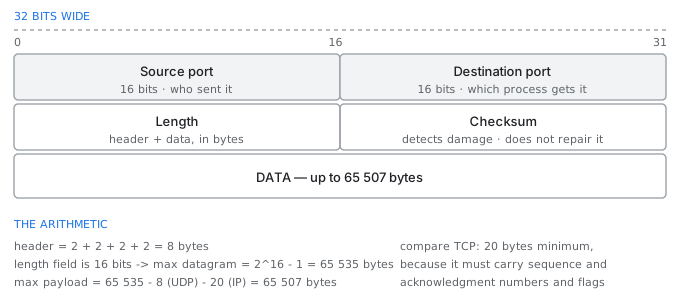
The entire UDP header — eight bytes, four fields, and two of them are optional in spirit
Why you would choose it
- Late data is worthless. In live voice or video, a packet retransmitted after its moment has passed cannot be played, so retransmitting it wastes bandwidth and delays everything behind it. Concealing the gap is better than filling it late.
- The exchange is a single short round trip. A DNS query and its answer fit in one datagram each; opening a TCP connection first would triple the time for no benefit.
- One-to-many delivery. TCP is strictly between two endpoints, so broadcast and multicast are only possible over UDP. This is why DHCP, which must reach a server it cannot yet address, is UDP.
- The application can do it better itself. QUIC, which carries HTTP/3, runs over UDP and implements its own reliability per stream, avoiding the head of line blocking that TCP's single ordered stream imposes.
සිංහලෙන්: - ප්රමාද වූ දත්ත නිෂ්ඵලයි. සජීවී හඬ හෝ වීඩියෝව තුළ, එහි මොහොත ගත වූ පසු නැවත සම්ප්රේෂණය කරන ලද පැකට්ටුවක් වාදනය කළ නොහැක, එබැවින් එය නැවත සම්ප්රේෂණය කිරීමෙන් කලාප පළල අපතේ යන අතර පිටුපස ඇති සියල්ල ප්රමාද කරයි. ප්රමාද වී පිරවීමට වඩා හිඩැස වසන් කිරීම හොඳය.
- හුවමාරුව තනි කෙටි වට සංචාරයකි. DNS විමසුමක් සහ එහි පිළිතුර එක් datagram එකකට ගැලපේ; පළමුව TCP සම්බන්ධතාවයක් විවෘත කිරීමෙන් කිසිදු ප්රයෝජනයක් නොමැතිව කාලය තුන් ගුණයකින් වැඩි වනු ඇත.
- එක සිට බොහෝ බෙදා හැරීම. TCP අන්ත ලක්ෂ්ය දෙකක් අතර පවතින බැවින් විකාශනය සහ බහු විකාශනය කළ හැක්කේ UDP හරහා පමණි. DHCP, තවමත් ආමන්ත්රණය කළ නොහැකි සේවාදායකයකට ළඟා විය යුතු, UDP වන්නේ එබැවිනි.
- යෙදුමට එය වඩා හොඳින් කළ හැකිය. HTTP/3 දරණ QUIC, UDP හරහා දිවෙන අතර TCP හි තනි ඇණවුම් ප්රවාහය පනවන රේඛාවේ ප්රධානියා අවහිර කිරීම මගහරිමින් ප්රවාහයකට තමන්ගේම විශ්වසනීයත්වය ක්රියාත්මක කරයි.
TCP and UDP side by side
| TCP | UDP | |
|---|---|---|
| Connection | three-way handshake first | none; just send |
| Header | 20 bytes minimum, up to 60 | 8 bytes, always |
| Reliability | acknowledged and retransmitted | none |
| Ordering | guaranteed by sequence numbers | none |
| Flow control | receiver's advertised window | none |
| Congestion control | yes | none — the application must behave |
| Delivery | one to one only | one to one, broadcast or multicast |
| Overhead | higher | minimal |
| Typical use | web, mail, file transfer, SSH | DNS, DHCP, voice, video, games, QUIC |
The responsibility it hands you
Choosing UDP does not remove the need for reliability; it moves the decision into your application. A game that needs a player's position update can simply drop a lost one, because a newer one is already on the way. A game that needs the fact that a player fired must implement its own acknowledgment for that particular message.
සිංහලෙන්: UDP තෝරාගැනීම විශ්වසනීයත්වය සඳහා අවශ්යතාවය ඉවත් නොකරයි; එය ඔබගේ යෙදුමට තීරණය ගෙන යයි. ක්රීඩකයෙකුගේ ස්ථාන යාවත්කාලීන කිරීම අවශ්ය වන ක්රීඩාවකට නැතිවූ එකක් අතහැරිය හැක, මන්ද අලුත් එකක් දැනටමත් පැමිණෙමින් තිබේ. ක්රීඩකයෙකු වෙඩි තැබූ බව අවශ්ය වන ක්රීඩාවකට එම නිශ්චිත පණිවිඩය සඳහා තමන්ගේම පිළිගැනීම ක්රියාත්මක කළ යුතුය.
The same applies to congestion. TCP backs off when the network is loaded; UDP does not, so a UDP application that sends at a fixed rate regardless of conditions will happily drive a link into collapse and starve every TCP connection sharing it, since the TCP flows politely reduce their rate and the UDP flow does not.
සිංහලෙන්: තදබදයට ද එය අදාළ වේ. ජාලය පූරණය වූ විට TCP පසුබසියි; UDP නැත, එබැවින් කොන්දේසි නොතකා ස්ථාවර ගාස්තුවකට යවන UDP යෙදුමක් සතුටින් සබැඳියක් බිඳවැටීමට හේතු වන අතර එය බෙදාගන්නා සෑම TCP සම්බන්ධතාවයක්ම සාගින්නෙන් පෙළේ, මන්ද TCP ප්රවාහයන් ආචාරශීලී ලෙස ඒවායේ අනුපාතය අඩු කරන අතර UDP ප්රවාහය සිදු නොවේ.
What goes wrongවැරදෙන තැන
The dangerous property of UDP is that it is trivially spoofable, because there is no handshake to prove the sender's address. This makes it the basis of amplification attacks: a small forged query to an open DNS or NTP server produces a large reply sent to the forged victim's address. Any UDP service reachable from the internet needs rate limiting and response size limits for this reason alone.
සිංහලෙන්: UDP හි භයානක ගුණාංගය නම්, යවන්නාගේ ලිපිනය ඔප්පු කිරීමට අතට අත දීමක් නොමැති නිසා එය සුළු වශයෙන් වංචා කළ හැකි වීමයි. මෙය විස්තාරණ ප්රහාරවල පදනම බවට පත් කරයි: විවෘත DNS හෝ NTP සේවාදායකයක් වෙත කුඩා ව්යාජ විමසුමක් ව්යාජ වින්දිතයාගේ ලිපිනයට යවන ලද විශාල පිළිතුරක් නිපදවයි. අන්තර්ජාලයෙන් ළඟා විය හැකි ඕනෑම UDP සේවාවකට මේ හේතුව නිසා පමණක් ගාස්තු සීමා කිරීම සහ ප්රතිචාර ප්රමාණය සීමා කිරීම අවශ්ය වේ.
Routing tables and the control plane
රවුටින් වගු සහ control plane
No router knows the whole path. The path is what emerges from many routers each making one local decision.කිසිම රවුටරයක් මුළු මාර්ගයම දන්නේ නැහැ. මාර්ගය යනු එක් එක් දේශීය තීරණයක් ගන්නා බොහෝ රවුටර වලින් මතු වන දෙයයි.
A packet crossing the internet may pass fifteen routers, and not one of them knows the full route. Each knows only which of its own neighbours is the right next step for that destination, and the path is the accumulated consequence of those independent decisions.
සිංහලෙන්: අන්තර්ජාලය හරහා ගමන් කරන පැකට්ටුවක්රවුටර පහළොවක් පසු කළ හැකි අතර, ඔවුන්ගෙන් එකක්වත් සම්පූර්ණ මාර්ගය නොදනී. එම ගමනාන්තය සඳහා නිවැරදි මීළඟ පියවර වන්නේ තමන්ගේම අසල්වැසියන්ගෙන් කවුරුන්ද යන්න පමණක් සෑම කෙනෙකුම දන්නා අතර මාර්ගය එම ස්වාධීන තීරණවල සමුච්චිත ප්රතිවිපාක වේ.
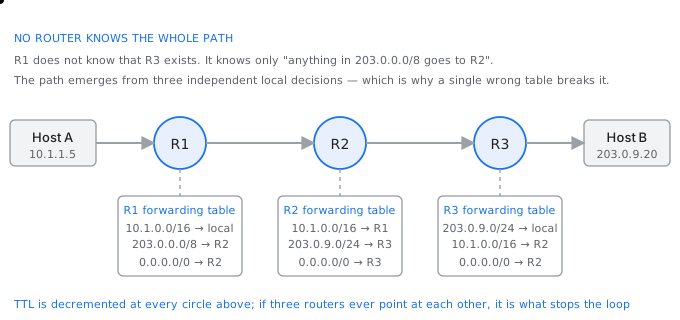
Hop by hop — each router reads only the destination and consults only its own table
Routing table and forwarding table
Two tables, often confused
| Routing table (RIB) | Forwarding table (FIB) | |
|---|---|---|
| Holds | every route learned, from every protocol | one chosen next hop per prefix |
| Built by | routing protocols and static configuration | derived from the routing table |
| Lives in | the router's general processor | the forwarding hardware |
| Consulted | when routes change | for every single packet |
| Speed | milliseconds | nanoseconds |
The distinction matters because forwarding must happen at line rate — a 100 Gbps interface may forward 150 million packets a second — and no general purpose processor can consult a table of a million routes that fast. So the slow, clever work of choosing routes is separated from the fast, simple work of applying them.
සිංහලෙන්: වෙනස වැදගත් වන්නේ ඉදිරියට යැවීම රේඛීය අනුපාතයට සිදු විය යුතු බැවිනි - 100 Gbps අතුරු මුහුණතක් තත්පරයකට පැකට් මිලියන 150 ක් යොමු කළ හැකිය - සහ කිසිදු සාමාන්ය කාර්ය සකසනයකට වේගවත් මාර්ග මිලියනයක වගුවක් පරිශීලනය කළ නොහැක. එබැවින් මාර්ග තෝරා ගැනීමේ මන්දගාමී, දක්ෂ කාර්යය ඒවා යෙදීමේ වේගවත්, සරල කාර්යයෙන් වෙන් කරනු ලැබේ.
Control plane and data plane
This separation has a name. The control plane is everything that decides where traffic should go: the routing protocols, their adjacencies, their algorithms, the policy. The data plane is everything that actually moves traffic: look up the destination, decrement the TTL, rewrite the layer two header, send it out of a port.
සිංහලෙන්: මෙම වෙන්වීමට නමක් ඇත. පාලන තලය යනු ගමනාගමනය යා යුත්තේ කොතැනටද යන්න තීරණය කරන සියල්ලයි: මාර්ගගත කිරීමේ ප්රොටෝකෝල, ඒවායේ යාබදතා, ඒවායේ ඇල්ගොරිතම, ප්රතිපත්තිය. දත්ත තලය යනු ඇත්ත වශයෙන්ම ගමනාගමනය ගෙන යන සෑම දෙයක්ම වේ: ගමනාන්තය සොයා බලන්න, TTL අඩු කරන්න, ස්ථර දෙකේ ශීර්ෂය නැවත ලියන්න, එය වරායෙන් පිටතට යවන්න.
The control plane runs in software and is measured in seconds; the data plane runs in hardware and is measured in nanoseconds. A router whose control plane fails often keeps forwarding perfectly for a while, using the last table it computed — which is precisely why a failure can be invisible until the topology changes.
සිංහලෙන්: පාලක තලය මෘදුකාංගයේ ධාවනය වන අතර තත්පර වලින් මනිනු ලැබේ; දත්ත තලය දෘඪාංගයේ ධාවනය වන අතර නැනෝ තත්පර වලින් මනිනු ලැබේ. පාලක තලය අසාර්ථක වන රවුටරයක් බොහෝ විට එය ගණනය කළ අවසාන වගුව භාවිතා කරමින් ටික වේලාවක් පරිපූර්ණව ඉදිරියට යවයි - ස්ථල විද්යාව වෙනස් වන තෙක් අසාර්ථක වීමක් නොපෙනී යා හැක්කේ එබැවිනි.
Static and dynamic routing
A static route is written by hand and never changes. It is correct when there is genuinely only one path, costs nothing to run, and has the fatal property of not noticing when the path stops working.
සිංහලෙන්: ස්ථිතික මාර්ගයක් අතින් ලියා ඇති අතර කිසි විටෙකත් වෙනස් නොවේ. සැබෑ ලෙසම එකම මාර්ගයක් ඇති විට, ධාවනය කිරීමට කිසිවක් වැය නොවන විට සහ මාර්ගය ක්රියා විරහිත වූ විට නොදැන සිටීමේ මාරාන්තික ගුණයක් ඇති විට එය නිවැරදි වේ.
A dynamic routing protocol discovers routes and adapts. The three families differ in what each router knows.
සිංහලෙන්: ගතික රවුටින් ප්රොටෝකෝලයක් මාර්ග සොයාගෙන අනුවර්තනය කරයි. එක් එක්රවුටරය දන්නා දේ අනුව පවුල් තුන වෙනස් වේ.
- Distance vector, used by RIP. Each router tells its neighbours the cost it believes it has to every destination, and nothing more. It is simple, converges slowly, and can form loops, which is why it needs devices such as split horizon and hold-down timers.
- Link state, used by OSPF and IS-IS. Every router floods a description of its own links to every other router, so all of them build an identical map and each runs Dijkstra's algorithm over it independently. Convergence is fast and loops do not form, at the cost of memory and processing.
- Path vector, used by BGP. Each route carries the full list of autonomous systems it has crossed, which makes loop detection trivial — a router seeing its own number in the path discards the route — and lets policy rather than distance decide.
සිංහලෙන්: - RIP විසින් භාවිතා කරන දුරස්ථ දෛශිකය. සෑම රවුටරයක්ම එහි අසල්වැසියන්ට සෑම ගමනාන්තයකටම තමන් විශ්වාස කරන පිරිවැය පවසන අතර ඊට වඩා දෙයක් නැත. එය සරලයි, සෙමින් අභිසාරී වන අතර ලූප සෑදිය හැක, එම නිසා එයට බෙදීම් ක්ෂිතිජය සහ රඳවා තබා ගැනීමේ කාල ගණක වැනි උපාංග අවශ්ය වේ.
- සබැඳි තත්ත්වය, OSPF සහ IS-IS විසින් භාවිතා කරනු ලැබේ. සෑම රවුටරයක්ම අනෙක් සෑම රවුටරයක් වෙතම තමන්ගේම සබැඳියන් පිළිබඳ විස්තරයක් ගලා එයි, එබැවින් ඒවා සියල්ලම එක සමාන සිතියමක් ගොඩනඟා ගන්නා අතර ඒ සෑම එකක්ම ස්වාධීනව එය මත Dijkstra හි ඇල්ගොරිතම ධාවනය කරයි. අභිසාරී වීම වේගවත් වන අතර මතකයේ සහ සැකසීමේ පිරිවැය මත ලූප සෑදෙන්නේ නැත.
- BGP විසින් භාවිතා කරන මාර්ග දෛශිකය. සෑම මාර්ගයක්ම එය තරණය කර ඇති ස්වයංක්රීය පද්ධතිවල සම්පූර්ණ ලැයිස්තුවක් දරයි, එමඟින් ලූප් හඳුනාගැනීම සුළුපටු කරයි - රවුටරයක් මාර්ගයේ තමන්ගේම අංකයක් දැකීමෙන් මාර්ගය ඉවතලයි - සහ දුර තීරණය කිරීමට වඩා ප්රතිපත්තිවලට ඉඩ දෙයි.
What one forwarding decision looks like
packet arrives for 203.0.9.20

1. is the TTL greater than 1?   if not, discard and send ICMP
2. longest prefix match against the forwarding table:
      0.0.0.0/0      -> R3     matches, 0 bits
      203.0.0.0/8    -> R3     matches, 8 bits
      203.0.9.0/24   -> R2     matches, 24 bits   <- most specific, wins
3. decrement TTL, recompute the IP header checksum
4. look up R2's MAC address in the ARP cache
5. build a new Ethernet frame and transmit

elapsed: tens of nanoseconds, in hardware, per packet
What goes wrongවැරදෙන තැන
A static default route pointed at a link that is up but useless is the quiet failure. The interface stays up, so the route stays in the table, and traffic is sent into a provider that has itself lost connectivity. This is why critical static routes are paired with something that tests reachability rather than link state — object tracking, or bidirectional forwarding detection.
සිංහලෙන්: ස්ථිතික පෙරනිමි මාර්ගයක් දක්වා ඇති නමුත් නිෂ්ඵල සබැඳියක් වෙත යොමු කර ඇත්තේ නිහඬ අසාර්ථකත්වයයි. අතුරුමුහුණත දිගටම පවතිනු ඇත, එබැවින් මාර්ගය මේසය තුළ පවතිනු ඇත, සහ ගමනාගමනය සම්බන්ධතාව අහිමි වූ සැපයුම්කරුවෙකු වෙත යවනු ලැබේ. විවේචනාත්මක ස්ථිතික මාර්ග සම්බන්ධක තත්ත්වයට වඩා ළඟා විය හැකි බව පරීක්ෂා කරන දෙයක් සමඟ යුගලනය වන්නේ එබැවිනි - වස්තු ලුහුබැඳීම හෝ ද්විපාර්ශ්වික ඉදිරියට යැවීම හඳුනාගැනීම.
ARP and the MAC address
ARP සහ MAC ලිපිනය
Two addresses for every packet, one of which is replaced at every hop — and the broadcast question that connects them.සෑම පැකට්ටුවක් සඳහාම ලිපින දෙකක්, ඉන් එකක් සෑම හොප් එකකදීම ප්රතිස්ථාපනය වේ - සහ ඒවා සම්බන්ධ කරන විකාශන ප්රශ්නය.
Every packet carries two kinds of address at once, and understanding why is the single most clarifying thing in the data link layer.
සිංහලෙන්: සෑම පැකට්ටුවක්ම එකවර ලිපින වර්ග දෙකක් දරයි, සහ දත්ත සම්බන්ධක ස්ථරයේ ඇති වඩාත්ම පැහැදිලි දෙය වන්නේ මන්දැයි තේරුම් ගැනීම.
- The IP address identifies the final destination and does not change anywhere along the path. It is logical, assigned by configuration or DHCP, and meaningful across the whole internet.
- The MAC address identifies the next device on this particular link. It is replaced at every single hop. It is physical, burned into the interface at manufacture, and meaningful only on the local segment.
සිංහලෙන්: - IP ලිපිනය අවසාන ගමනාන්තය හඳුනා ගන්නා අතර මාර්ගයේ කොතැනකවත් වෙනස් නොවේ. එය තාර්කික, වින්යාස කිරීම හෝ DHCP මගින් පවරා ඇති අතර, මුළු අන්තර්ජාලය පුරාවටම අර්ථවත් වේ.
- MAC ලිපිනය මෙම විශේෂිත සබැඳියේ ඊළඟ උපාංගය හඳුනා ගනී. එය සෑම හොප් එකකම ප්රතිස්ථාපනය වේ. එය භෞතික වන අතර, නිෂ්පාදනයේදී අතුරු මුහුණතට පුළුස්සා දමනු ලැබේ, සහ දේශීය අංශය මත පමණක් අර්ථවත් වේ.
A MAC address is 48 bits, written as twelve hexadecimal digits. The first half identifies the manufacturer and the second is their serial number, which is why you can often tell what a device is from its address alone. It belongs to a network interface rather than to a machine, so a laptop with wired, wireless and Bluetooth interfaces has three of them.
සිංහලෙන්: MAC ලිපිනයක් යනු බිටු 48ක් වන අතර එය ෂඩාස්ර දශම ඉලක්කම් දොළහක් ලෙස ලියා ඇත. පළමු භාගය නිෂ්පාදකයා හඳුනා ගන්නා අතර දෙවැන්න ඔවුන්ගේ අනුක්රමික අංකය වේ, එබැවින් උපාංගයක් යනු කුමක්ද යන්න එහි ලිපිනයෙන් පමණක් ඔබට පැවසිය හැකිය. එය යන්ත්රයකට වඩා ජාල අතුරුමුහුණතකට අයත් වේ, එබැවින්රැහැන්ගත, රැහැන්රහිත සහ බ්ලූටූත් අතුරුමුහුණත් සහිත ලැප්ටොප් පරිගණකයක් ඒවායින් තුනක් ඇත.
The question ARP asks
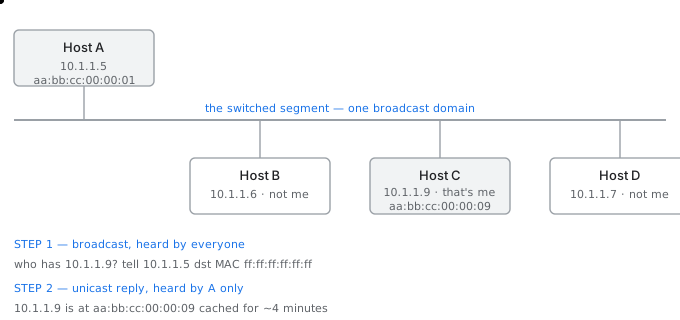
ARP — a broadcast question that only one machine answers, and the answer is cached
A host that wants to send to an IP address on its own segment knows the destination's IP address and needs its MAC address to build the frame. The Address Resolution Protocol is how it finds out.
සිංහලෙන්: තමන්ගේම කොටසේ IP ලිපිනයකට යැවීමට අවශ්ය සත්කාරකයකු ගමනාන්තයේ IP ලිපිනය දන්නා අතර රාමුව තැනීමට එහි MAC ලිපිනය අවශ්ය වේ. ලිපින විභේදන ප්රොටෝකෝලය එය සොයා ගන්නා ආකාරයයි.
The exchange, in two frames
cache miss:

1. BROADCAST  (destination MAC ff:ff:ff:ff:ff:ff — every host must look)
      "who has 10.1.1.9?  tell 10.1.1.5"

   every host on the segment receives and examines it.
   every host except 10.1.1.9 silently discards it.

2. UNICAST reply, straight back to the asker
      "10.1.1.9 is at aa:bb:cc:00:00:09"

3. the answer is cached, typically for 4 minutes on Linux,
   so the next thousand packets need no ARP at all
What happens for a remote destination
This is where students most often go wrong. A host sending to a destination on another network does not ARP for that destination — it cannot, because the broadcast would never leave the segment and the destination would never hear it.
සිංහලෙන්: සිසුන්ට බොහෝ විට වැරදෙන්නේ මෙතැනදීය. වෙනත් ජාලයක ගමනාන්තයකට යවන ධාරකයෙකු එම ගමනාන්තය සඳහා ARP නොකරයි - එය කළ නොහැක, මන්ද විකාශනය කිසි විටෙක කොටස හැර නොයන අතර ගමනාන්තයට එය ඇසෙන්නේ නැත.
Instead the host ANDs the destination with its own subnet mask, concludes the destination is not local, and ARPs for its default gateway instead. The frame it builds carries the destination's IP address and the gateway's MAC address. The gateway strips that frame, looks at the IP address, and builds a new frame with the next hop's MAC address.
සිංහලෙන්: ඒ වෙනුවට ධාරකය තමන්ගේම උපජාල වෙස් මුහුණකින් ගමනාන්තය AND කරයි, ගමනාන්තය දේශීය නොවන බව නිගමනය කරයි, ඒ වෙනුවට එහි පෙරනිමි ද්වාරය සඳහා ARPs. එය ගොඩනඟන රාමුව ගමනාන්තයේ IP ලිපිනය සහ ද්වාරයෙහි MAC ලිපිනය දරයි. ද්වාරය එම රාමුව ඉවත් කර, IP ලිපිනය දෙස බලමින්, ඊළඟ hop හි MAC ලිපිනය සමඟ නව රාමුවක් ගොඩනඟයි.
The two addresses along a three-hop path
A (10.1.1.5) sending to B (203.0.9.20), via R1, R2, R3

hop            src IP       dst IP        src MAC   dst MAC
A  -> R1     10.1.1.5   203.0.9.20        A         R1
R1 -> R2     10.1.1.5   203.0.9.20        R1        R2
R2 -> R3     10.1.1.5   203.0.9.20        R2        R3
R3 -> B      10.1.1.5   203.0.9.20        R3        B

the IP addresses NEVER change.
the MAC addresses change on EVERY hop.

(NAT is the exception that rewrites the source IP too — which is
 exactly why NAT breaks protocols that carry addresses inside the payload)
What goes wrongවැරදෙන තැන
ARP has no authentication whatsoever: any host may answer any request, or send an unsolicited reply that others will cache. That is ARP spoofing, and it is how traffic on a local network is redirected through an attacker's machine. The defences are switch features — dynamic ARP inspection and DHCP snooping — not anything in the protocol itself.
සිංහලෙන්: ARP හට කිසිඳු සත්යාපනයක් නොමැත: ඕනෑම සත්කාරකයෙකුට ඕනෑම ඉල්ලීමකට පිළිතුරු දිය හැකිය, නැතහොත් වෙනත් අය හැඹිලිගත කරන ලෙස ඉල්ලා නොසිටි පිළිතුරක් යැවිය හැක. එනම් ARP spoofing වන අතර එය ප්රහාරක යන්ත්රයක් හරහා ප්රාදේශීය ජාලයක ගමනාගමනය යළි හරවා යවන ආකාරයයි. ආරක්ෂක යනු ස්විච් විශේෂාංග වේ - ගතික ARP පරීක්ෂාව සහ DHCP සෝදිසි කිරීම - ප්රොටෝකෝලය තුළම කිසිවක් නොවේ.
Middleboxes — stateful firewalls and NAT
මිඩ්ල්බොක්ස් — stateful ෆයර්වෝල සහ NAT
The devices between the end hosts that the original design said should not exist, and which the internet now depends on.මුල් නිර්මාණයේ සඳහන් නොකළ යුතු සහ අන්තර්ජාලය දැන්රඳා පවතින අවසාන ධාරක අතර උපාංග.
The internet was designed on the end-to-end principle: the network should move packets and nothing else, and all intelligence should live in the end hosts. A middlebox is any device that violates this by inspecting or modifying traffic in transit. They are everywhere, and much of the modern internet's awkwardness comes from that tension.
සිංහලෙන්: අන්තර්ජාලය නිර්මාණය කර ඇත්තේ අන්තයේ සිට අවසානය දක්වා වූ මූලධර්මය මත ය: ජාලය පැකට් ගෙන යා යුතු අතර වෙන කිසිවක් නොකළ යුතු අතර, සියලු බුද්ධිය අවසන් ධාරකවල ජීවත් විය යුතුය. මැද පෙට්ටියක් යනු ගමනාගමනයේ ගමනාගමනය පරීක්ෂා කිරීම හෝ වෙනස් කිරීම මගින් මෙය උල්ලංඝනය කරන ඕනෑම උපාංගයකි. ඔවුන් සෑම තැනකම සිටින අතර, නවීන අන්තර්ජාලයේ බොහෝ අපහසුතාවයන් පැමිණෙන්නේ එම ආතතියෙනි.
Stateless and stateful filtering
Two generations of firewall
| Stateless packet filter | Stateful firewall | |
|---|---|---|
| Examines | each packet alone | packets in the context of a connection |
| Remembers | nothing | a table of permitted connections |
| Return traffic | needs its own explicit rule | allowed automatically |
| Rule count | roughly double | half — and the risky half is gone |
| Performance | constant per packet | fast after the first packet of a flow |
| Weakness | cannot tell a reply from an unsolicited packet | the state table is a finite resource |
The rule count difference is the practical argument. Permitting web browsing with a stateless filter needs an outbound rule to port 80 and an inbound rule allowing anything from port 80 to the high ports — and that second rule admits any packet that merely claims to come from port 80, whether anyone asked for it or not. A stateful firewall needs only the outbound rule, because it recognises the reply as belonging to a connection it already approved.
සිංහලෙන්: රීති ගණන් වෙනස ප්රායෝගික තර්කයයි. රාජ්ය රහිත ෆිල්ටරයක් සමඟ වෙබ් බ්රවුස් කිරීමට අවසර දීම සඳහා පෝට් 80 වෙත පිටතට යන රීතියක් සහ වරාය 80 සිට ඉහළ වරායන් දක්වා ඕනෑම දෙයකට ඉඩ දෙන අභ්යන්තර රීතියක් අවශ්ය වේ - සහ එම දෙවන රීතියට කවුරුන් ඉල්ලා සිටියත් නැතත් 80 වරායෙන් එන බව පවසන ඕනෑම පැකට්ටුවක් පිළිගනී. ප්රකාශිත ෆයර්වෝලයකට අවශ්ය වන්නේ පිටතට යන රීතිය පමණි, මන්ද එය පිළිතුර එය දැනටමත් අනුමත කර ඇති සම්බන්ධතාවයකට අයත් බව හඳුනා ගන්නා බැවිනි.
The cost is that the state table is finite. A firewall rated for a million connections holds a million, and a connection flood that fills it stops new legitimate connections from being established, which is the mechanism behind several denial of service techniques.
සිංහලෙන්: වියදම රාජ්ය වගුව සීමිතයි. සම්බන්ධතා මිලියනයක් සඳහා ශ්රේණිගත කරන ලද ෆයර්වෝලයක් මිලියනයක්රඳවා තබා ගන්නා අතර, එය පුරවන සම්බන්ධතා ගංවතුරක් නව නීත්යානුකූල සම්බන්ධතා ස්ථාපිත කිරීම නවත්වයි, එය සේවා ශිල්පීය ක්රම කිහිපයක් ප්රතික්ෂේප කිරීම පිටුපස ඇති යාන්ත්රණයයි.
NAT in detail
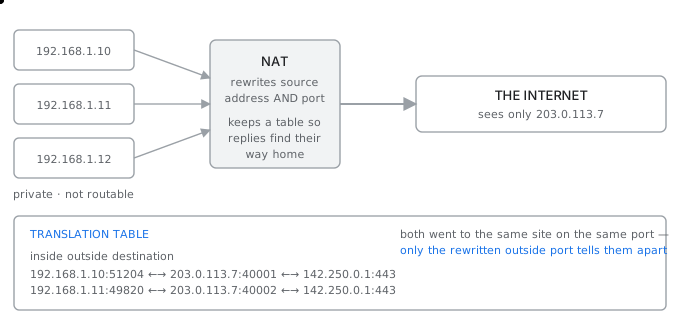
NAT — one public address, a table, and the port number doing the real work
Network address translation rewrites the source address of outgoing packets to a single public address and keeps a table so that replies can be rewritten back. What makes it work for many hosts at once is that it rewrites the port as well, which is why the full name for the common form is network address and port translation.
සිංහලෙන්: ජාල ලිපින පරිවර්තනය මඟින් පිටතට යන පැකට් වල මූලාශ්ර ලිපිනය තනි පොදු ලිපිනයකට නැවත ලියන අතර පිළිතුරු නැවත ලිවිය හැකි පරිදි මේසයක් තබා ගනී. එය බොහෝ ධාරක සඳහා එකවර ක්රියා කරන්නේ එය වරාය ද නැවත ලිවීමයි, එම නිසා පොදු පෝරමයේ සම්පූර්ණ නම ජාල ලිපිනය සහ වරාය පරිවර්තනය වේ.
Why the port rewrite is essential
two hosts behind NAT, both browsing the same site:

   192.168.1.10:51204  ->  142.250.1.14:443
   192.168.1.11:51204  ->  142.250.1.14:443     <- same source port!

if NAT only rewrote the address, both become
   203.0.113.7:51204 -> 142.250.1.14:443
and the reply is ambiguous. So NAT assigns a fresh outside port:

   192.168.1.10:51204  <->  203.0.113.7:40001
   192.168.1.11:51204  <->  203.0.113.7:40002

the outside port is the only thing distinguishing them.
one public address can therefore serve tens of thousands of
simultaneous conversations — bounded by the ~64 000 ports.
What NAT bought and what it cost
- It bought time. IPv4 exhaustion was predicted for the mid 1990s and did not become acute until the 2010s, almost entirely because NAT let millions of devices share single addresses.
- It bought a side effect that is often mistaken for a security feature: an unsolicited packet from outside has no table entry, so it cannot be delivered. This is useful, but it is a consequence of the mechanism rather than a policy, and it is not a substitute for a firewall.
- It cost the end-to-end principle. A host behind NAT has no address the outside world can reach, so it can initiate but never receive, and any peer-to-peer application has to work around this with techniques such as STUN, TURN and hole punching.
- It cost protocols that carry addresses inside their payload. FTP in active mode and SIP both announce an address in the data, which NAT does not rewrite, so the announced address is a private one that is useless to the far end. Application layer gateways exist inside NAT devices purely to fix this case by case.
සිංහලෙන්: - එය කාලය මිලදී ගත්තේය. IPv4 විඩාව 1990 ගණන්වල මැද භාගය සඳහා පුරෝකථනය කරන ලද අතර 2010 දශකය වන තෙක් උග්ර වූයේ නැත, සම්පූර්ණයෙන්ම පාහේ NAT උපාංග මිලියන ගණනකට තනි ලිපින බෙදා ගැනීමට ඉඩ සලසයි.
- එය ආරක්ෂිත අංගයක් ලෙස බොහෝ විට වරදවා වටහා ගන්නා අතුරු ආබාධයක් මිල දී ගෙන ඇත: පිටතින් නොපැමිණි පැකට්ටුවකට වගු ඇතුළත් කිරීමක් නොමැත, එබැවින් එය භාර දිය නොහැක. මෙය ප්රයෝජනවත් වේ, නමුත් එය ප්රතිපත්තියකට වඩා යාන්ත්රණයේ ප්රතිවිපාකයක් වන අතර එය ෆයර්වෝලයක් සඳහා ආදේශකයක් නොවේ.
- එය අන්තයේ සිට අවසානය දක්වා වූ මූලධර්මය පිරිවැය. NAT පිටුපස සිටින සත්කාරකයකුට බාහිර ලෝකයට ළඟා විය හැකි ලිපිනයක් නැත, එම නිසා එයට ආරම්භ කළ හැකි නමුත් කිසිදා නොලැබෙන අතර, ඕනෑම සම වයසේ සිට සම වයසේ සිට STUN, TURN සහ සිදුරු සිදුරු කිරීම වැනි ශිල්පීය ක්රම සමඟින් මෙය වටා ක්රියා කළ යුතුය.
- ඔවුන්ගේ ගෙවුම් පටය තුළ ලිපින රැගෙන යන ප්රොටෝකෝල සඳහා වැය වේ. FTP ක්රියාකාරී මාදිලියේ සහ SIP යන දෙකම දත්තවල ලිපිනයක් නිවේදනය කරයි, එය NAT නැවත ලියන්නේ නැත, එබැවින් නිවේදනය කරන ලද ලිපිනය පුද්ගලික එකක් වන අතර එය අන්තයටම නිෂ්ඵල වේ. යෙදුම් ස්ථර ද්වාර NAT උපාංග තුළ ඇත්තේ තනි තනිව මෙම අවස්ථාව නිවැරදි කිරීමට පමණි.
What goes wrongවැරදෙන තැන
Treating NAT as security is the persistent error. NAT stops unsolicited inbound connections as a side effect of having no table entry, and it does absolutely nothing about a compromised machine inside making outbound connections, which is how essentially every real compromise proceeds. It also does nothing about traffic between two hosts on the same side of it.
සිංහලෙන්: NAT ආරක්ෂාව ලෙස සැලකීම නිරන්තර දෝෂයකි. NAT විසින් කිසිදු වගු ප්රවේශයක් නොමැති අතුරු ප්රතිඵලයක් ලෙස අනවශ්ය ඇතුල්වීම් සම්බන්ධතා නවත්වන අතර, පිටතට යන සම්බන්ධතා ඇති කිරීම තුල ඇති සම්මුතියට ලක් වූ යන්ත්රයක් සම්බන්ධයෙන් එය කිසිසේත්ම කිසිවක් නොකරයි, එනම් සෑම සැබෑ සම්මුතියක්ම අත්යවශ්යයෙන්ම සිදු වන්නේ කෙසේද යන්නයි. එහි එකම පැත්තේ ධාරක දෙකක් අතර ගමනාගමනය ගැන ද එය කිසිවක් නොකරයි.
IPv6 and why the world still runs IPv4
IPv6 සහ ලෝකය තවමත් IPv4 ධාවනය කරන්නේ ඇයි
An address space large enough for every grain of sand, standardised in 1998, and still a minority of traffic.සෑම වැලි කැටයක් සඳහාම ප්රමාණවත් ලිපින ඉඩක්, 1998 දී ප්රමිතිගත කරන ලද, සහ තවමත්රථවාහන සුළුතරයකි.
IPv4 has 32 bit addresses, giving about 4.3 billion, of which large blocks are reserved and unusable. The regional registries began running out in 2011. IPv6 has 128 bit addresses, which is not four times as many but 2 to the power 96 times as many.
සිංහලෙන්: IPv4 හි බිට් ලිපින 32 ක් ඇති අතර, එය බිලියන 4.3 ක් පමණ ලබා දෙයි, එයින් විශාල කුට්ටි වෙන් කර ඇති අතර භාවිතයට නුසුදුසු ය. ප්රාදේශීය ලේඛන 2011 දී අවසන් වීමට පටන් ගත්තේය. IPv6 හි බිට් ලිපින 128ක් ඇත, එය හතර ගුණයක් නොව 2ක් බලයට 96 ගුණයක් වැඩිය.
The scale of the difference
IPv4   2^32  =                       4 294 967 296
IPv6   2^128 = 340 282 366 920 938 463 463 374 607 431 768 211 456

ratio  2^96  ~= 7.9 x 10^28

put differently: every person alive could have
   4 x 10^28 addresses each

the point is not the count. It is that addresses stop being scarce,
so they no longer have to be conserved, shared or translated.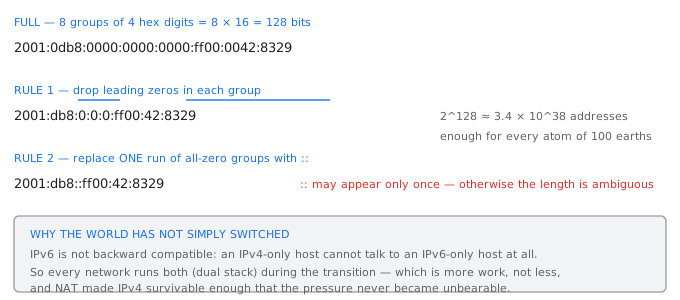
Writing an IPv6 address — the two shortening rules, applied once each
What changed besides the length
- No NAT is needed, so every device can have a globally reachable address and the end-to-end principle is restored.
- No broadcast. IPv6 replaces it entirely with multicast, so a device is not interrupted by traffic that was never for it. ARP is replaced by Neighbour Discovery, which uses multicast.
- Simplified header. The fixed header is 40 bytes with far fewer fields, and options move into extension headers, so routers do less work per packet. The header checksum was removed entirely, on the grounds that the layers above and below already detect corruption.
- No fragmentation by routers. Only the sending host may fragment, so path MTU discovery becomes mandatory rather than optional.
- Address autoconfiguration. A host can generate its own address from the router's advertised prefix without a DHCP server at all.
සිංහලෙන්: - NAT අවශ්ය නොවේ, එබැවින් සෑම උපාංගයකටම ගෝලීය වශයෙන් ළඟා විය හැකි ලිපිනයක් තිබිය හැකි අතර අවසානය සිට අවසානය දක්වා මූලධර්මය ප්රතිසාධනය කෙරේ.
- විකාශනය නැත. IPv6 එය සම්පුර්ණයෙන්ම බහු විකාශනයකින් ප්රතිස්ථාපනය කරයි, එම නිසා උපාංගයක් කිසි විටෙක ඒ සඳහා නොවූ ගමනාගමනයට බාධා නොකරයි. ARP බහු විකාශනය භාවිතා කරන Neighbour Discovery මගින් ප්රතිස්ථාපනය වේ.
- සරල කළ ශීර්ෂකය. ස්ථාවර ශීර්ෂකය බයිට් 40ක් වන අතර ක්ෂේත්ර අඩු ප්රමාණයකින් යුක්ත වන අතර විකල්ප දිගු ශීර්ෂයන් වෙත ගමන් කරයි, එබැවින්රවුටර පැකට්ටුවකට අඩු වැඩ කරයි. ශීර්ෂ පිරික්සුම සම්පූර්ණයෙන්ම ඉවත් කරන ලද්දේ, ඉහත සහ පහළ ස්ථර දැනටමත් දූෂණය අනාවරණය කර ගැනීමේ පදනම මතය.
- රවුටර මගින් ඛණ්ඩනයක් නොමැත. යැවීමේ ධාරකය පමණක් ඛණ්ඩනය විය හැක, එබැවින් මාර්ගය MTU සොයා ගැනීම විකල්ප නොව අනිවාර්ය වේ.
- ලිපින ස්වයංක්රීය වින්යාසය. DHCP සේවාදායකයක් නොමැතිව රවුටරයේ ප්රචාරණය කරන ලද උපසර්ගයෙන් ධාරකයකට තමන්ගේම ලිපිනයක් ජනනය කළ හැක.
Why adoption took twenty-five years
The decisive problem is that IPv6 is not backward compatible. An IPv6-only host cannot talk to an IPv4-only host; the packets are simply a different format. So there is no moment at which a network can switch, and instead it must run both protocols side by side — dual stack — for as long as the transition lasts.
සිංහලෙන්: තීරනාත්මක ගැටළුව වන්නේ IPv6 පසුගාමී නොගැලපීමයි. IPv6-පමණක් ධාරකයෙකුට IPv4-පමණි ධාරකයකට කතා කළ නොහැක; පැකට් සරලව වෙනස් ආකෘතියකි. එබැවින් ජාලයකට මාරු විය හැකි මොහොතක් නොමැති අතර, ඒ වෙනුවට එය සංක්රාන්තිය පවතින තාක් කල් - ද්විත්ව තොගය - ප්රොටෝකෝල දෙකම ක්රියාත්මක කළ යුතුය.
Dual stack means more work, not less: two addressing plans, two sets of firewall rules, two routing tables, and twice the surface for mistakes. Meanwhile NAT made IPv4 comfortable enough that the pain of not moving stayed lower than the pain of moving, for a very long time.
සිංහලෙන්: Dual stack යනු වැඩිපුර වැඩ, අඩු නොවේ: ලිපින සැලසුම් දෙකක්, ෆයර්වෝල්රීති කට්ටල දෙකක්, මාර්ගගත කිරීමේ වගු දෙකක් සහ වැරදි සඳහා මතුපිට දෙගුණයක්. මේ අතර NAT විසින් IPv4 පහසු කරවන අතර, චලනය නොවී සිටීමේ වේදනාව චලනය වීමේ වේදනාවට වඩා ඉතා දිගු කාලයක් පැවතුනි.
Adoption is nevertheless real and accelerating, driven by mobile networks, which had no choice because they were allocating addresses to billions of handsets. A large fraction of traffic to the major content providers is now IPv6, even though many networks in between have never configured it.
සිංහලෙන්: කෙසේ වෙතත්, දරුකමට හදා ගැනීම සැබෑ සහ වේගවත් වන අතර, ජංගම දුරකථන ජාල මගින් මෙහෙයවනු ලබන අතර, ඔවුන් විසින් ජංගම දුරකථන බිලියන ගණනකට ලිපින වෙන් කිරීම නිසා වෙනත් විකල්පයක් නොතිබුණි. ප්රධාන අන්තර්ගත සපයන්නන් වෙත ගමනාගමනයෙන් විශාල කොටසක් දැන් IPv6 වේ, ඒ අතර ඇති බොහෝ ජාල කිසි විටෙකත් එය වින්යාස කර නැත.
What goes wrongවැරදෙන තැන
The mistake in a dual stack network is securing only one of the two protocols. A host reachable over both has two independent paths in, and a firewall policy written only for IPv4 leaves the IPv6 path wide open. Worse, IPv6 is often enabled by default and autoconfigures itself, so the exposure exists on networks whose administrators believe they are not running it at all.
සිංහලෙන්: ද්විත්ව ස්ටැක් ජාලයක ඇති වැරැද්ද නම් ප්රොටෝකෝල දෙකෙන් එකක් පමණක් සුරක්ෂිත කිරීමයි. දෙකටම ළඟා විය හැකි ධාරකයකට ස්වාධීන මාර්ග දෙකක් ඇත, IPv4 සඳහා පමණක් ලියා ඇති ෆයර්වෝල් ප්රතිපත්තියක් IPv6 මාර්ගය පුළුල් ලෙස විවෘත කරයි. නරකම දෙය නම්, IPv6 බොහෝ විට පෙරනිමියෙන් සක්රීය කර ඇති අතර ස්වයංක්රීයව වින්යාස කරයි, එබැවින් නිරාවරණය පවතින්නේ ඔවුන් එය කිසිසේත් ක්රියාත්මක නොවන බව පරිපාලකයින් විශ්වාස කරන ජාල මත ය.
Seeing it yourself — the commands
ඔබම දැකීම — විධාන
Nine commands that make everything on this site visible on your own machine. Run them while reading the pages they belong to.මෙම වෙබ් අඩවියේ ඇති සියල්ල ඔබගේම යන්ත්රයක දෘශ්යමාන කරන විධාන නවයක්. ඒවාට අයත් පිටු කියවන අතරතුර ඒවා ධාවනය කරන්න.
Every mechanism described on this site leaves a trace you can observe. These commands work on macOS and Linux; the Windows equivalents are noted where they differ.
සිංහලෙන්: මෙම වෙබ් අඩවියේ විස්තර කර ඇති සෑම යාන්ත්රණයක්ම ඔබට නිරීක්ෂණය කළ හැකි හෝඩුවාවක් ඉතිරි කරයි. මෙම විධාන macOS සහ Linux මත ක්රියා කරයි; වින්ඩෝස් සමානකම් වෙනස් වන තැන් සටහන් කර ඇත.
Where am I?
Your own addresses
$ ifconfig                    # macOS / older Linux   (Windows: ipconfig /all)
$ ip addr                     # modern Linux

   look for:  inet 192.168.1.42 netmask 0xffffff00
              ether a4:83:e7:1b:2c:3d        <- the MAC address

$ curl ifconfig.me            # your PUBLIC address, as the world sees it

   the two differ whenever you are behind NAT, which is almost always.
   that difference IS the NAT page, demonstrated in two commands.
Is it reachable, and how far away?
ping and traceroute
$ ping -c 5 google.com
   64 bytes from 142.250.183.14: icmp_seq=0 ttl=115 time=12.4 ms
                                          ^^^^^^^  ^^^^^^^^^
                                          TTL left  round trip time

   ttl=115 means about 13 routers were crossed (128 - 115),
   because most senders start the TTL at 64, 128 or 255.

$ traceroute google.com       # Windows: tracert

   traceroute works BY abusing the TTL: it sends packets with
   TTL=1, then 2, then 3, and each router that discards one
   reports itself in the ICMP error. The route is assembled
   from those complaints.
What is this name, really?
dig and nslookup
$ dig google.com
   ;; ANSWER SECTION:
   google.com.  212  IN  A  142.250.183.14
                ^^^ the TTL remaining on this cached answer

$ dig +trace google.com       # watch the WHOLE resolution, root downward
   -> this prints the eight steps from the DNS page, live

$ dig MX gmail.com            # which servers accept mail for gmail
$ dig AAAA google.com         # the IPv6 address
$ dig -x 8.8.8.8              # reverse: address back to a name

$ nslookup -type=MX gmail.com # the same, in the older tool
What is my machine actually talking to?
Open connections and live packets
$ netstat -an | grep ESTABLISHED        # every open connection
$ ss -tunap                             # modern Linux equivalent
$ lsof -i -P                            # which PROCESS owns each socket

   tcp4  0 0  192.168.1.42:51204  142.250.183.14:443  ESTABLISHED
              ^^^^^^^^^^^^^^^^^^  ^^^^^^^^^^^^^^^^^^
              the four-tuple from the socket page, on your machine

$ sudo tcpdump -n -c 20                 # 20 packets, raw
$ sudo tcpdump -n port 53               # watch DNS queries only
$ sudo tcpdump -n 'tcp[tcpflags] & tcp-syn != 0'   # watch handshakes begin

$ arp -a                                # your ARP cache
   ? (192.168.1.1) at 3c:37:86:1a:2b:3c on en0   <- your gateway's MAC
Is the port open and what is behind it?
Testing a service directly
$ nc -vz example.com 443          # is the port open at all?
$ nc -vz example.com 80

$ curl -v https://example.com     # the whole HTTP exchange, headers and all
   > GET / HTTP/1.1               <- what you sent
   > Host: example.com
   < HTTP/1.1 200 OK              <- what came back
   < content-type: text/html

$ curl -I https://example.com     # headers only
$ curl -w '%{time_namelookup} %{time_connect} %{time_total}\n' -o /dev/null -s URL
   -> splits the total time into DNS, TCP connect and everything else,
      which is how you tell a slow DNS from a slow server
The command for each page of this site
| To see... | Run | Described on |
|---|---|---|
| your public vs private address | curl ifconfig.me, then ifconfig | NAT |
| the DNS hierarchy resolving | dig +trace example.com | DNS in depth |
| TTL being decremented | ping, then traceroute | Time to live |
| the four-tuple of a socket | lsof -i -P | Program, process, thread, socket |
| ephemeral port allocation | netstat -an, watch the source ports | Ports in depth |
| the three-way handshake | sudo tcpdump 'tcp[tcpflags] & tcp-syn != 0' | Three way handshake |
| ARP resolving a neighbour | arp -d <ip>, ping it, arp -a | ARP and the MAC address |
| fragmentation happening | ping -s 2000 <host> | Fragmentation |
| HTTP status codes and headers | curl -v | HTTP, Status codes |
What goes wrongවැරදෙන තැන
tcpdump and its relatives need elevated privilege because they put the interface into promiscuous mode, and on a shared network they will show you other people's traffic. On a network you do not own, running them may be a disciplinary or a criminal matter regardless of your intent. Capture on your own machine, on your own network, and nowhere else.
සිංහලෙන්: tcpdump සහ එහි ඥාතීන්ට උසස් වරප්රසාද අවශ්ය වන්නේ ඔවුන් අතුරු මුහුණත සල්ලාල ප්රකාරයට දමා ඇති නිසා සහ හවුල් ජාලයක ඔවුන් ඔබට වෙනත් පුද්ගලයින්ගේ ගමනාගමනය පෙන්වනු ඇති බැවිනි. ඔබට අයිති නැති ජාලයක, ඔබේ අභිප්රාය නොසලකා ඒවා ක්රියාත්මක කිරීම විනය හෝ අපරාධ කාරණයක් විය හැකිය. ඔබේම යන්ත්රයකින්, ඔබේම ජාලයකින් සහ වෙනත් තැනක ග්රහණය කර ගන්න.
Keep going: ← Previous chapter · Next chapter → · Networking stage in the Self Guide
Finished this one?
Part of Self Guide · Stage 2: Networking fundamentals. Progress is saved in this browser.
Projects in this lesson

Education
Data Communication & Computer Networking Hub
Interactive TCP/IP model simulator, network design workbook, and bilingual Sinhala networking knowledge portal.
Education
AI Network Labs
A free course, graded labs and a 40-device campus capstone built around cisco-pt-mcp — the open-source MCP server for Cisco Packet Tracer by Muhammad Balawal.