Networking 02 — Devices: Hubs, Repeaters, Bridges, Switches, Routers and Middleboxes
Every box in a network rack and what layer it works at — plus the real-world components: desk drops, patch panels, firewalls and more.
These notes began as two handwritten notebooks for COM 3401 — Data Communication and Networking at Rajarata University. I OCR'd them, rewrote them in English, and paired every section with a Sinhala explanation so the concept comes first and the English terms stay intact for the exam. Diagrams are redrawn as vector graphics.
Repeater
රිපීටරය
A repeater operates at the physical layer. Its job is to regenerate the signal over the same network before the signal becomes too weak or corrupted, so as to extend the length to which the signal can be transmitted over the same network.
සිංහලෙන්: රිපීටරයක් භෞතික ස්ථරයේ ක්රියා කරයි. එහි කාර්යය වන්නේ සංඥාව ඉතා දුර්වල හෝ දූෂිත වීමට පෙර එම ජාලය හරහා සංඥාව නැවත උත්පාදනය කිරීම, එම ජාලය හරහා සංඥා සම්ප්රේෂණය කළ හැකි දිග දිගු කිරීමයි.
Repeaters do not amplify the signal. When the signal becomes weak, they copy the signal bit by bit and regenerate it at the original strength. It is a two port device.
සිංහලෙන්: පුනරාවර්තන සංඥාව විස්තාරණය නොකරයි. සංඥාව දුර්වල වූ විට, ඔවුන් සංඥාව ටිකෙන් ටික පිටපත් කර එය මුල් ශක්තියෙන් නැවත උත්පාදනය කරයි. එය වරාය දෙකේ උපාංගයකි.
Hub
හබ්
A hub is basically a multiport repeater. A hub connects multiple wires coming from different branches. Hubs cannot filter data, so data packets are sent to all connected devices.
සිංහලෙන්: හබ් එකක් මූලික වශයෙන් බහු-පෝට්රිපීටරයකි. හබ් එකක් විවිධ ශාඛා වලින් එන බහු වයර් සම්බන්ධ කරයි. මධ්යස්ථාන වලට දත්ත පෙරීමට නොහැක, එබැවින් සම්බන්ධිත සියලුම උපාංග වෙත දත්ත පැකට් යවනු ලැබේ.
An active hub has its own power supply and can clean, boost and relay the signal along the network. It serves both as a repeater as well as a wiring center, and these are used to extend the maximum distance between nodes.
සිංහලෙන්: සක්රීය මධ්යස්ථානයකට තමන්ගේම බල සැපයුමක් ඇති අතර ජාලය හරහා සංඥාව පිරිසිදු කිරීමට, වැඩි කිරීමට සහ රිලේ කිරීමට හැකිය. එය පුනරාවර්තකයක් මෙන්ම රැහැන් මධ්යස්ථානයක් ලෙසද සේවය කරන අතර, නෝඩ් අතර උපරිම දුර දිගු කිරීමට මේවා භාවිතා වේ.
A passive hub collects wiring from nodes and power supply from an active hub. These hubs relay signals onto the network without cleaning and boosting them, and cannot be used to extend the distance between nodes.
සිංහලෙන්: නිෂ්ක්රීය කේන්ද්රස්ථානයක් නෝඩ් වලින්රැහැන් සහ ක්රියාකාරී මධ්යස්ථානයකින් බල සැපයුම එකතු කරයි. මෙම මධ්යස්ථාන මගින් සංඥා පිරිසිදු කිරීම සහ වැඩි කිරීමකින් තොරව ජාලයට රිලේ කරන අතර නෝඩ් අතර දුර දිගු කිරීමට භාවිතා කළ නොහැක.
Bridge
බ්රිජ්
A bridge operates at the data link layer. A bridge is a repeater with the additional functionality of filtering content by reading the MAC addresses of the source and destination. It is also used for interconnecting two LANs working on the same protocol. It has a single input and a single output port, thus making it a two port device.
සිංහලෙන්: දත්ත සම්බන්ධක ස්ථරයේ පාලමක් ක්රියාත්මක වේ. පාලමක් යනු මූලාශ්රයේ සහ ගමනාන්තයේ MAC ලිපින කියවීමෙන් අන්තර්ගත පෙරීමේ අතිරේක ක්රියාකාරීත්වය සහිත පුනරාවර්තකයකි. එය එකම ප්රොටෝකෝලය මත වැඩ කරන LAN දෙකක් අන්තර් සම්බන්ධ කිරීම සඳහා ද භාවිතා වේ. එයට තනි ආදානයක් සහ තනි ප්රතිදාන වරායක් ඇති අතර එමඟින් එය වරාය දෙකක උපාංගයක් බවට පත් කරයි.
A transparent bridge is a bridge in which the stations are completely unaware of the bridge's existence, that is, whether or not a bridge is added or deleted from the network. These bridges make use of two processes, bridge forwarding and bridge learning.
සිංහලෙන්: විනිවිද පෙනෙන පාලමක් යනු පාලමේ පැවැත්ම, එනම් ජාලයෙන් පාලමක් එකතු කිරීම හෝ මකා දැමීම පිළිබඳව දුම්රිය ස්ථාන සම්පූර්ණයෙන්ම නොදන්නා පාලමකි. මෙම පාලම් ක්රියාවලි දෙකක් භාවිතා කරයි, පාලම ඉදිරියට යැවීම සහ පාලම ඉගෙනීම.
In source routing bridges the routing operation is performed by the source station, and the frame specifies which route to follow.
සිංහලෙන්: මූලාශ්ර මාර්ගගත කිරීමේ පාලම් වලදී, මාර්ගගත කිරීමේ මෙහෙයුම ප්රභව ස්ථානය මගින් සිදු කරනු ලබන අතර, කුමන මාර්ගය අනුගමනය කළ යුතුද යන්න රාමුව නියම කරයි.
Switch
ස්විචය
A switch is a multiport bridge with a buffer and a design that can boost its efficiency and performance. A switch is a data link layer device.
සිංහලෙන්: ස්විචයක් යනු බෆරයක් සහ එහි කාර්යක්ෂමතාව සහ කාර්ය සාධනය ඉහළ නැංවිය හැකි මෝස්තරයක් සහිත බහු-පෝට් පාලමකි. ස්විචයක් යනු දත්ත සම්බන්ධක ස්ථර උපාංගයකි.
A switch can perform error checking before forwarding data. That makes it efficient, as it does not forward packets that have errors and forwards good packets selectively to the correct port only.
සිංහලෙන්: දත්ත යැවීමට පෙර ස්විචයකට දෝෂ පරීක්ෂාවක් සිදු කළ හැක. එය කාර්යක්ෂම කරයි, මන්ද එය දෝෂ ඇති පැකට් ඉදිරියට නොයවන අතර හොඳ පැකට් තෝරාගෙන නිවැරදි වරායට පමණක් යොමු කරයි.
Modem and Router
මොඩමය සහ රවුටරය
A modem converts the digital data signals into analogue data signals. Modem stands for Modulation and Demodulation.
සිංහලෙන්: මොඩමයක් ඩිජිටල් දත්ත සංඥා ඇනලොග් දත්ත සංඥා බවට පරිවර්තනය කරයි. Modem යනු Modulation සහ Demodulation යන්නයි.
A router receives and sends data on computer networks. A router routes the data packets based on their IP addresses.
සිංහලෙන්: රවුටරයක් පරිගණක ජාල වල දත්ත ලබා ගැනීම සහ යවයි. රවුටරයක් ඔවුන්ගේ IP ලිපින මත පදනම්ව දත්ත පැකට්ටු මෙහෙයවයි.
Data packets contain various kinds of data such as files, communications and images. The data packets have several layers or sections, one of which carries identifying information such as the sender, the data type, the size and most importantly the destination IP address.
සිංහලෙන්: දත්ත පැකට් වල ගොනු, සන්නිවේදනය සහ රූප වැනි විවිධ දත්ත අඩංගු වේ. දත්ත පැකට්ටුවට ස්තර කිහිපයක් හෝ කොටස් ඇත, ඉන් එකක් යවන්නා, දත්ත වර්ගය, ප්රමාණය සහ වඩාත්ම වැදගත් ගමනාන්ත IP ලිපිනය වැනි හඳුනාගැනීමේ තොරතුරු රැගෙන යයි.
Router and Gateway
රවුටරය සහ ගේට්වේ
A router is a device like a switch that routes data packets based on their IP addresses. A router is mainly a network layer device.
සිංහලෙන්: රවුටරයක් යනු ස්විචයක් වැනි උපාංගයක් වන අතර එය දත්ත පැකට් IP ලිපින මත පදනම්ව ගමන් කරයි. රවුටරයක් යනු ප්රධාන වශයෙන් ජාල ස්ථර උපාංගයකි.
A gateway is a passage to connect two networks together that may work upon different networking models. Gateways are also called protocol converters and can operate at any network layer.
සිංහලෙන්: ගේට්වේ යනු විවිධ ජාලකරණ ආකෘති මත ක්රියා කළ හැකි ජාල දෙකක් එකට සම්බන්ධ කිරීමේ ඡේදයකි. ද්වාර ප්රොටෝකෝල පරිවර්තක ලෙසද හඳුන්වන අතර ඕනෑම ජාල ස්ථරයක ක්රියා කළ හැකිය.
A brouter is also known as a bridging router. It is a device which combines the features of both a bridge and a router. It can work either at the data link layer or at the network layer.
සිංහලෙන්: බ්රවුටරයක් පාලම්රවුටරයක් ලෙසද හැඳින්වේ. එය පාලමක සහ රවුටරයක ලක්ෂණ ඒකාබද්ධ කරන උපකරණයකි. එය දත්ත සම්බන්ධක ස්ථරයේ හෝ ජාල ස්ථරයේ ක්රියා කළ හැක.
Middleboxes
මිඩ්ල්බොක්ස්
A middlebox is a computer networking device that performs transforms, inspects, filters and manipulates traffic for purposes other than packet forwarding. Middleboxes are mostly found in the network layer but can also be found in the transport layer.
සිංහලෙන්: මැද පෙට්ටියක් යනු පැකට් යොමු කිරීම හැර වෙනත් අරමුණු සඳහා පරිණාමනය, පරීක්ෂා කිරීම, පෙරහන් සහ ගමනාගමනය හැසිරවීම සිදු කරන පරිගණක ජාලකරණ උපාංගයකි. මැද පෙට්ටි බොහෝ දුරට ජාල ස්ථරයේ දක්නට ලැබෙන නමුත් ප්රවාහන ස්ථරයේ ද සොයාගත හැකිය.
- Firewalls filter traffic based on a set of predefined security rules set by a network administrator.
- An Intrusion Detection System monitors traffic and collects data for offline analysis for security anomalies.
- Network address translators translate private addresses to public addresses.
- WAN optimizers improve bandwidth consumption and perceived latency between endpoints.
- Load balancers provide one point of entry to a service, but forward traffic flows to one or more hosts that actually provide the service.
සිංහලෙන්: ජාල පරිපාලකයෙකු විසින් සකසන ලද පූර්ව නිශ්චිත ආරක්ෂක නීති මාලාවක් මත පදනම්ව ෆයර්වෝල්රථවාහන පෙරහන් කරයි.ආක්රමණ හඳුනාගැනීමේ පද්ධතියක් ගමනාගමනය නිරීක්ෂණය කරන අතර ආරක්ෂක විෂමතා සඳහා නොබැඳි විශ්ලේෂණය සඳහා දත්ත රැස් කරයි.ජාල ලිපින පරිවර්තකයන් පුද්ගලික ලිපින පොදු ලිපින වලට පරිවර්තනය කරයි.WAN ප්රශස්තකාරක කලාප පළල පරිභෝජනය සහ අන්ත ලක්ෂ්ය අතර ප්රමාදය වැඩි දියුණු කරයි.ලෝඩ් බැලන්සර් සේවාවකට ඇතුල් වීමේ එක් ලක්ෂ්යයක් සපයයි, නමුත් ඇත්ත වශයෙන්ම සේවාව සපයන ධාරක එකකට හෝ වැඩි ගණනකට ඉදිරි ගමනාගමනය ගලා යයි.
The desk drop
මේස සම්බන්ධතාවය
A new office floor, 88 desks, and the one measurement that decides where the wiring closet goes.නව කාර්යාල තට්ටුවක්, මේස 88ක් සහ රැහැන් වැසිකිලිය යන්නේ කොතැනටද යන්න තීරණය කරන එක් මිනුමකි.
A company is fitting out the second floor of a building for 88 staff. The floor is 62 metres long. Somebody has to decide where the wiring closet goes, and that decision cannot be changed later without opening the ceiling again, so it is worth getting right the first time.
සිංහලෙන්: සමාගමක් කාර්ය මණ්ඩලය 88 ක් සඳහා ගොඩනැගිල්ලක දෙවන මහල සවි කරමින් සිටී. බිම දිග මීටර් 62 කි. කම්බි අල්මාරිය යන්නේ කොතැනටද යන්න යමෙකු තීරණය කළ යුතු අතර, එම තීරණය නැවත සිවිලිම විවෘත නොකර පසුව වෙනස් කළ නොහැක, එබැවින් පළමු වරට නිවැරදි කිරීම වටී.
The chain from a computer to a switch is four separate components, and students almost always think of it as one cable. It is a patch cord from the computer to the wall outlet, a horizontal run inside the wall or ceiling from that outlet to a patch panel in the closet, the patch panel itself, and a second patch cord from the panel to a switch port.
සිංහලෙන්: පරිගණකයක සිට ස්විචයක් දක්වා වූ දාමය වෙනම සංරචක හතරක් වන අතර සිසුන් සෑම විටම පාහේ එය එක් කේබල් එකක් ලෙස සලකයි. එය පරිගණකයේ සිට බිත්ති පිටවන ස්ථානයට පැච් ලණුවකි, එම අලෙවිසැලේ සිට බිත්තියේ හෝ සිවිලිමේ සිට අල්මාරියේ ඇති පැච් පැනලය දක්වා තිරස් දිවීම, පැච් පැනලය සහ පැනලයේ සිට ස්විච් පෝට් එකකට දෙවන පැච් ලණුවකි.
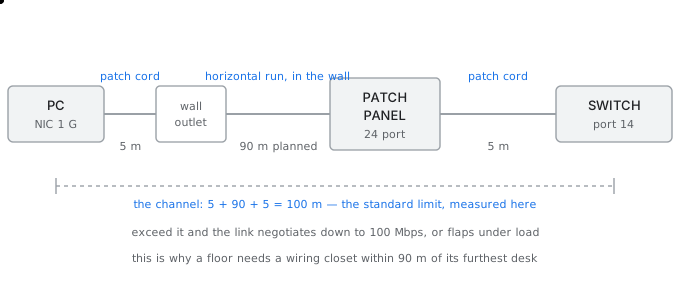
One desk drop, end to end — the 100 m limit is the whole channel, not the cable in the wall
The number that decides everything
The hundred metre limit for twisted pair is not a limit on the cable in the wall. It is a limit on the whole channel, measured from the network card to the switch port, and that includes both patch cords. This single fact is why a floor plan needs a wiring closet rather than one cupboard for the building.
සිංහලෙන්: ඇඹරුණු යුගල සඳහා මීටර් සියයේ සීමාව බිත්තියේ කේබලය මත සීමාවක් නොවේ. එය ජාල කාඩ්පතේ සිට ස්විච් පෝට් දක්වා මනිනු ලබන මුළු නාලිකාවේම සීමාවක් වන අතර එයට පැච් ලණු දෙකම ඇතුළත් වේ. මෙම තනි කරුණ වන්නේ ගොඩනැගිල්ල සඳහා එක් අල්මාරියකට වඩා බිම් සැලැස්මකට රැහැන් වැසිකිලියක් අවශ්ය වන්නේ මන්ද යන්නයි.
Planning the horizontal run
standard channel limit                 100 m
less patch cord at the desk             -5 m
less patch cord in the closet           -5 m
                    horizontal run       90 m maximum

but cable does not travel in straight lines:
   up the wall to the ceiling void        3 m
   along the tray, with bends and slack  +15 % over the plan distance
   down into the closet                   3 m

so a desk 70 m away on the drawing is really
   3 + (70 x 1.15) + 3 = 86.5 m   -> inside 90, just
a desk 80 m away is 98 m  ->  fails, and will fail intermittently,
which is far worse than failing outright
For this floor, a closet placed in the centre puts every desk within 31 metres on the drawing, or about 42 metres of real cable, which leaves a comfortable margin. A closet at one end would put the far desks at 62 metres on the drawing and about 77 metres of cable, still legal but with no margin for the inevitable moves and additions.
සිංහලෙන්: මෙම මහල සඳහා, මධ්යයේ තබා ඇති වැසිකිලිය සෑම මේසයක්ම ඇඳීම මත මීටර් 31 ක් ඇතුළත හෝ සැබෑ කේබල් මීටර් 42 ක් පමණ වන අතර එමඟින් සුවපහසු ආන්තිකයක් ඉතිරි වේ. එක් කෙළවරක ඇති වැසිකිලියක් ඇඳීම මත දුර ඩෙස්ක් මීටර් 62 ක් සහ කේබල් මීටර් 77 ක් පමණ වේ, තවමත් නීත්යානුකූල නමුත් නොවැළැක්විය හැකි චලනයන් සහ එකතු කිරීම් සඳහා ආන්තිකයක් නොමැත.
Choosing the cable
What the categories actually buy you
| Category | Rated for | 10 G distance | Cost per drop | Choose when |
|---|---|---|---|---|
| Cat5e | 1 Gbps | not supported | baseline | never in a new build |
| Cat6 | 1 Gbps | 55 m | +15 % | standard office desks |
| Cat6a | 10 Gbps | 100 m | +60 % | where 10 G to the desk is real |
| Cat6a shielded | 10 Gbps | 100 m | +90 % | factory floors, near motors |
| OM4 fibre | 10–100 Gbps | 400 m at 10 G | +200 % | risers and between buildings |
Cat6 is the right answer for an ordinary desk, because the workstation has a one gigabit card and will still have a one gigabit card when the cable is fifteen years old. Cat6a is bought for the uplinks and for the small number of positions that genuinely need ten gigabits, such as a video edit suite.
සිංහලෙන්: Cat6 යනු සාමාන්ය මේසයක් සඳහා නිවැරදි පිළිතුරයි, මන්ද වැඩපොළේ ගිගාබිට් එකක කාඩ්පතක් ඇති අතර කේබලය වයස අවුරුදු පහළොවක් වන විට ගිගාබිට් එකක කාඩ්පතක් තවමත් පවතිනු ඇත. Cat6a ඉහළ සබැඳි සඳහා සහ වීඩියෝ සංස්කරණ කට්ටලයක් වැනි ගිගාබිට් දහයක් අව්යාජව අවශ්ය වන කුඩා ස්ථාන සංඛ්යාව සඳහා මිල දී ගෙන ඇත.
The reason not to simply buy Cat6a everywhere is that the cable is thicker and stiffer, so the cable tray must be larger and the bend radius bigger, and 88 drops of it fills a tray that 88 drops of Cat6 would not. The cost is in the containment as much as in the cable.
සිංහලෙන්: සරලව සෑම තැනකම Cat6a මිල දී නොගැනීමට හේතුව කේබලය ඝනකම සහ තද බව නිසා කේබල් තැටිය විශාල විය යුතු අතර වංගු අරය විශාල විය යුතු අතර, එයින් බිංදු 88ක් Cat6 බිංදු 88ක් නොවන තැටියක් පුරවයි. පිරිවැය කේබල් එකේ තරම්ම අඩංගු වේ.
What goes wrongවැරදෙන තැන
The classic failure here is a channel of 104 metres that passes the installer's test on a quiet afternoon and then drops out whenever the floor is busy. The link auto-negotiates down to 100 Mbps, or it stays at a gigabit and silently discards frames, and the fault report says the application is slow rather than the cable is too long. Always plan the horizontal run at 90 metres, never at 100.
සිංහලෙන්: මෙහි ඇති සම්භාව්ය අසාර්ථකත්වය මීටර් 104 ක නාලිකාවක් වන අතර එය නිශ්ශබ්ද දහවල් ස්ථාපකයේ පරීක්ෂණය සමත් වන අතර පසුව බිම කාර්යබහුල වන සෑම විටම පහත වැටේ. සබැඳිය 100 Mbps දක්වා ස්වයංක්රීයව සාකච්ඡා කරයි, නැතහොත් එය ගිගාබිට් එකක පවතින අතර නිශ්ශබ්දව රාමු ඉවතලයි, සහ දෝෂ වාර්තාව පවසන්නේ කේබලය දිගු වීම වෙනුවට යෙදුම මන්දගාමී බවයි. සෑම විටම තිරස් දිවීම මීටර් 90 කින් සැලසුම් කරන්න, කිසි විටෙකත් 100 ට නොයන්න.
Repeater, hub and media converter
රිපීටරය, හබ් සහ මාධ්ය පරිවර්තකය
The gatehouse is 400 metres from the main building, and nothing in the catalogue reaches that far.ගේට්හවුස් ප්රධාන ගොඩනැගිල්ලේ සිට මීටර් 400 ක් දුරින් පිහිටා ඇති අතර නාමාවලියේ කිසිවක් එතරම් දුරට ළඟා නොවේ.
A factory wants a network point in its gatehouse, which sits 400 metres from the main building across an open yard. Twisted pair stops at 100 metres. Three components claim to solve this, and only one of them should be used.
සිංහලෙන්: කම්හලකට එහි ප්රධාන ගොඩනැගිල්ලේ සිට මීටර් 400ක් දුරින් විවෘත අංගනයක් හරහා පිහිටා ඇති එහි ගේට්හවුස්හි ජාල ලක්ෂ්යයක් අවශ්ය වේ. විකෘති යුගලය මීටර් 100 ක දුරින් නතර වේ. සංරචක තුනක් මෙය විසඳීමට හිමිකම් කියන අතර ඒවායින් එකක් පමණක් භාවිතා කළ යුතුය.
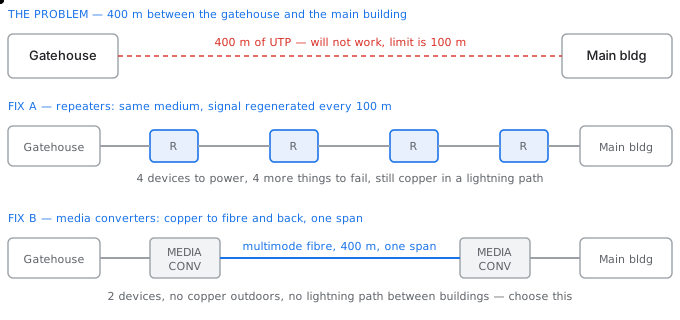
Beating the distance limit — a repeater regenerates, a media converter changes the medium
What each one actually does
- A repeater receives a weakened, distorted signal, decides whether each bit was a one or a zero, and transmits a clean new signal at full strength. It does not amplify, because amplifying would amplify the noise as well. It works at the physical layer and understands nothing above bits.
- A hub is a repeater with more than two ports. Anything arriving on one port is repeated out of every other port, so every device hears every transmission and they collide with each other. A hub makes one collision domain no matter how many ports it has.
- A media converter is a two port device that takes the signal off one medium and puts it onto another, most commonly copper to fibre. It is also a physical layer device, but it changes the medium rather than merely refreshing the signal.
සිංහලෙන්: - පුනරාවර්තකයක් දුර්වල වූ, විකෘති වූ සංඥාවක් ලබා ගනී, එක් එක් බිටු එකක් හෝ බිංදුවක් ද යන්න තීරණය කරයි, සහ සම්පූර්ණ ශක්තියෙන් පිරිසිදු නව සංඥාවක් සම්ප්රේෂණය කරයි. එය විස්තාරණය නොවේ, මන්ද වර්ධක කිරීම ශබ්දය ද විස්තාරණය කරයි. එය භෞතික ස්ථරයේ ක්රියා කරන අතර බිටුවලට ඉහළින් කිසිවක් තේරුම් නොගනී.
- හබ් එකක් යනු වරායන් දෙකකට වඩා ඇති රිපීටරයකි. එක් වරායකට පැමිණෙන ඕනෑම දෙයක් අනෙක් සෑම වරායකින්ම පුනරාවර්තනය වේ, එබැවින් සෑම උපාංගයකටම සෑම සම්ප්රේෂණයක්ම ඇසෙන අතර ඒවා එකිනෙක ගැටේ. හබ් එකකට වරායන් කීයක් තිබුණත් එක ඝට්ටන වසමක් ඇති කරයි.
- මාධ්ය පරිවර්තකයක් යනු එක් මාධ්යයකින් සංඥා ඉවත් කර තවත් මාධ්යයක් මතට තබන, සාමාන්යයෙන් තඹ සිට තන්තු දක්වා ඇති පෝට් දෙකක උපාංගයකි. එය භෞතික ස්ථර උපාංගයක් ද වේ, නමුත් එය හුදෙක් සංඥාව ප්රබෝධමත් කරනවාට වඩා මාධ්යය වෙනස් කරයි.
The arithmetic for the gatehouse
Option A — chain of repeaters
400 m of copper, regenerated every 100 m
   -> 4 repeaters (or 3 plus a switch at the end)

cost      4 devices, each needing power at a point in an open yard
failure   4 more things that can fail, in weatherproof enclosures
risk      500 m of continuous copper between two buildings
          -> a lightning strike on the yard induces a surge that
             travels straight into both buildings' switches
latency   negligible, about 1 us total
Option B — two media converters and a fibre span
copper 10 m  ->  converter  ->  fibre 400 m  ->  converter  ->  copper 10 m

cost      2 devices, both indoors, both on existing power
failure   2 things, in controlled environments
risk      fibre is glass: it carries no current, so there is NO
          electrical path between the buildings at all
headroom  OM4 multimode is good to 400 m at 10 Gbps, so the same
          fibre survives an upgrade the copper never could
Option B wins on every count, and the deciding one is not distance or speed. It is that fibre carries light rather than current, so it provides no path for a surge between two separately earthed buildings. Any link that leaves a building and enters another should be fibre for that reason alone, even when the distance would allow copper.
සිංහලෙන්: B විකල්පය සෑම ගණනයකදීම ජය ගන්නා අතර, තීරණය වන්නේ දුර හෝ වේගය නොවේ. එය තන්තු ධාරාවට වඩා ආලෝකය රැගෙන යන බැවින්, එය වෙන් වෙන්ව ගොඩනැගුණු ගොඩනැගිලි දෙකක් අතර නැගීමක් සඳහා කිසිදු මාර්ගයක් සපයන්නේ නැත. ගොඩනැගිල්ලකින් පිටවී වෙනත් පුරුකකට ඇතුළු වන ඕනෑම සබැඳියක් එම හේතුව නිසාම තන්තු විය යුතුය, දුර තඹ ඉඩ ලබා දෙන විට පවා.
Where hubs went
A hub should never appear in a new design. Because it makes one collision domain, adding devices makes every device slower, and because it repeats everything everywhere, any device can see all the traffic. A switch costs little more and gives each port its own collision domain and its own traffic.
සිංහලෙන්: නව නිර්මාණයක කිසිවිටක කේන්ද්රස්ථානයක් නොපෙන්විය යුතුය. එය එක් ඝට්ටන වසමක් සාදන නිසා, උපාංග එකතු කිරීම සෑම උපාංගයක්ම මන්දගාමී කරයි, සහ එය සෑම තැනකම සෑම දෙයක්ම පුනරුච්චාරණය කරන නිසා, ඕනෑම උපාංගයකට සියලු මාර්ග තදබදය දැකිය හැකිය. ස්විචයක් මිල අඩු වන අතර සෑම වරායකටම තමන්ගේම ඝට්ටන වසමක් සහ එහි ගමනාගමනය ලබා දෙයි.
The one place a hub is still occasionally used is deliberately, by a network engineer who wants a port that sees all traffic for troubleshooting. Even then a switch with port mirroring is the better tool, because it does not slow the link it is observing.
සිංහලෙන්: මධ්යස්ථානයක් තවමත් ඉඳහිට භාවිතා කරන එක් ස්ථානයක්, දෝශ නිරාකරණය සඳහා සියලු මාර්ග තදබදය දකින වරායක් අවශ්ය ජාල ඉංජිනේරුවෙකු විසින් හිතාමතාම භාවිතා කරයි. එසේ වුවද, පෝට් දර්පණ සහිත ස්විචයක් වඩා හොඳ මෙවලමකි, මන්ද එය එය නිරීක්ෂණය කරන සබැඳිය මන්දගාමී නොවන බැවිනි.
What goes wrongවැරදෙන තැන
The failure to avoid here is running copper between two buildings because the distance happened to be under 100 metres. It will work for years and then one storm will destroy switches at both ends, because the two buildings sit at slightly different earth potentials and the cable joined them. Distance is the obvious constraint; the electrical path is the one that causes the expensive failure.
සිංහලෙන්: මෙහි මගහැරීමට අසමත් වීම ගොඩනැගිලි දෙකක් අතර තඹ ධාවනය වන අතර දුර මීටර් 100 ට අඩු විය. එය වසර ගණනාවක් ක්රියා කරනු ඇති අතර පසුව එක් කුණාටුවක් දෙපස ඇති ස්විචයන් විනාශ කරනු ඇත, මන්ද ගොඩනැගිලි දෙක තරමක් වෙනස් පෘථිවි විභවයන් හි වාඩි වී කේබලය ඒවාට සම්බන්ධ වූ බැවිනි. දුර යනු පැහැදිලි සීමාවයි; මිල අධික අසාර්ථකත්වයට හේතුව විදුලි මාර්ගයයි.
The access switch
ප්රවේශ ස්විචය
Eighty-eight desks, six access points and two cameras, and three separate questions that all look like 'how big a switch'.මේස අසූ අටක්, ප්රවේශ ස්ථාන හයක් සහ කැමරා දෙකක් සහ 'කොච්චර විශාල ස්විචයක්' ලෙස පෙනෙන වෙනම ප්රශ්න තුනක්.
The same floor from the first page now needs switches. It has 88 desks, six wireless access points in the ceiling, and two security cameras. The obvious question is how many ports, but port count is only one of three questions, and it is the easiest one.
සිංහලෙන්: පළමු පිටුවේ සිට එකම තට්ටුව දැන් ස්විචයන් අවශ්ය වේ. එහි මේස 88 ක්, සිවිලිමේ රැහැන්රහිත පිවිසුම් ස්ථාන හයක් සහ ආරක්ෂක කැමරා දෙකක් ඇත. පැහැදිලි ප්රශ්නය වන්නේ වරාය ගණන කොපමණද යන්නයි, නමුත් වරාය ගණන ප්රශ්න තුනෙන් එකක් පමණක් වන අතර එය පහසුම එක වේ.
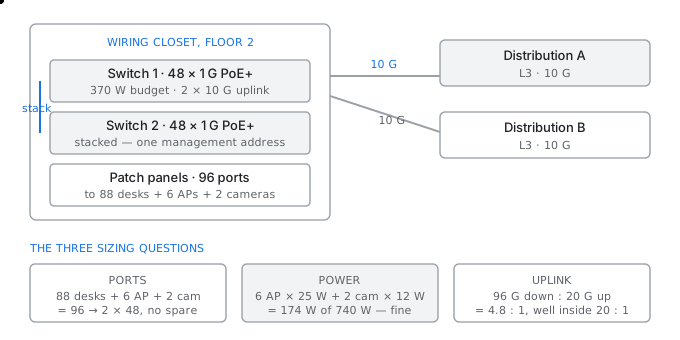
A floor's wiring closet — port count, PoE budget and uplinks are three separate sizing questions
Question one — ports
Counting honestly
88 desks   x 1 port                     88
 6 access points                         6
 2 cameras                               2
                                 subtotal 96

two 48-port switches = 96 ports, exactly.  That is the trap:
   a printer arrives, a meeting room is added, a desk is split in two
   -> plan at 80 % occupancy

96 / 0.8 = 120 ports  ->  three 48-port switches, 144 ports
or two 48-port plus one 24-port = 120, which is cheaper and sufficient
Question two — power
Access points and cameras have no power socket in the ceiling, so the switch must feed them over the same cable that carries their data. This is Power over Ethernet, and the number that matters is not the per-port rating but the total budget the switch can supply across all ports at once.
සිංහලෙන්: ප්රවේශ ස්ථාන සහ කැමරාවලට සිවිලිමේ බල සොකට් නොමැත, එබැවින් ස්විචය ඔවුන්ගේ දත්ත රැගෙන යන කේබලය හරහා ඒවා පෝෂණය කළ යුතුය. මෙය පවර් ඕවර් ඊතර්නෙට් වන අතර, වැදගත් වන්නේ එක් වරායක් සඳහා ශ්රේණිගත කිරීම නොව, ස්විචයට සියලු වරායන් හරහා එකවර සැපයිය හැකි මුළු අයවැයයි.
Power over Ethernet standards
| Standard | Name | Watts at the device | Typical load |
|---|---|---|---|
| 802.3af | PoE | 12.95 W | IP phone, basic AP |
| 802.3at | PoE+ | 25.5 W | 802.11ac/ax AP, PTZ camera |
| 802.3bt Type 3 | PoE++ | 51 W | multi-radio AP, video phone |
| 802.3bt Type 4 | PoE++ | 71.3 W | laptop, thin client, lighting |
Budgeting the closet
 6 access points  x 25.5 W (PoE+)     = 153 W
 2 cameras        x 12.95 W (PoE)     =  26 W
                             subtotal   179 W

growth: 4 more APs planned            = 102 W
                               total    281 W

a 48-port switch with a 370 W budget covers this on its own.
a 48-port switch with a 'PoE+ on all ports' claim does NOT:
   48 x 25.5 = 1224 W, and no 1U switch supplies that.
   read the BUDGET, not the per-port figure.
Question three — uplinks
Oversubscription for this floor
access capacity = 96 ports x 1 Gbps = 96 Gbps

target ratio for desk traffic, which is bursty and mostly idle  20 : 1
required uplink = 96 / 20 = 4.8 Gbps

chosen: 2 x 10 Gbps, one to each distribution switch
   = 20 Gbps, ratio 4.8 : 1
   -> generous, and still 9.6 : 1 if one uplink fails

why not 2 x 1 Gbps (ratio 48 : 1)?
   one user copying a file at line rate would consume half the uplink
Managed, smart or unmanaged
Which class of switch to buy
| Class | VLANs | Spanning tree | Monitoring | Use it |
|---|---|---|---|---|
| Unmanaged | no | no | none | a two-person office, nowhere else |
| Smart / web managed | yes | basic | port counters | small sites with one VLAN plan |
| Fully managed L2 | yes | full | SNMP, mirroring, logs | the access tier of any real network |
| Managed L3 | yes, plus routing | full | full | the distribution tier |
The access tier needs a fully managed layer two switch, because VLANs are how the access points, the cameras and the desks are kept apart on the same physical wiring, and because a switch you cannot monitor is a switch you cannot troubleshoot.
සිංහලෙන්: ප්රවේශ ස්ථරයට සම්පුර්ණයෙන් කළමනාකරණය කළ ස්ථර දෙකක ස්විචයක් අවශ්ය වේ, මන්ද VLAN යනු ප්රවේශ ස්ථාන, කැමරා සහ මේස එකම භෞතික රැහැන් මත වෙන් කර තබන ආකාරය වන අතර ඔබට නිරීක්ෂණය කළ නොහැකි ස්විචයක් ඔබට දෝශ නිරාකරණය කළ නොහැකි ස්විචයකි.
What goes wrongවැරදෙන තැන
The expensive mistake in a wiring closet is buying exactly 96 ports for 96 devices. Within a year somebody daisy-chains a small unmanaged switch under a desk to get two more ports, and that switch has no spanning tree, no VLAN and no monitoring. The first time someone loops its two ports together, the broadcast storm takes down the whole floor and nobody can see where it came from.
සිංහලෙන්: වයර් අල්මාරියක මිල අධික වැරැද්ද වන්නේ උපාංග 96 ක් සඳහා හරියටම වරායන් 96 ක් මිලදී ගැනීමයි. වසරක් ඇතුළත කවුරුහරි ඩේසි-දාම තවත් වරායන් දෙකක් ලබා ගැනීම සඳහා මේසයක් යට කුඩා කළමනාකාරී නොවන ස්විචයක් සවි කර ඇති අතර, එම ස්විචයට විහිදෙන ගසක් නොමැත, VLAN නොමැත සහ අධීක්ෂණයක් නොමැත. යමෙක් පළමු වරට එහි වරායන් දෙක එකට ලූප් කරන විට, විකාශන කුණාටුව මුළු මහලම පහතට ඇද දමන අතර එය පැමිණියේ කොහෙන්දැයි කිසිවෙකුට නොපෙනේ.
The branch router
ශාඛා රවුටරය
One box at the edge of a site doing three different jobs, only one of which is routing.විවිධ රැකියා තුනක් කරන වෙබ් අඩවියක කෙළවරේ ඇති එක් පෙට්ටියක්, මාර්ගගත කිරීම ඉන් එකක් පමණි.
A branch office has a local network of 40 devices and a 10 Mbps circuit to head office. One router sits between them. It is doing three jobs at once, and confusing them is the reason branch performance problems are so often misdiagnosed.
සිංහලෙන්: ශාඛා කාර්යාලයක උපාංග 40 ක දේශීය ජාලයක් සහ ප්රධාන කාර්යාලයට 10 Mbps පරිපථයක් ඇත. ඔවුන් අතර එක්රවුටරයක් වාඩි වී ඇත. එය එකවර රැකියා තුනක් කරන අතර, ඒවා ව්යාකූල කිරීම ශාඛා කාර්ය සාධන ගැටළු බොහෝ විට වැරදි ලෙස හඳුනා ගැනීමට හේතුවයි.
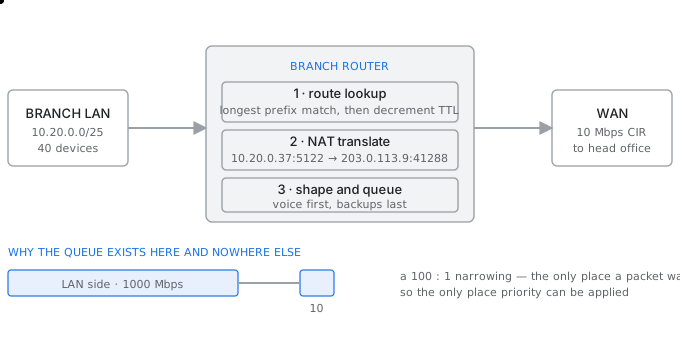
A branch router doing its three jobs at once — routing, translating and shaping
Job one — routing
The router examines the destination address of each packet, finds the most specific matching entry in its routing table, decrements the time to live, and forwards. This is the job it is named after, and on a branch router it is almost trivial: there are usually three routes, namely the local network, a summary route to head office, and a default route.
සිංහලෙන්: රවුටරය එක් එක් පැකට්ටුවේ ගමනාන්ත ලිපිනය පරීක්ෂා කරයි, එහි මාර්ගගත කිරීමේ වගුවේ වඩාත් නිශ්චිත ගැළපෙන ප්රවේශය සොයා ගනී, ජීවත් වීමට කාලය අඩු කරයි, සහ ඉදිරියට යයි. එය නම් කර ඇති කාර්යය මෙය වන අතර ශාඛා රවුටරයක එය ඉතා සුළු දෙයක් වේ: සාමාන්යයෙන් මාර්ග තුනක් ඇත, එනම් දේශීය ජාලය, ප්රධාන කාර්යාලයට සාරාංශ මාර්ගයක් සහ පෙරනිමි මාර්ගයක්.
Job two — address translation
The branch uses private addresses that cannot appear on the internet, so the router rewrites the source address of outgoing packets to its own public address, and records the change so that replies can be rewritten back. The table it keeps is the reason a router has a session count in its specification.
සිංහලෙන්: ශාඛාව අන්තර්ජාලයේ දිස්විය නොහැකි පුද්ගලික ලිපින භාවිතා කරයි, එබැවින්රවුටරය පිටතට යන පැකට් වල මූලාශ්ර ලිපිනය එහිම පොදු ලිපිනයට නැවත ලියයි, සහ පිළිතුරු නැවත ලිවිය හැකි පරිදි වෙනස් කිරීම වාර්තා කරයි. රවුටරයක එහි පිරිවිතරයේ සැසි සංඛ්යාවක් තිබීමට හේතුව එය තබා ඇති වගුවයි.
Sizing the translation table
40 devices, and a modern browser opens 6 connections per site,
with perhaps 8 sites open, plus background sync and updates:

   40 x 6 x 8 = 1920 concurrent sessions, typical
   plus background, call it 3000 at the busy hour

each entry is held for a timeout after the session closes:
   TCP established idle timeout, commonly 3600 s
   TCP closing / TIME_WAIT                   30 s
   UDP                                       30 s

a long idle timeout is what actually fills the table:
   a router rated for 10 000 sessions is comfortable here
   a router rated for 2 000 will start dropping NEW sessions
   while the old ones sit idle, and the symptom will be
   'some websites do not load' rather than 'the link is full'
Job three — shaping and queueing
The LAN side of the router runs at a gigabit and the WAN side at 10 megabits, a narrowing of a hundred to one. That narrowing is the only point in the whole path where a packet has to wait, which makes it the only point where deciding which packet waits has any effect.
සිංහලෙන්: රවුටරයේ LAN පැත්ත ගිගාබිට් එකකින් ද WAN පැත්ත මෙගාබිට් 10කින් ද දිවෙන අතර එය සියයේ සිට එක දක්වා පටු වේ. පැකට්ටුවක් බලා සිටිය යුතු මුළු මාවතේම එකම ලක්ෂ්යය එම පටු වීම වන අතර එමඟින් කුමන පැකට්ටුවක්රැඳී සිටිය යුතුද යන්න තීරණය කිරීම යම් බලපෑමක් ඇති කරන එකම ලක්ෂ්යය බවට පත් කරයි.
This is why quality of service is configured on the branch router and nowhere else on the branch. A switch with a gigabit in and a gigabit out never builds a queue, so prioritising traffic on it changes nothing at all.
සිංහලෙන්: මේ නිසා සේවා ගුණාත්මකභාවය ශාඛා රවුටරයේ වින්යාස කර ඇති අතර ශාඛාවේ වෙනත් තැනක නොවේ. ගිගාබිට් එකක් සහ ගිගාබිට් එකක් සහිත ස්විචයක් කිසි විටෙකත් පෝලිමක් ගොඩනඟන්නේ නැත, එබැවින් එහි ගමනාගමනයට ප්රමුඛත්වය දීමෙන් කිසිවක් වෙනස් නොවේ.
Choosing the router
What to read on a router datasheet
| Figure | What it really means | How to size it |
|---|---|---|
| Throughput, Mbps | measured with large packets and no features on | expect half of it with NAT, firewall and QoS enabled |
| Packets per second | the honest capacity figure | the one to compare between models |
| Concurrent sessions | size of the NAT and firewall table | devices × 6 × 8, plus 50 % |
| New sessions per second | how fast it can open connections | matters for many short connections |
| Interfaces | WAN and LAN port types and speeds | two WAN ports if there is a backup circuit |
| IPsec throughput | tunnel speed, usually far lower | the binding figure if the backup runs over VPN |
What goes wrongවැරදෙන තැන
The common misdiagnosis is a branch that feels slow while the circuit graph shows it is only 40 percent used. The circuit is not the problem; the router's session table is full, or its CPU is saturated by encrypting the VPN, and packets are being dropped inside the box. Always check the session count and the CPU before ordering more bandwidth.
සිංහලෙන්: සාමාන්ය වැරදි රෝග විනිශ්චය යනු මන්දගාමී බවක් දැනෙන ශාඛාවක් වන අතර පරිපථ ප්රස්ථාරයෙන් පෙන්නුම් කරන්නේ එය සියයට 40 ක් පමණක් භාවිතා වන බවයි. පරිපථය ගැටලුව නොවේ; රවුටරයේ සැසි වගුව පිරී ඇත, නැතහොත් එහි CPU VPN සංකේතනය කිරීමෙන් සංතෘප්ත වන අතර පැකට් පෙට්ටිය තුළට දමනු ලැබේ. වැඩි කලාප පළලක් ඇණවුම් කිරීමට පෙර සෑම විටම සැසි ගණන සහ CPU පරීක්ෂා කරන්න.
The firewall
ෆයර්වෝලය
Why the throughput number on the box is never the number you get.කොටුවේ ඇති ප්රතිදාන අංකය කිසි විටෙකත් ඔබට ලැබෙන අංකය නොවන්නේ ඇයි?
A company is replacing its perimeter firewall. It has a 1 Gbps internet circuit, and the vendor's datasheet says the appliance does 20 Gbps, so it looks like twenty times more than enough. It is not, and understanding why is the whole content of this page.
සිංහලෙන්: සමාගමක් එහි පරිමිතිය ගිනි පවුර ප්රතිස්ථාපනය කරයි. එය 1 Gbps අන්තර්ජාල පරිපථයක් ඇති අතර, විකුණුම්කරුගේ දත්ත පත්රිකාව පවසන්නේ උපකරණය 20 Gbps කරන බවයි, එබැවින් එය ප්රමාණවත් තරම් විසි ගුණයකින් වැඩි බව පෙනේ. එය නොවේ, සහ මෙම පිටුවේ සම්පූර්ණ අන්තර්ගතය වන්නේ මන්දැයි තේරුම් ගැනීම.
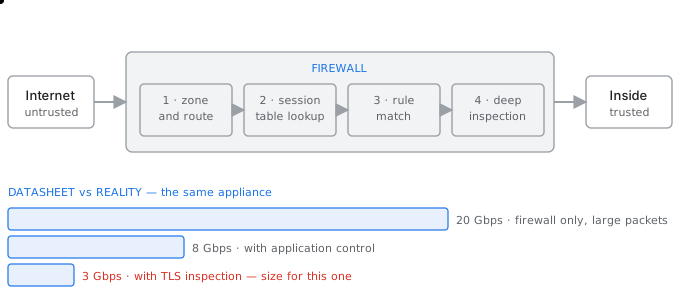
What a packet passes through inside a firewall, and why the throughput figure on the datasheet is not the one you get
What a packet actually goes through
- Zone and route. The firewall works out which zone the packet arrived from and which zone it is going to, because every rule is written between zones rather than between interfaces.
- Session lookup. If the packet belongs to a connection already permitted, it is forwarded immediately without consulting any rule. This is what makes a stateful firewall fast: the expensive work happens once per connection, not once per packet.
- Rule match. A packet that starts a new connection is compared against the rule base in order until something matches, and if nothing matches it is denied.
- Deep inspection. If enabled, the firewall reassembles the stream and examines the content, identifying the application, scanning for malware, or decrypting and re-encrypting TLS.
සිංහලෙන්: - කලාපය සහ මාර්ගය. සෑම රීතියක්ම අතුරු මුහුණත් අතර නොව කලාප අතර ලියා ඇති නිසා ෆයර්වෝලය පැකට්ටුව පැමිණියේ කුමන කලාපයෙන්ද සහ කුමන කලාපයටද යන්න තීරණය කරයි.
- සැසි සෙවීම. පැකට්ටුව දැනටමත් අවසර දී ඇති සම්බන්ධතාවයකට අයත් නම්, එය කිසිදු රීතියක් නොමැතිව වහාම යොමු කරනු ලැබේ. ප්රකාශිත ෆයර්වෝලයක් වේගවත් කරන්නේ මෙයයි: මිල අධික කාර්යය සිදු වන්නේ සම්බන්ධතාවකට වරක් මිස පැකට්ටුවකට වරක් නොවේ.
- රීති ගැලපීම. නව සම්බන්ධතාවයක් ආරම්භ කරන පැකට්ටුවක් යම් දෙයක් ගැලපෙන තෙක්රීති පදනමට සාපේක්ෂව සංසන්දනය කරනු ලබන අතර කිසිවක් නොගැලපේ නම් එය ප්රතික්ෂේප කරනු ලැබේ.
- ගැඹුරු පරීක්ෂාව. සබල කර ඇත්නම්, ෆයර්වෝලය ප්රවාහය නැවත එකලස් කර අන්තර්ගතය පරීක්ෂා කරයි, යෙදුම හඳුනා ගැනීම, අනිෂ්ට මෘදුකාංග සඳහා ස්කෑන් කිරීම, හෝ TLS විකේතනය කර නැවත සංකේතනය කරයි.
Why the datasheet number is not yours
The same appliance, three figures
firewall throughput, 1518-byte packets, no inspection   20 Gbps
   this is the headline number. It is measured with large packets
   and every feature switched off.

with application identification enabled                  8 Gbps
with TLS inspection enabled                              3 Gbps

and with realistic traffic, which is a mix of small packets:
   at 64-byte packets the appliance is limited by packets per second,
   not bits per second, and the effective figure falls further.

for a 1 Gbps circuit with TLS inspection on, 3 Gbps of capacity
gives a genuine 3x margin. The 20 Gbps figure would have suggested 20x
and the appliance would have been undersized by the time it was fully
configured.
Sizing by sessions, not only by bandwidth
The other capacity limit
1000 staff, each with a workstation and a phone:
   1000 x 6 connections x 8 destinations = 48 000 concurrent
   plus servers, backups, monitoring       = 60 000 typical busy hour

new sessions per second is the harder figure:
   a normal working morning       ~2 000 per second
   Monday 09:00, everyone opening mail at once  ~8 000 per second

an appliance rated 1 000 000 concurrent but only 30 000 new per second
is fine here. One rated 100 000 concurrent and 5 000 new per second
will fail at 09:00 every Monday and look healthy the rest of the week.
Where it sits
The firewall belongs between zones, which means it needs one interface per zone rather than simply sitting between the router and the switch. A design with an outside, a demilitarised zone, an inside and a management zone needs four interfaces, and the number of zones is decided before the appliance is chosen.
සිංහලෙන්: ෆයර්වෝලය අයත් වන්නේ කලාප අතර වන අතර එයින් අදහස් වන්නේ රවුටරය සහ ස්විචය අතර සරලව වාඩි වී සිටිනවාට වඩා කලාපයකට එක් අතුරු මුහුණතක් අවශ්ය බවයි. පිටත, යුද මුක්ත කලාපයක්, ඇතුළත සහ කළමනාකරණ කලාපයක් සහිත සැලසුමකට අතුරු මුහුණත් හතරක් අවශ්ය වන අතර, උපකරණය තෝරා ගැනීමට පෙර කලාප ගණන තීරණය කරනු ලැබේ.
It is deployed as a pair, because a single firewall is a single point of failure on the path that every packet takes. The two units share session state, so an existing connection survives a failover rather than being reset.
සිංහලෙන්: එය යුගලයක් ලෙස යොදවා ඇත, මන්ද එක් ෆයර්වෝලයක් සෑම පැකට්ටුවක්ම ගමන් කරන මාර්ගයේ අසාර්ථක වීමේ තනි ලක්ෂ්යයකි. ඒකක දෙක සැසි තත්ත්වය බෙදා ගනී, එබැවින් පවතින සම්බන්ධතාවයක් යළි පිහිටුවීමට වඩා අසාර්ථකත්වයකින් බේරී ඇත.
What goes wrongවැරදෙන තැන
The failure mode worth remembering is the firewall that was sized on the headline figure, then had application control and TLS inspection switched on a year later during a security review. Throughput collapses to a fraction of the circuit, and because the firewall is dropping rather than failing, the symptom is intermittent slowness that the circuit graphs cannot explain. Size for the features you will eventually enable, not the ones enabled on day one.
සිංහලෙන්: මතක තබා ගත යුතු අසාර්ථක ප්රකාරය නම් සිරස්තල රූපයේ ප්රමාණයේ ඇති ෆයර්වෝලයයි, පසුව යෙදුම් පාලනය සහ TLS පරීක්ෂාව වසරකට පසුව ආරක්ෂක සමාලෝචනයක් අතරතුර ක්රියාත්මක විය. ප්රතිදානය පරිපථයේ කොටසකට කඩා වැටෙන අතර, ෆයර්වෝලය අසාර්ථක වීමට වඩා පහත වැටීම නිසා, රෝග ලක්ෂණය වන්නේ පරිපථ ප්රස්ථාරවලට පැහැදිලි කළ නොහැකි අතරමැදි මන්දගාමිත්වයයි. ඔබ අවසානයේ සක්රිය කරන විශේෂාංග සඳහා ප්රමාණය, පළමු දිනයේ සබල කළ ඒවා නොවේ.
The wireless access point
නොරැහැන් ප්රවේශ ලක්ෂ්යය
A 300 seat lecture hall, and why the answer is three access points rather than one or six.ආසන 300 ක දේශන ශාලාවක්, සහ පිළිතුර එක් හෝ හයකට වඩා ප්රවේශ ස්ථාන තුනක් වන්නේ ඇයි.
A university lecture hall seats 300 students, 40 metres long and 16 metres wide. During a lecture most students have a phone and many have a laptop, so roughly 400 devices are present and perhaps 150 are actively transmitting at any moment. The estates department has asked for one access point because one access point covers the room.
සිංහලෙන්: විශ්ව විද්යාල කථිකාචාර්ය ශාලාවක සිසුන් 300 කට අසුන් ගත හැකි අතර එහි දිග මීටර් 40 ක් සහ පළල මීටර් 16 කි. දේශනයක් අතරතුර බොහෝ සිසුන්ට දුරකථනයක් ඇති අතර බොහෝ දෙනෙකුට ලැප්ටොප් පරිගණකයක් ඇත, එබැවින් දළ වශයෙන් උපාංග 400 ක් පමණ පවතින අතර සමහර විට 150 ක් ඕනෑම මොහොතක සක්රියව සම්ප්රේෂණය වේ. එක් පිවිසුම් ස්ථානයක් කාමරය ආවරණය වන නිසා වතු දෙපාර්තමේන්තුව එක් පිවිසුම් ස්ථානයක් ඉල්ලා ඇත.
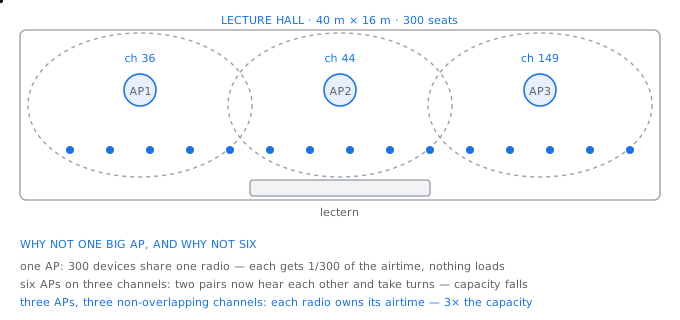
A 300 seat lecture hall — three access points on non-overlapping channels, because the constraint is airtime, not coverage
Coverage is not the constraint
A single modern access point does cover the hall. It would also be useless, because wi-fi is a shared medium: every device on one radio takes its turn, and 400 devices sharing one radio each get a four hundredth of the airtime. The constraint is contention, not coverage, and every wireless design that gets this backwards fails in exactly the same way.
සිංහලෙන්: තනි නවීන පිවිසුම් ස්ථානයක් ශාලාව ආවරණය කරයි. එයද නිෂ්ඵල වනු ඇත, මන්ද wi-fi බෙදාගත් මාධ්යයකි: එක්රේඩියෝවක සෑම උපාංගයක්ම එහි වාරය ගනී, එක්රේඩියෝවක් බෙදා ගන්නා උපාංග 400කට ගුවන් කාලයෙන් හාරසියයෙන් පංගුවක් ලැබේ. බාධාව වන්නේ විවාදයයි, ආවරණය නොවේ, සහ මෙය පසුපසට ලබා ගන්නා සෑම රැහැන්රහිත සැලසුමක්ම හරියටම එකම ආකාරයකින් අසාර්ථක වේ.
Sizing by capacity, then checking coverage
devices present            400
concurrently transmitting  ~35 %  = 140

design rule: 25 to 30 concurrent devices per radio on 5 GHz
   140 / 30 = 4.7  ->  5 access points by capacity

coverage check:
   hall area = 40 x 16 = 640 m2
   an 802.11ax AP indoors covers ~250 m2 at a usable data rate
   640 / 250 = 2.6  ->  3 access points by coverage

capacity says 5, coverage says 3. Capacity wins.
But: only 3 non-overlapping channels are usable in one room at
5 GHz low band, so 5 APs would make two pairs interfere.

answer: 3 APs at reduced power on channels 36, 44 and 149,
        or 5 APs if the 5 GHz upper band is available and clean,
        with a site survey to confirm.
Why more is not better
Two access points on the same channel within earshot of each other do not double the capacity. They hear each other and take turns, so they share the capacity that one of them would have had, while also interfering with each other's clients. Adding access points without adding channels actively reduces performance.
සිංහලෙන්: එකම නාලිකාවේ ඇති ප්රවේශ ස්ථාන දෙකක් එකිනෙක ඇසෙන දුරින් ධාරිතාව දෙගුණ නොකරයි. ඔවුන් එකිනෙකාට සවන් දී මාරුවෙන් මාරුවට, ඒ නිසා ඔවුන් එකිනෙකාගේ ගනුදෙනුකරුවන්ට මැදිහත් වන අතරම ඔවුන්ගෙන් එක් අයෙකුට තිබූ ධාරිතාව බෙදා ගනී. නාලිකා එකතු නොකර ප්රවේශ ස්ථාන එකතු කිරීම ක්රියාකාරීව කාර්ය සාධනය අඩු කරයි.
This is why channel planning matters as much as access point count, and why turning the transmit power down is often the correct fix for a slow wireless network. A smaller cell hears fewer neighbours and contains fewer clients.
සිංහලෙන්: නාලිකා සැලසුම් කිරීම ප්රවේශ ලක්ෂ්ය ගණන තරම්ම වැදගත් වන්නේ එබැවිනි, සහ සම්ප්රේෂණ බලය අඩු කිරීම බොහෝ විට මන්දගාමී රැහැන්රහිත ජාලයක් සඳහා නිවැරදි විසඳුම වන්නේ ඇයි. කුඩා සෛලයක් අසල්වාසීන් අඩුවෙන් අසන අතර අඩු සේවාදායකයින් අඩංගු වේ.
What to specify
Access point selection
| Specification | Why it matters | Typical choice |
|---|---|---|
| Standard | determines efficiency under load, not just top speed | 802.11ax (Wi-Fi 6) minimum |
| Radios | one per band, so both can be used at once | dual or tri-band |
| Spatial streams | how many simultaneous conversations per radio | 4×4 in dense areas |
| Uplink port | the AP is useless if its uplink saturates | 2.5 G, not 1 G, in a hall |
| Power draw | decides the switch's PoE budget | 25.5 W (PoE+) typical |
| Mounting | ceiling gives a clean downward pattern | ceiling, never behind metal |
The uplink port deserves attention. An access point capable of 1.2 Gbps of wireless throughput connected by a 1 Gbps port is limited by the cable, not the radio, which is why dense deployments specify 2.5 gigabit ports and Cat6a to the ceiling.
සිංහලෙන්: uplink port අවධානයට සුදුසුයි. 1 Gbps පෝට් එකකින් සම්බන්ධ 1.2 Gbps රැහැන්රහිත ප්රතිදානය කළ හැකි ප්රවේශ ලක්ෂ්යයක්රේඩියෝවෙන් නොව කේබලයෙන් සීමා වේ, එම නිසා ඝන යෙදවුම් 2.5 gigabit ports සහ Cat6a සිවිලිමට නියම කරයි.
What goes wrongවැරදෙන තැන
The design that fails most often is one access point per room, installed by counting rooms rather than measuring devices. In a corridor of small offices this puts several radios within earshot on overlapping channels, and every one of them runs slower than a single well placed access point would have. Count devices, then check coverage; never the other way round.
සිංහලෙන්: බොහෝ විට අසාර්ථක වන සැලසුම කාමරයකට එක් ප්රවේශ ලක්ෂ්යයක් වන අතර, මිනුම් උපාංගවලට වඩා කාමර ගණන් කිරීමෙන් ස්ථාපනය කර ඇත. කුඩා කාර්යාලවල කොරිඩෝවකදී මෙය අතිච්ඡාදනය වන නාලිකාවල රේඩියෝ කිහිපයක් ශ්රවණය කරන දුරින් තබන අතර, ඒ සෑම එකක්ම හොඳින් තබා ඇති ප්රවේශ ලක්ෂ්යයකට වඩා සෙමින් ධාවනය වේ. උපාංග ගණන් කරන්න, ඉන්පසු ආවරණය පරීක්ෂා කරන්න; කවදාවත් අනෙක් අතට.
The load balancer
බර සමතුලිතකාරකය
One name, one address, four servers, and the health check that is the whole point.එක් නමක්, එක් ලිපිනයක්, සේවාදායක හතරක් සහ සෞඛ්ය පරීක්ෂණය සම්පූර්ණ කාරණයයි.
An online shop runs on four identical web servers. Customers type one address. Something has to accept every connection on that one address and decide which of the four servers will handle it, notice when one of them dies, and stop sending customers to it. That something is a load balancer, and the deciding part of its job is the noticing.
සිංහලෙන්: අන්තර්ජාල සාප්පුවක් සමාන වෙබ් සර්වර් හතරකින් ක්රියාත්මක වේ. පාරිභෝගිකයින් එක් ලිපිනයක් ටයිප් කරන්න. යමක් එම එක් ලිපිනයක ඇති සෑම සම්බන්ධතාවයක්ම පිළිගෙන එය හසුරුවන්නේ කුමන සේවාදායකද යන්න තීරණය කළ යුතු අතර, ඔවුන්ගෙන් එක් අයෙකු මිය ගිය විට දන්වා, පාරිභෝගිකයින් එයට යැවීම නැවැත්විය යුතුය. යමක් බර සමතුලිතයක් වන අතර එහි කාර්යයේ තීරණාත්මක කොටස වන්නේ දැනුම්දීමයි.
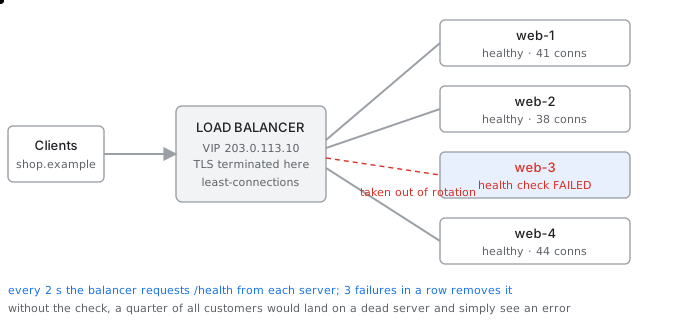
One address, many servers — the health check is what makes it work, and server 3 has just failed it
How it chooses a server
Distribution methods
| Method | How it works | Good for | Weakness |
|---|---|---|---|
| Round robin | each new connection to the next server | identical servers, short requests | ignores how busy a server is |
| Least connections | to whichever server holds fewest | long-lived or uneven requests | needs accurate counting |
| Weighted | proportional to a set capacity value | servers of different sizes | weights must be maintained |
| Source hash | same client always to the same server | sticky sessions | uneven when clients are behind one NAT |
| Least response time | fastest responder wins | mixed workloads | can stampede a recovering server |
Least connections is the sensible default for a web tier, because it responds to what is actually happening rather than to an assumption that all requests cost the same. Source hash is chosen only when the application keeps session state in the server's memory, and the better fix for that is to move the session state into a shared cache so any server can serve any customer.
සිංහලෙන්: අවම සම්බන්ධතා යනු වෙබ් ස්ථරයක් සඳහා සංවේදී පෙරනිමියයි, මන්ද එය සියලු ඉල්ලීම් වලට සමාන මිලක් ඇතැයි උපකල්පනයකට වඩා ඇත්ත වශයෙන්ම සිදුවෙමින් පවතින දෙයට ප්රතිචාර දක්වයි. ප්රභව හැෂ් තෝරාගනු ලබන්නේ යෙදුම සේවාදායකයේ මතකයේ සැසි තත්ත්වය තබා ගත් විට පමණක් වන අතර, ඒ සඳහා වඩා හොඳ විසඳුම වන්නේ සැසි තත්ත්වය බෙදාගත් හැඹිලියකට ගෙන යාමයි එවිට ඕනෑම සේවාදායකයෙකුට ඕනෑම පාරිභෝගිකයෙකුට සේවය කළ හැකිය.
The health check is the component
How a server is removed and restored
the balancer requests a URL, for example /health, every 2 s

removal:   3 consecutive failures  ->  out of rotation
           = 6 s of bad responses before customers stop landing there
restoration: 2 consecutive successes -> back in rotation

what the check must actually test:
   BAD   'is the TCP port open'      — a hung server still accepts
   BAD   'does / return 200'         — a cached page proves nothing
   GOOD  'can the app reach its database and return a real answer'

a health check that is too shallow is worse than none,
because it reports healthy while customers see errors.
Without the health check, a quarter of all customers would be sent to a dead server and would simply see an error page. With it, the failure is invisible to everyone except the monitoring system.
සිංහලෙන්: සෞඛ්ය පරීක්ෂාවකින් තොරව, සියලුම පාරිභෝගිකයින්ගෙන් හතරෙන් එකක් මිය ගිය සේවාදායකයකට යවනු ලබන අතර දෝෂ සහිත පිටුවක් දැකිය හැකිය. එය සමඟ, අධීක්ෂණ පද්ධතිය හැර අනෙක් සියල්ලන්ටම අසාර්ථකත්වය නොපෙනේ.
What else it does while it is there
- Terminates TLS, so the certificate lives in one place instead of on every server, and the servers spend their processor time on the application.
- Absorbs the connection count, holding thousands of slow client connections while using a small pool of fast connections to the servers behind it.
- Allows a server to be taken out for patching with no outage, by draining its existing connections before removing it.
සිංහලෙන්: - TLS අවසන් කරයි, එබැවින් සහතිකය සෑම සේවාදායකයකම වෙනුවට එක තැනක ජීවත් වන අතර සේවාදායකයන් ඔවුන්ගේ ප්රොසෙසර කාලය යෙදුම මත ගත කරයි.
- එහි පිටුපස ඇති සේවාදායකයන් වෙත වේගවත් සම්බන්ධතා ඇති කුඩා සංචිතයක් භාවිතා කරන අතරතුර, මන්දගාමී සේවාදායක සම්බන්ධතා දහස් ගණනක්රඳවා තබා ගනිමින් සම්බන්ධතා ගණන අවශෝෂණය කරයි.
- එය ඉවත් කිරීමට පෙර එහි පවතින සම්බන්ධතා සිඳී යාමෙන්, කිසිදු ඇනහිටීමක් නොමැතිව පැච් කිරීම සඳහා සේවාදායකයක් පිටතට ගැනීමට ඉඩ දෙයි.
What goes wrongවැරදෙන තැන
The subtle failure is the load balancer that becomes the single point of failure it was bought to eliminate. Four servers behind one appliance means one device failure takes the whole service down, and the four servers behind it change nothing. Load balancers are deployed in pairs, sharing the virtual address, for exactly the same reason firewalls are.
සිංහලෙන්: සියුම් අසාර්ථකත්වය යනු බර සමතුලිතකය වන අතර එය තුරන් කිරීමට මිලදී ගත් අසාර්ථකත්වයේ තනි ලක්ෂ්යය බවට පත්වේ. එක් උපකරණයක් පිටුපස ඇති සේවාදායකයන් හතරක් යන්නෙන් අදහස් වන්නේ එක් උපාංගයක් අසමත් වීම මුළු සේවාවම පහත හෙලන අතර එය පිටුපස ඇති සර්වර් හතර කිසිවක් වෙනස් නොකරයි. ලෝඩ් බැලන්සර් යුගල වශයෙන් යොදවා ඇත, අතථ්ය ලිපිනය බෙදා ගනී, හරියටම එකම හේතුව ෆයර්වෝල් වේ.
The last mile and the power behind it
අවසන් සැතපුම සහ එහි බලය
The ONT, the UPS and Power over Ethernet — the components nobody draws until they fail.ONT, UPS සහ පවර් ඕවර් ඊතර්නෙට් - ඒවා අසාර්ථක වන තුරු කිසිවෙක් අඳින්නේ නැත.
A branch has fibre from its provider. Between that fibre and the first switch there are two components that rarely appear on a network diagram, and behind all of them is a power design that decides whether any of it works during a cut.
සිංහලෙන්: ශාඛාවක් එහි සැපයුම්කරුගෙන් කෙඳි ඇත. එම තන්තු සහ පළමු ස්විචය අතර කලාතුරකින් ජාල රූප සටහනක දිස්වන සංරචක දෙකක් ඇති අතර, ඒ සියල්ලට පිටුපසින් ඇත්තේ කප්පාදුවකදී එයින් එකක් ක්රියා කරන්නේද යන්න තීරණය කරන බල සැලසුමකි.
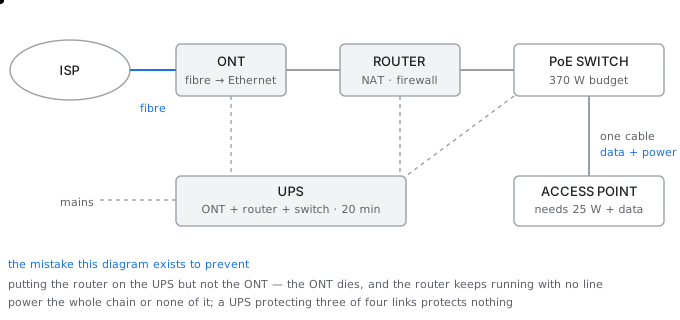
The last mile and the power behind it — data and power take different paths to the same access point
The termination
- An optical network terminal, or ONT, converts the provider's fibre into Ethernet. It belongs to the provider, it is not managed by the site, and it is a single point of failure that no amount of internal redundancy can remove.
- A modem performs the same role on an older copper service, modulating digital data onto an analog line and demodulating it in the other direction. The name is simply modulator-demodulator.
- A router sits behind either of them and does the routing, translation and firewalling. Consumer equipment combines all three into one box, which is convenient at home and wrong in a branch, because it makes one failure take out everything.
සිංහලෙන්: - දෘශ්ය ජාල පර්යන්තයක්, හෝ ONT, සැපයුම්කරුගේ තන්තු ඊතර්නෙට් බවට පරිවර්තනය කරයි. එය සපයන්නාට අයත් වේ, එය වෙබ් අඩවිය විසින් කළමනාකරණය නොකරන අතර, එය කිසිදු අභ්යන්තර අතිරික්තයක් ඉවත් කළ නොහැකි තනි අසාර්ථකත්වයකි.
- මොඩමයක් පැරණි තඹ සේවාවක එකම භූමිකාවක් ඉටු කරයි, ඩිජිටල් දත්ත ඇනලොග්රේඛාවකට වෙනස් කර අනෙක් දිශාවට විකෘති කරයි. නම සරලව modulator-demodulator වේ.
- රවුටරයක් ඔවුන්ගෙන් එක් අයෙකු පිටුපස වාඩි වී මාර්ගගත කිරීම, පරිවර්තනය සහ ෆයර්වෝල් කිරීම සිදු කරයි. පාරිභෝගික උපකරණ තුනම එක පෙට්ටියකට ඒකාබද්ධ කරයි, එය නිවසේදී පහසු සහ ශාඛාවක වැරදියි, මන්ද එය එක් අසාර්ථකත්වයකින් සියල්ල පිටතට ගැනීමට හේතු වේ.
Power over Ethernet
Ceiling mounted access points and cameras have no power socket near them, and running mains cable to a ceiling is expensive and requires an electrician. Power over Ethernet sends direct current along the same twisted pair that carries the data, so one cable does both jobs.
සිංහලෙන්: සිවිලිං සවිකර ඇති ප්රවේශ ස්ථාන සහ කැමරාවලට ඒවා අසල බල සොකට් එකක් නොමැති අතර, ප්රධාන කේබලය සිවිලිමට ධාවනය කිරීම මිල අධික වන අතර විදුලි කාර්මිකයෙකු අවශ්ය වේ. ඊතර්නෙට් හරහා බලය මඟින් දත්ත රැගෙන යන එකම විකෘති යුගල දිගේ සෘජු ධාරාවක් යවයි, එබැවින් එක් කේබලයක් කාර්යයන් දෙකම කරයි.
Which device supplies the power
endspan   — the switch itself supplies power on its ports
            cleanest: one device, one budget, central monitoring

midspan   — a separate injector sits between switch and device
            used when an existing switch has no PoE
            adds a device and a power socket per link

budget, not per-port rating, is the number that matters:
   a 48-port switch advertising 'PoE+ on every port'
   would need 48 x 25.5 = 1224 W, which it does not have.
   it has perhaps 370 W or 740 W, shared.

   370 W / 25.5 W = 14 PoE+ devices, not 48.
The power design
A branch typically has a small uninterruptible power supply so that the network survives a short cut. The mistake it exists to prevent is protecting some of the chain and not all of it.
සිංහලෙන්: ශාඛාවකට සාමාන්යයෙන් කුඩා අඛණ්ඩ බල සැපයුමක් ඇති අතර එමඟින් ජාලය කෙටි මාර්ගයකින් නොනැසී පවතී. එය වැලැක්වීම සඳහා පවතින වැරැද්ද නම් සමහර දාමයන් ආරක්ෂා කිරීම මිස සියල්ලම නොවේ.
What must be on the UPS, and for how long
the chain that must stay up:
   ONT   8 W   +   router 25 W   +   PoE switch 180 W   =  213 W

runtime wanted: 20 minutes
   energy = 213 W x (20/60) h = 71 Wh
   allow for inverter losses and battery ageing, x 1.6 = 114 Wh
   -> a 1000 VA / 600 W unit comfortably covers it

the classic error:
   router on the UPS, ONT plugged into the wall
   -> power cut, ONT dies, router runs happily with no line
   -> the UPS protected everything except the thing that mattered

a UPS protecting three links of a four-link chain protects nothing.
The same logic applies to the access points. If the switch feeding them is on the UPS then the access points stay up, because their power comes from the switch. If it is not, then wireless dies the instant the mains does, no matter how well the rest is protected.
සිංහලෙන්: ප්රවේශ ස්ථාන සඳහා ද එම තර්කය අදාළ වේ. ඒවා පෝෂණය කරන ස්විචය UPS මත තිබේ නම්, ප්රවේශ ස්ථාන ක්රියාත්මක වේ, මන්ද ඒවායේ බලය ලැබෙන්නේ ස්විචයෙනි. එය එසේ නොවේ නම්, ඉතිරිය කෙතරම් හොඳින් ආරක්ෂා කර තිබුණද, විදුලිය ක්රියාත්මක වන සැණින්රැහැන්රහිතව මිය යයි.
What goes wrongවැරදෙන තැන
The failure nobody plans for is the one that happens during the annual generator test. The mains drops for two seconds, everything on the UPS rides through it, and the one device that was plugged into a wall socket reboots and takes four minutes to come back. Trace the whole chain from the provider's fibre to the last device, and confirm that every link in it is protected.
සිංහලෙන්: කිසිවෙකු සැලසුම් නොකරන අසාර්ථකත්වය වාර්ෂික උත්පාදක පරීක්ෂණය අතරතුර සිදු වේ. ප්රධාන විදුලිය තත්පර දෙකකට පහත වැටේ, UPS මත ඇති සියල්ල එය හරහා ගමන් කරයි, සහ බිත්ති සොකට් එකකට සම්බන්ධ කර ඇති එක් උපාංගයක් නැවත පණ ගන්වා නැවත පැමිණීමට මිනිත්තු හතරක් ගතවේ. සැපයුම්කරුගේ තන්තු සිට අවසාන උපාංගය දක්වා සම්පූර්ණ දාමය සොයා, එහි ඇති සෑම සබැඳියක්ම ආරක්ෂිත බව තහවුරු කරන්න.
Keep going: ← Previous chapter · Next chapter → · Networking stage in the Self Guide
Finished this one?
Part of Self Guide · Stage 2: Networking fundamentals. Progress is saved in this browser.
Projects in this lesson

Education
Data Communication & Computer Networking Hub
Interactive TCP/IP model simulator, network design workbook, and bilingual Sinhala networking knowledge portal.
Education
AI Network Labs
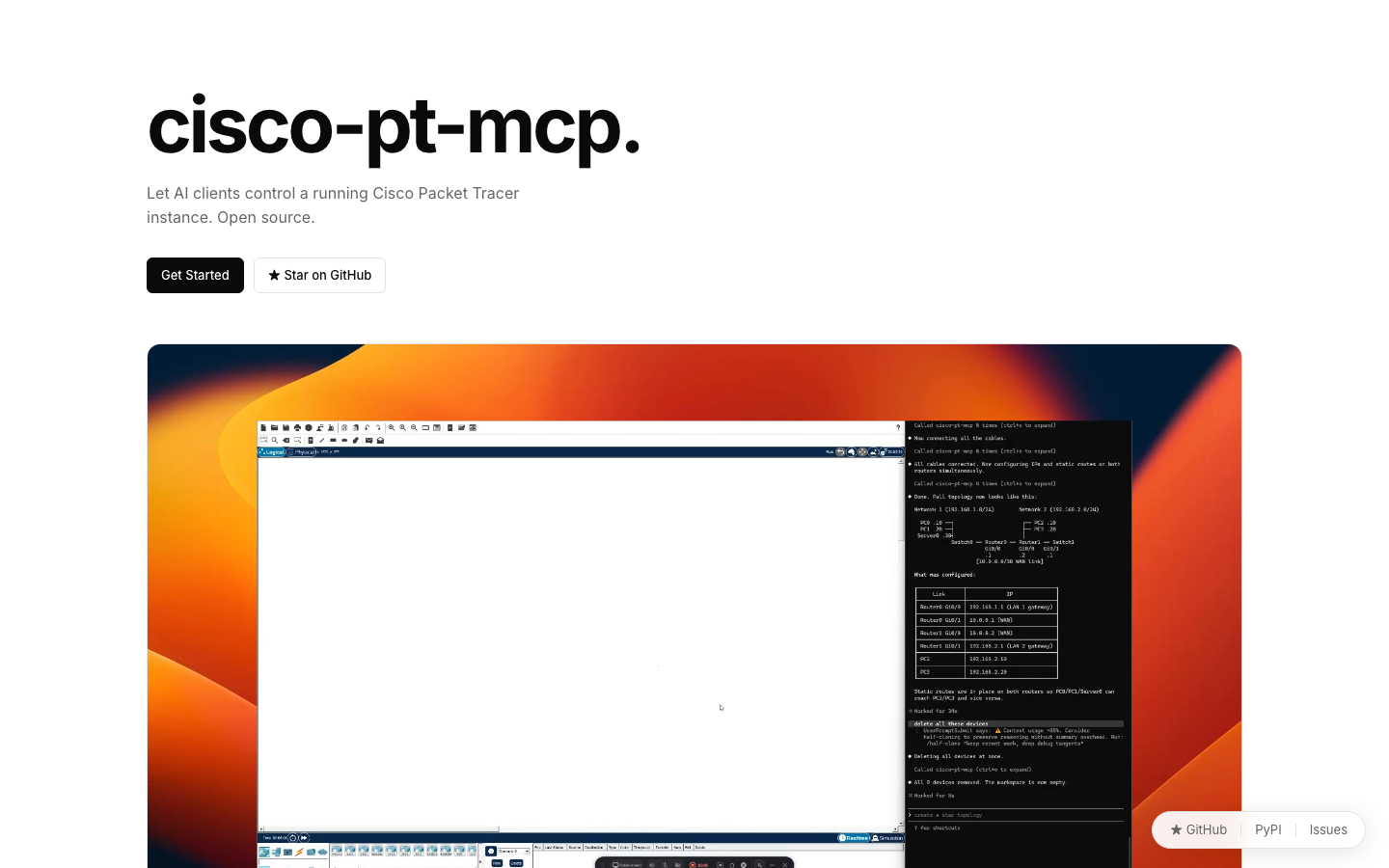
A free course, graded labs and a 40-device campus capstone built around cisco-pt-mcp — the open-source MCP server for Cisco Packet Tracer by Muhammad Balawal.