Networking 07 — Application Layer: DNS, HTTP, Status Codes, Cookies, FTP and Email
How names resolve, what an HTTP request really contains, methods and status codes, cookies and state, FTP, and SMTP/POP3/IMAP.
These notes began as two handwritten notebooks for COM 3401 — Data Communication and Networking at Rajarata University. I OCR'd them, rewrote them in English, and paired every section with a Sinhala explanation so the concept comes first and the English terms stay intact for the exam. Diagrams are redrawn as vector graphics.
DNS
ඩීඑන්එස්
DNS stands for Domain Name System. DNS is a host name to IP address translation service. It is a service that translates and maps the domain name into IP addresses.
සිංහලෙන්: DNS යනු වසම් නාම පද්ධතියයි. DNS යනු IP ලිපින පරිවර්තන සේවාව සඳහා සත්කාරක නාමයකි. එය වසම් නාමය IP ලිපින බවට පරිවර්තනය කර සිතියම්ගත කරන සේවාවකි.
This allows the users of networks to utilize user friendly names when looking for another host, instead of remembering the IP addresses. It uses UDP.
සිංහලෙන්: ජාල භාවිතා කරන්නන්ට IP ලිපින මතක තබා ගැනීම වෙනුවට වෙනත් සත්කාරකයක් සොයන විට පරිශීලක හිතකාමී නම් භාවිතා කිරීමට මෙය ඉඩ දෙයි. එය UDP භාවිතා කරයි.
- Generic domains: .com for commercial, .edu for educational, .org for nonprofit organizations, .info for information service providers and .gov for government institutions.
- Country domains: .in for India, .lk for Sri Lanka, .us and .uk. These are country specific.
- Inverse domain: it is used for mapping an address to a name.
සිංහලෙන්: සාමාන්ය වසම්: වාණිජ සඳහා.com, අධ්යාපනික සඳහා.edu, ලාභ නොලබන සංවිධාන සඳහා.org, තොරතුරු සේවා සපයන්නන් සඳහා තොරතුරු සහ රාජ්ය ආයතන සඳහා.gov.රටේ වසම්: ඉන්දියාව සඳහා.in, ශ්රී ලංකාව සඳහා.lk,.us සහ.uk. මේවා රටට ආවේණිකයි.ප්රතිලෝම වසම: එය නමකට ලිපිනයක් සිතියම්ගත කිරීම සඳහා භාවිතා වේ.
In the name mail.google.com, the word mail is the sub domain, google is the second level domain and com is the top level domain.
සිංහලෙන්: mail.google.com යන නාමයේ, mail යන වචනය උප වසම වේ, google යනු දෙවන මට්ටමේ වසම වන අතර com යනු ඉහළ මට්ටමේ වසම වේ.
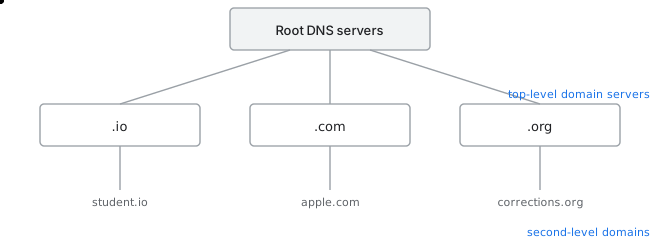
DNS hierarchy
Root DNS servers are the first point of contact and they are maintained by root-servers.org. Top level domain names are managed by ICANN, which stands for the Internet Corporation for Assigned Names and Numbers.
සිංහලෙන්: Root DNS සේවාදායකයන් සම්බන්ධ වීමේ පළමු ස්ථානය වන අතර ඒවා root-servers.org විසින් නඩත්තු කරනු ලැබේ. ඉහළ මට්ටමේ ඩොමේන් නාම කළමනාකරණය කරනු ලබන්නේ ICANN විසිනි, එය පවරන ලද නම් සහ අංක සඳහා වන අන්තර්ජාල සංස්ථාවයි.
HTTP
එච්ටීටීපී
HTTP stands for Hypertext Transfer Protocol. It is used by web browsers and it uses TCP inside it. Basically it decides the format of the data that is being transferred between web clients and servers. The default port is port 80.
සිංහලෙන්: HTTP යනු Hypertext Transfer Protocol යන්නයි. එය වෙබ් බ්රව්සර් විසින් භාවිතා කරන අතර එය ඇතුළත TCP භාවිතා කරයි. මූලික වශයෙන් එය වෙබ් සේවාදායකයින් සහ සේවාදායකයන් අතර හුවමාරු වන දත්තවල ආකෘතිය තීරණය කරයි. පෙරනිමි වරාය වරාය 80 වේ.
HTTP Methods
එච්ටීටීපී ක්රම
While browsing, the end user sends a request to the web server and the server sends the correlated response. HTTP defines a set of request methods to indicate the chosen action to be performed. There are nine predefined methods used with HTTP and HTTPS.
සිංහලෙන්: බ්රවුස් කරන අතරතුර, අවසාන පරිශීලකයා වෙබ් සේවාදායකයට ඉල්ලීමක් යවන අතර සේවාදායකය සහසම්බන්ධ ප්රතිචාරය යවයි. HTTP විසින් සිදු කිරීමට තෝරාගත් ක්රියාව දැක්වීමට ඉල්ලීම් ක්රම මාලාවක් නිර්වචනය කරයි. HTTP සහ HTTPS සමඟ භාවිතා කරන පූර්ව නිශ්චිත ක්රම නවයක් ඇත.
- GET: the GET method is used to retrieve or get information from the web server.
- HEAD: the head method is identical to get, except that the server transfers only the status line and header section, without the response body.
- POST: this request is used to transmit important structured data to the server, for example customer data or file uploads, using HTML forms to create or update a resource.
- PUT: similar to post, it replaces all the current representations of the target resource with the uploaded content. It puts data at a specific location.
- DELETE: this method is used to delete the resource at the specified URL or from the server.
- TRACE: this method allows the client to see what is being received at the server end of the request chain and to use that data for testing.
- CONNECT: this transforms the request connection to a transparent TCP/IP tunnel, typically to enable SSL encrypted data exchange through an unencrypted HTTP proxy. This is called HTTP tunneling.
- PATCH: this method applies partial modifications to a resource. The patch method is faster and less resource consuming than the put method when making partial changes to the specified resource.
- OPTIONS: this HTTP method requests that the server should return data describing what other methods the server supports at the given URL, without indicating a resource action or requesting a resource retrieval.
සිංහලෙන්: GET: වෙබ් සේවාදායකයෙන් තොරතුරු ලබා ගැනීමට හෝ ලබා ගැනීමට GET ක්රමය භාවිතා කරයි.HEAD: ප්රතිචාර ශරීරය නොමැතිව සේවාදායකය විසින් තත්ව රේඛාව සහ ශීර්ෂ කොටස පමණක් මාරු කිරීම හැර, හිස ක්රමය ලබා ගැනීමට සමාන වේ.POST: මෙම ඉල්ලීම සේවාදායකය වෙත වැදගත් ව්යුහගත දත්ත සම්ප්රේෂණය කිරීමට භාවිතා කරයි, උදාහරණයක් ලෙස පාරිභෝගික දත්ත හෝ ගොනු උඩුගත කිරීම්, සම්පතක් සෑදීමට හෝ යාවත්කාලීන කිරීමට HTML පෝරම භාවිතා කරයි.PUT: පළ කිරීම හා සමානව, එය උඩුගත කළ අන්තර්ගතය සමඟ ඉලක්ක සම්පතේ සියලුම වත්මන් නිරූපණයන් ප්රතිස්ථාපනය කරයි. එය නිශ්චිත ස්ථානයක දත්ත තබයි.DELETE: මෙම ක්රමය භාවිතා කරනුයේ නිශ්චිත URL එකෙහි හෝ සේවාදායකයෙන් සම්පත් මකා දැමීමයි.TRACE: මෙම ක්රමය මඟින් සේවාලාභියාට ඉල්ලීම් දාමයේ සේවාදායකයේ අවසානයේ ලැබෙන දේ බැලීමට සහ එම දත්ත පරීක්ෂා කිරීම සඳහා භාවිත කිරීමට ඉඩ සලසයි.සම්බන්ධ කරන්න: මෙය සාමාන්යයෙන් සංකේතනය නොකළ HTTP ප්රොක්සියක් හරහා SSL සංකේතනය කළ දත්ත හුවමාරුව සක්රීය කිරීමට, විනිවිද පෙනෙන TCP/IP උමගකට ඉල්ලීම් සම්බන්ධතාවය පරිවර්තනය කරයි. මෙය HTTP උමං මාර්ගය ලෙස හැඳින්වේ.PATCH: මෙම ක්රමය සම්පතකට අර්ධ වෙනස් කිරීම් යෙදේ. පැච් ක්රමය නිශ්චිත සම්පතට අර්ධ වෙනස් කිරීම් සිදු කරන විට දැමීමේ ක්රමයට වඩා වේගවත් හා අඩු සම්පත් පරිභෝජනයකි.විකල්ප: මෙම HTTP ක්රමය මඟින් සම්පත් ක්රියාවක් නොපෙන්වමින් හෝ සම්පත් ලබා ගැනීමක් ඉල්ලා නොසිට, ලබා දී ඇති URL හි සේවාදායකය සහාය දක්වන වෙනත් ක්රම මොනවාදැයි විස්තර කරන දත්ත සේවාදායකය විසින් ආපසු ලබා දෙන ලෙස ඉල්ලා සිටී.
Status Codes
ස්ටේටස් කේත
The status code element in a server response is a three digit integer where the first digit of the status code defines the class of the response, and the last two digits do not have any categorization role. There are five values for the first digit.
සිංහලෙන්: සේවාදායක ප්රතිචාරයක තත්ව කේත මූලද්රව්යය ඉලක්කම් තුනක පූර්ණ සංඛ්යාවක් වන අතර එහිදී තත්ව කේතයේ පළමු ඉලක්කම් ප්රතිචාරයේ පන්තිය නිර්වචනය කරයි, සහ අවසාන ඉලක්කම් දෙකට වර්ගීකරණ භූමිකාවක් නොමැත. පළමු ඉලක්කම් සඳහා අගයන් පහක් ඇත.
- 1xx informational: it means the request has been received and the process is continuing.
- 2xx success: it means the action was successfully received, understood and accepted.
- 3xx redirection: it means further action must be taken in order to complete the request.
- 4xx client error: it means the request contains incorrect syntax or cannot be fulfilled.
- 5xx server error: it means the server failed to fulfil an apparently valid request.
සිංහලෙන්: 1xx තොරතුරු: එයින් අදහස් කරන්නේ ඉල්ලීම ලැබී ඇති අතර ක්රියාවලිය දිගටම පවතින බවයි.2xx සාර්ථකත්වය: එයින් අදහස් කරන්නේ ක්රියාව සාර්ථකව ලැබී, තේරුම් ගෙන සහ පිළිගත් බවයි.3xx යළි-යොමුවීම්: එයින් අදහස් වන්නේ ඉල්ලීම සම්පූර්ණ කිරීම සඳහා වැඩිදුර ක්රියාමාර්ග ගත යුතු බවයි.4xx සේවාලාභී දෝෂය: එයින් අදහස් වන්නේ ඉල්ලීමෙහි වැරදි වාක්ය ඛණ්ඩය අඩංගු වීම හෝ ඉටු කළ නොහැකි බවයි.5xx සේවාදායක දෝෂය: එයින් අදහස් වන්නේ පෙනෙන පරිදි වලංගු ඉල්ලීමක් ඉටු කිරීමට සේවාදායකය අසමත් වූ බවයි.
Cookies
කුකීස්
A cookie is a piece of data from a website that is stored within a web browser that the website can retrieve at a later time. Cookies are used to tell the server that users have returned to a particular website. It is a unique string and it is stored in the client browser.
සිංහලෙන්: කුකියක් යනු වෙබ් බ්රවුසරයක් තුළ ගබඩා කර ඇති වෙබ් අඩවියක දත්ත කොටසකි, එම වෙබ් අඩවියට පසු කාලයකදී ලබාගත හැක. පරිශීලකයන් යම් වෙබ් අඩවියකට ආපසු ගොස් ඇති බව සේවාදායකයට පැවසීමට කුකීස් භාවිතා කරයි. එය අද්විතීය තන්තුවක් වන අතර එය සේවාදායක බ්රව්සරයේ ගබඩා කර ඇත.
FTP
එෆ්ටීපී
FTP uses two connections. The control connection uses port 21 and stays open for the whole session, while the data connection uses port 20 or a dynamic port and opens only while a file is moving.
සිංහලෙන්: FTP සම්බන්ධතා දෙකක් භාවිතා කරයි. පාලන සම්බන්ධතාවය port 21 භාවිතා කරන අතර මුළු සැසිය සඳහාම විවෘතව පවතින අතර දත්ත සම්බන්ධතාවය port 20 හෝ ගතික වරායක් භාවිතා කරන අතර ගොනුවක් චලනය වන විට පමණක් විවෘත වේ.
To keep track of data transmission, FTP uses a wide variety of status codes and it is also supported with many commands. The monitoring of FTP constantly assumes the checking of status codes.
සිංහලෙන්: දත්ත සම්ප්රේෂණය නිරීක්ෂණය කිරීම සඳහා, FTP විවිධ තත්ව කේත භාවිතා කරන අතර එය බොහෝ විධාන සමඟ ද සහාය වේ. FTP අධීක්ෂණය නිරන්තරයෙන් තත්ව කේත පරීක්ෂා කිරීම උපකල්පනය කරයි.
In active mode the server opens the data connection back to the client. In passive mode the server generates a dynamic port and the client connects to it. In extended passive mode a firewall is placed between the client and the server, where a time is assigned to each packet, and if the packet is received after that time then the firewall discards the packet.
සිංහලෙන්: සක්රීය ප්රකාරයේදී සේවාදායකයා දත්ත සම්බන්ධතාවය නැවත සේවාදායකයා වෙත විවෘත කරයි. උදාසීන මාදිලියේදී සේවාදායකය ගතික වරායක් ජනනය කරන අතර සේවාදායකයා එයට සම්බන්ධ වේ. විස්තෘත නිෂ්ක්රීය මාදිලියේදී, සේවාලාභියා සහ සේවාදායකය අතර ෆයර්වෝලයක් තබා ඇති අතර, එහිදී සෑම පැකට්ටුවකටම වේලාවක් පවරනු ලබන අතර, එම කාලයෙන් පසුව පැකට්ටුව ලැබුණහොත් ෆයර්වෝලය විසින් පැකට්ටුව ඉවත දමයි.
TFTP never requires a username and password. All the users within the application can access the data. If we combine FTP with SSH, a secured pipeline is established which is used in FTP, in the same way that HTTP combined with SSL gives HTTPS.
සිංහලෙන්: TFTP කිසිවිටෙක පරිශීලක නාමයක් සහ මුරපදයක් අවශ්ය නොවේ. යෙදුම තුළ සිටින සියලුම පරිශීලකයින්ට දත්ත වෙත ප්රවේශ විය හැක. අපි SSH සමඟ FTP ඒකාබද්ධ කළහොත්, SSL සමඟ HTTP ඒකාබද්ධව HTTPS ලබා දෙන ආකාරයටම, FTP හි භාවිතා වන ආරක්ෂිත නල මාර්ගයක් ස්ථාපිත කෙරේ.
SMTP, POP3 and IMAP
එස්එම්ටීපී, පොප් සහ අයිමැප්
SMTP stands for Simple Mail Transfer Protocol. It uses port 25 at TCP. It is a host to host transport protocol. It is a text based protocol, but it is enabled with multimedia with the MIME extension.
සිංහලෙන්: SMTP යනු සරල තැපැල් හුවමාරු ප්රොටෝකෝලයයි. එය TCP හි port 25 භාවිතා කරයි. එය සත්කාරක ප්රවාහන ප්රොටෝකෝලය සඳහා සත්කාරකයකි. එය පෙළ පදනම් වූ ප්රොටෝකෝලයකි, නමුත් එය MIME දිගුව සමඟ බහුමාධ්ය සමඟ සක්රීය කර ඇත.
SMTP has two components, the user agent and the mail transfer agent. The user agent is used for handling the attachments and the detachments, and the mail transfer agent is in charge of having a connection with the help of SMTP through TCP.
සිංහලෙන්: SMTP හි සංරචක දෙකක් ඇත, පරිශීලක නියෝජිතයා සහ තැපැල් හුවමාරු නියෝජිතයා. ඇමුණුම් සහ වෙන් කිරීම් හැසිරවීම සඳහා පරිශීලක නියෝජිතයා භාවිතා කරනු ලබන අතර, TCP හරහා SMTP සහය සමඟ සම්බන්ධතාවක් ඇති කර ගැනීම තැපැල් හුවමාරු නියෝජිතයා භාරව සිටී.
It is part of a push and pull mechanism in mail communication. SMTP is used to push the mail, while POP3 and IMAP4 are used for pulling the message.
සිංහලෙන්: එය තැපැල් සන්නිවේදනයේ තල්ලු කිරීමේ සහ ඇදීමේ යාන්ත්රණයක කොටසකි. SMTP තැපෑල තල්ලු කිරීමට භාවිතා කරන අතර POP3 සහ IMAP4 පණිවිඩය ඇදීමට භාවිතා කරයි.
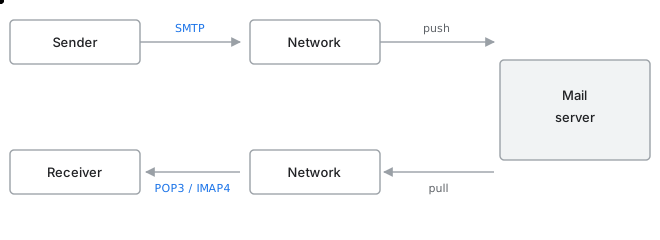
How email travels (SMTP / POP3 / IMAP)
POP stands for Post Office Protocol. Its approach is just to drop the email over the service mail provider and then leave it for the services to handle the transfer of messages.
සිංහලෙන්: POP යනු Post Office Protocol යන්නයි. එහි ප්රවේශය වන්නේ සේවා තැපැල් සපයන්නා හරහා විද්යුත් තැපෑල අතහැර පසුව පණිවිඩ හුවමාරුව හැසිරවීමට සේවා සඳහා එය තැබීමයි.
IMAP stands for Internet Message Access Protocol. IMAP has some special advantages over POP, like it supports bidirectional communication over email and there is no need to store conversations on the server as they are already well maintained in a database.
සිංහලෙන්: IMAP යනු අන්තර්ජාල පණිවිඩ ප්රවේශ ප්රොටෝකෝලයයි. IMAP හට POP ට වඩා විශේෂ වාසි ඇත, එය විද්යුත් තැපෑල හරහා ද්විපාර්ශ්වික සන්නිවේදනය සඳහා සහය දක්වන අතර ඒවා දැනටමත් දත්ත ගබඩාවක හොඳින් නඩත්තු කර ඇති බැවින් සේවාදායකයේ සංවාද ගබඩා කිරීමට අවශ්ය නොවේ.
Before downloading a file, a message is delivered to check whether it is safe or associated with any virus. If the user is interested to continue, then only it proceeds, and if he is not interested he can simply cancel it. That is an advantage of IMAP4 over POP3. IMAP4 also pushes some of the dangerous mails to junk mail, whereas POP3 cannot do that.
සිංහලෙන්: ගොනුවක් බාගත කිරීමට පෙර, එය ආරක්ෂිතද හෝ කිසියම් වෛරසයක් සමඟ සම්බන්ධද යන්න පරීක්ෂා කිරීමට පණිවිඩයක් ලබා දෙනු ලැබේ. පරිශීලකයා දිගටම කරගෙන යාමට කැමති නම්, එය පමණක් ඉදිරියට යයි, ඔහු උනන්දුවක් නොදක්වන්නේ නම් ඔහුට එය අවලංගු කළ හැකිය. එය POP3 ට වඩා IMAP4 හි වාසියකි. IMAP4 සමහර භයානක තැපැල් කුණු තැපෑලට තල්ලු කරයි, නමුත් POP3 ට එය කළ නොහැක.
Keep going: ← Previous chapter · Next chapter → · Networking stage in the Self Guide
Finished this one?
Part of Self Guide · Stage 2: Networking fundamentals. Progress is saved in this browser.
Projects in this lesson

Education
Data Communication & Computer Networking Hub
Interactive TCP/IP model simulator, network design workbook, and bilingual Sinhala networking knowledge portal.
Education
AI Network Labs
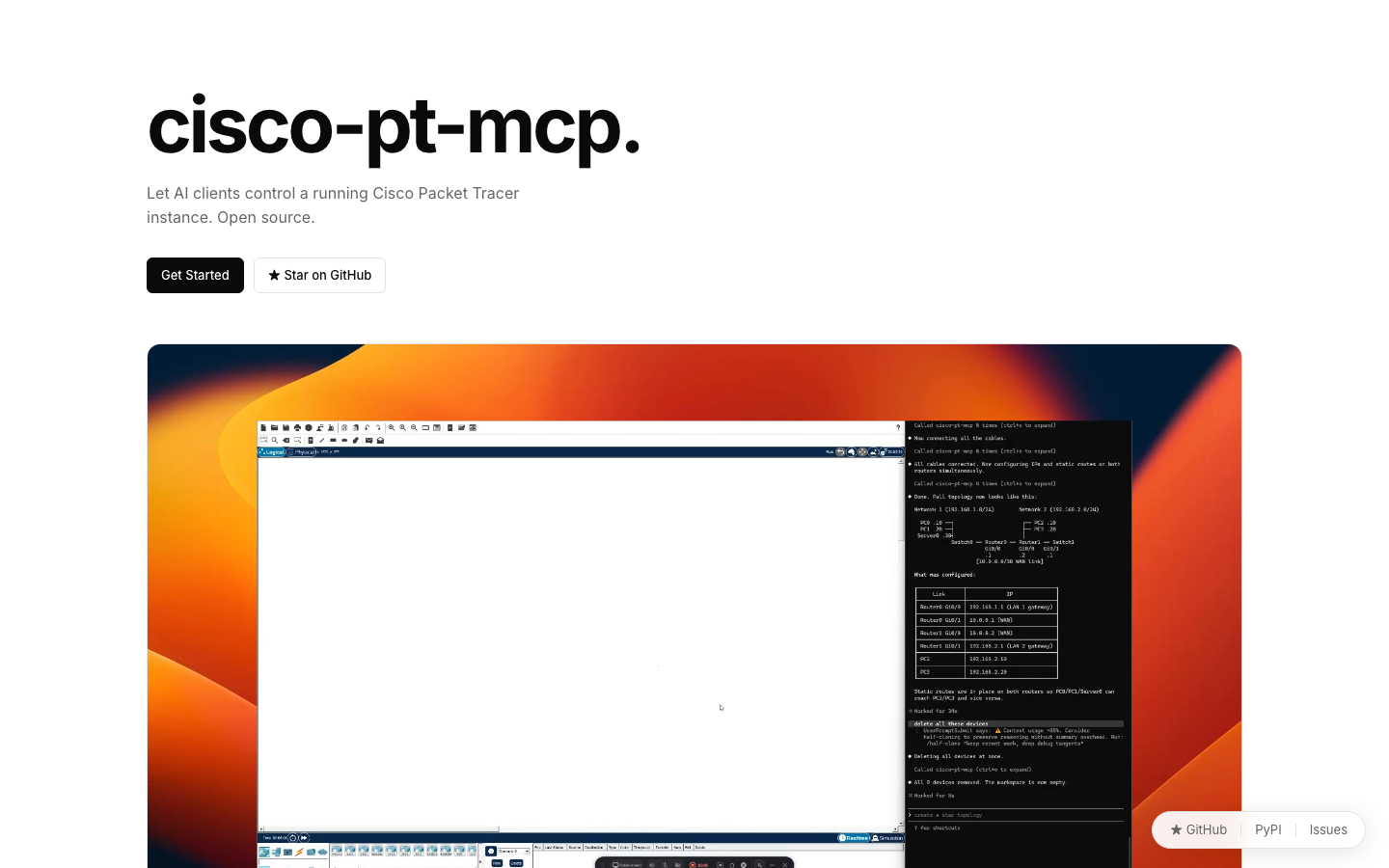
A free course, graded labs and a 40-device campus capstone built around cisco-pt-mcp — the open-source MCP server for Cisco Packet Tracer by Muhammad Balawal.