How I Ship 23 Projects: Cloud Build, GitHub Actions, Keyless Auth and Coolify
The deployment map behind my portfolio — which project runs where, the real Cloud Build and GitHub Actions files, Workload Identity Federation, what tokenless PyPI publishing looks like, and five rules I now follow.
I have 23 projects in this portfolio. Some are client websites that never change after launch; some are agent backends that redeploy several times a day during a competition week. They don't all deserve the same infrastructure — but they all deserve some, written down, so that future me can redeploy them without remembering anything.
This post is the map: which project deploys where, the pipelines behind the important ones (with the real workflow files), and the mistakes that shaped them.
If you only read one section, read "Five rules I now follow" at the end. Everything else is the evidence for those rules.
The deployment matrix
| Project | Runtime | Pipeline | Why this target |
|---|---|---|---|
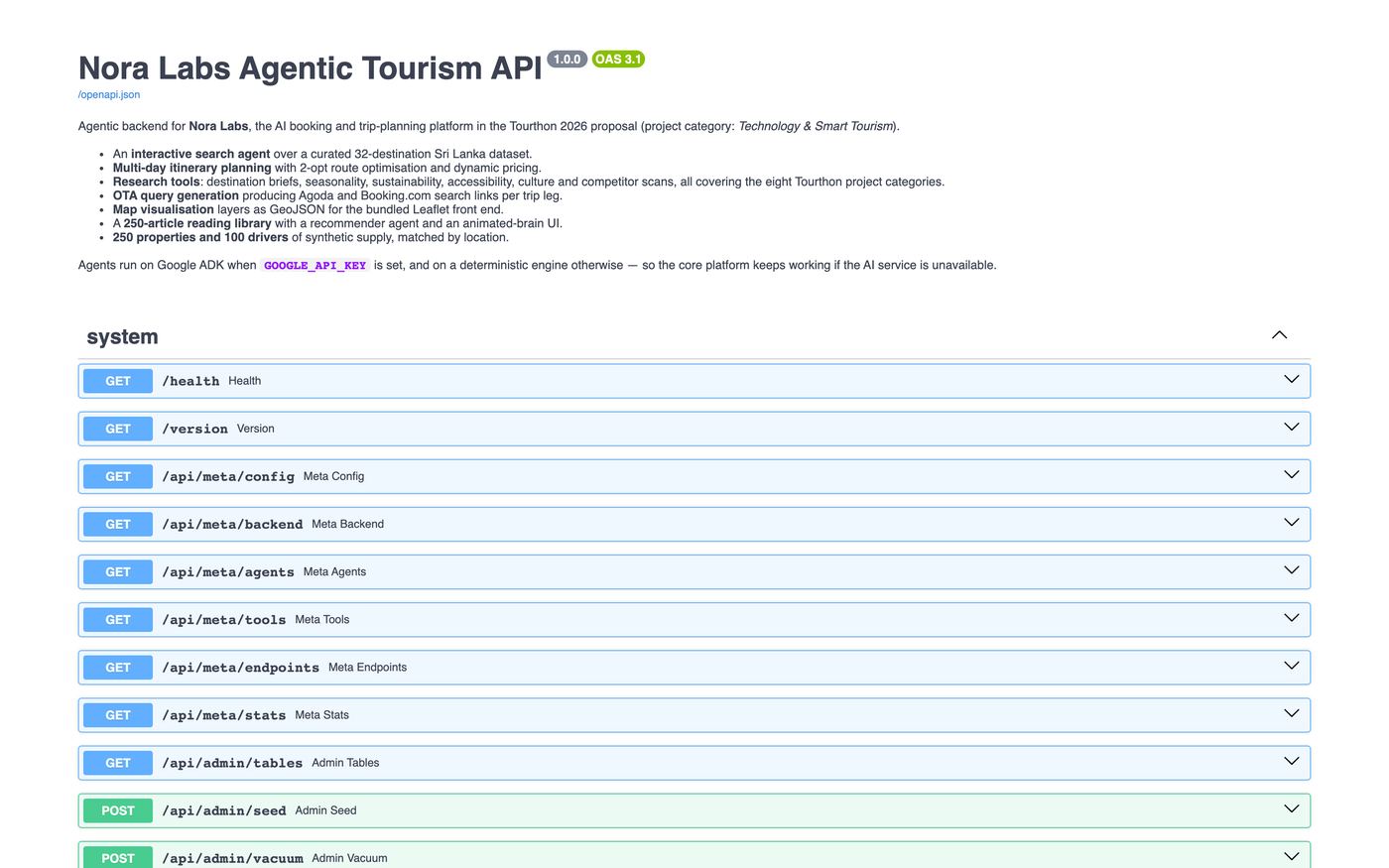
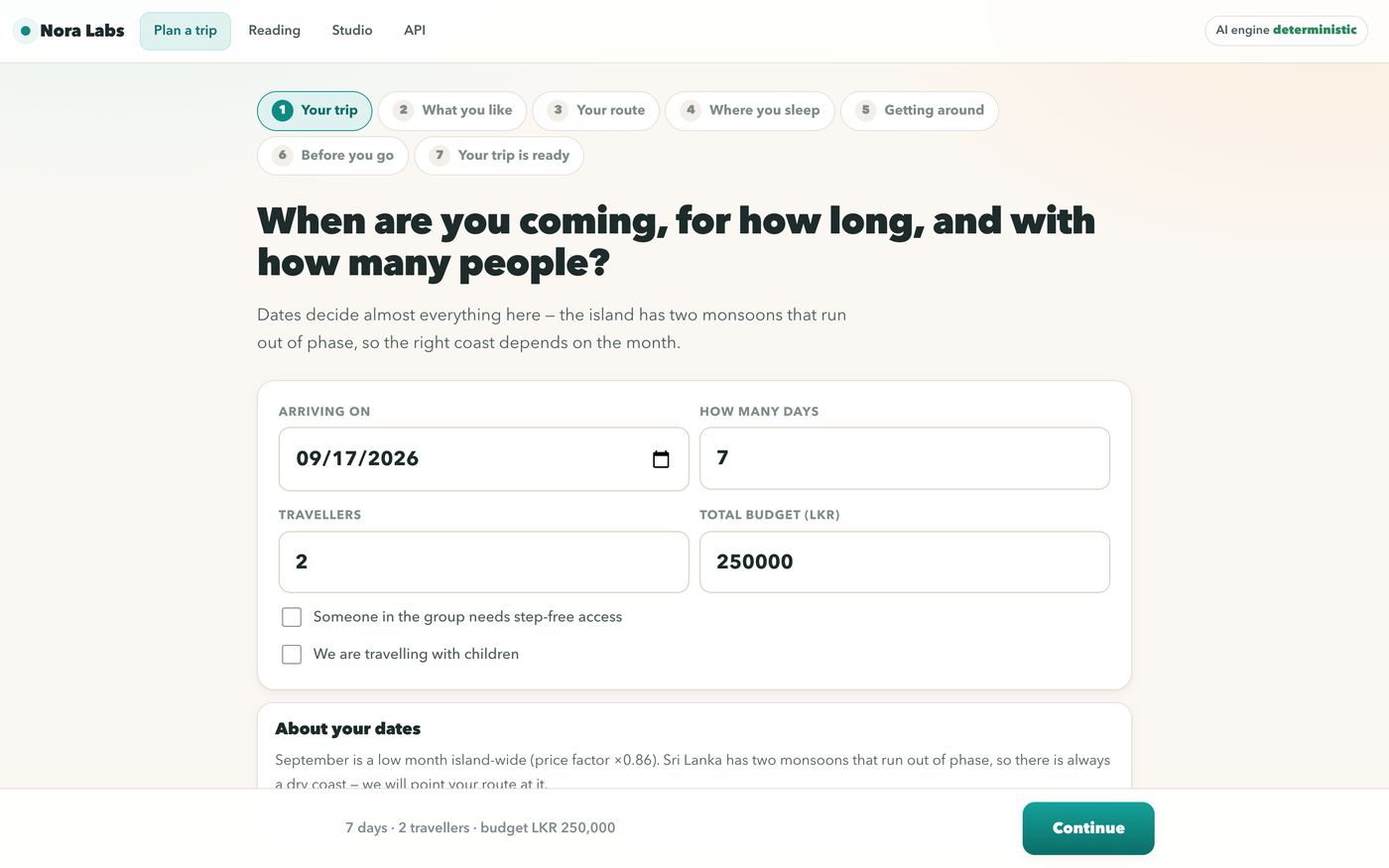
| Nora Labs (agents API) | Cloud Run + Vertex AI | Cloud Build → Artifact Registry | Scale-to-zero for a competition demo; Vertex creds from the service account |
| CryptoEdge | Cloud Run, min-instances=1 | GitHub Actions + Workload Identity Federation | Background scheduler must stay warm |
| The Part Timer | Cloud Run (API + web) | GitHub Actions with path filters | Two services that change independently |
| Quintrix ITSO | Compute Engine VM + Compose | GitHub Actions → gcloud compute ssh | ~1 GB PyTorch image, long video jobs, local disk for tiers |
| AI Network Labs (around cisco-pt-mcp) | Learner's machine via uvx + static course pages | None — the upstream author publishes to PyPI | A desktop integration, not a service |
| CinePrompt / News Studio | Single Docker image | Local / Coolify | Rendering is CPU-heavy and long-running |
| React Content Studio | Docker with a bind-mounted APP_DIR | Local | It edits your codebase on disk |
| Transcript Maker | Docker + Gunicorn | Local / Coolify | Small Flask app, file cache on a volume |
| Inventory Management | Compose: client + server + Postgres | Local | Classic three-tier stack |
| W3DevOps, SRE Handbook, Networking Hub | Static files | S3 + CloudFront / any static host | Zero runtime, fractions of a cent |
| Mahesh Travellers | next export static HTML | CDN | Content changes rarely; tourists are far away |
| Clean Air, Keshara, Ceyora, Super King Star | Static/SSR web | Vercel-style hosting | Client sites: cheap, fast, boring |
Three patterns fall out of this table:
- Managed serverless containers (Cloud Run) for anything that needs a public URL and occasional traffic.
- A plain VM with Docker Compose for heavy or stateful workloads where cold starts and ephemeral disks hurt.
- No server at all for anything that's really just content.
Pattern 1 — Cloud Build → Artifact Registry → Cloud Run (Nora Labs)
Nora Labs is the agentic tourism platform I built for Tourthon 2026: FastAPI + Google ADK agents on Vertex AI, SQLite for state, 150 documented API paths. The image is deliberately boring:
FROM python:3.12-slim
ENV PYTHONDONTWRITEBYTECODE=1 \
PYTHONUNBUFFERED=1 \
NORA_DB_PATH=/data/nora.db
WORKDIR /srv
RUN apt-get update && apt-get install -y --no-install-recommends curl \
&& rm -rf /var/lib/apt/lists/*
COPY requirements.txt .
RUN pip install --no-cache-dir -r requirements.txt
COPY app ./app
# SQLite lives on a mounted volume so the database survives container rebuilds.
RUN mkdir -p /data
VOLUME ["/data"]
# Cloud Run injects PORT; locally it defaults to 8000.
ENV PORT=8000
EXPOSE 8000
HEALTHCHECK \
CMD curl -fsS "http://localhost:${PORT}/health" || exit 1
CMD ["sh", "-c", "exec uvicorn app.main:app --host 0.0.0.0 --port ${PORT}"]Three details matter more than they look:
execinsidesh -c. I need a shell to expand${PORT}, but I want uvicorn to be PID 1 so it receivesSIGTERMwhen Cloud Run scales down.execreplaces the shell with the server.requirements.txtbeforeapp/. Editing an agent prompt doesn't reinstall dependencies.- A health endpoint that the image itself declares. Compose, Docker and the platform all agree on what "healthy" means.
The build pipeline tags every image twice — immutable :$SHORT_SHA for deploys, mutable :latest for humans:
substitutions:
  _REGION: us-central1
  _SERVICE: nora-labs
  _REPO: nora
  _MODEL: gemini-2.5-flash

steps:
  - id: build
    name: gcr.io/cloud-builders/docker
    args: [build,
           -t, "${_REGION}-docker.pkg.dev/$PROJECT_ID/${_REPO}/${_SERVICE}:$SHORT_SHA",
           -t, "${_REGION}-docker.pkg.dev/$PROJECT_ID/${_REPO}/${_SERVICE}:latest", .]

  - id: push
    name: gcr.io/cloud-builders/docker
    args: [push, --all-tags, "${_REGION}-docker.pkg.dev/$PROJECT_ID/${_REPO}/${_SERVICE}"]

  - id: deploy
    name: gcr.io/google.com/cloudsdktool/cloud-sdk
    entrypoint: gcloud
    args:
      - run
      - deploy
      - ${_SERVICE}
      - --image=${_REGION}-docker.pkg.dev/$PROJECT_ID/${_REPO}/${_SERVICE}:$SHORT_SHA
      - --region=${_REGION}
      - --allow-unauthenticated
      # SQLite has a single writer, so the service runs as one instance.
      - --max-instances=1
      - --cpu=1
      - --memory=1Gi
      - --set-env-vars=GOOGLE_GENAI_USE_VERTEXAI=TRUE,GOOGLE_CLOUD_PROJECT=$PROJECT_ID,GOOGLE_CLOUD_LOCATION=${_REGION},NORA_ADK_MODEL=${_MODEL}
Decisions and their consequences
No API key in the image. On Cloud Run the agents talk to Vertex AI using the runtime service account (roles/aiplatform.user). Locally, GOOGLE_API_KEY switches to the Gemini API. With neither set, a deterministic rule engine answers. GET /api/meta/backend tells you which engine is live, and every response says which engine served it — so no endpoint depends on an LLM being reachable. That was a commitment in the competition proposal's risk table, and it turned out to be the best reliability decision in the project.
--max-instances=1 is a database decision, not a scaling decision. SQLite allows one writer. Rather than pretending otherwise, the service is pinned to a single instance, and the README says exactly which tables (itineraries, workflows, article_events) move to Cloud SQL or Firestore once traffic outgrows a demo. Reference data (destinations, 250 articles, 250 hotels, 100 drivers) is read-only and reseeds from JSON on every boot.
State survives on a bucket. Without a GCS mount, /data is container-local and saved trips vanish when an instance recycles. The deploy script mounts a bucket at /data.
Two things that bite on a fresh GCP project
- There is no Cloud Build default service account on new projects.
gcloud builds submitfails withUnknown service account. My deploy script therefore builds locally with--platform linux/amd64and pushes straight to Artifact Registry, and only switches toBUILDER=cloudbuildonce a builder SA withroles/cloudbuild.builds.builderexists. - Model availability is per project and per region.
gemini-2.5-flashresolves inus-central1. If a model 404s, the ADK call is caught, the deterministic engine answers, and the failure reason is written to theagent_runstable.
Pattern 1b — GitHub Actions with keyless auth (CryptoEdge, The Part Timer)
Storing a service-account JSON key in GitHub secrets is the classic way to deploy to GCP — and the classic way to leak a key. Both of these projects use Workload Identity Federation (WIF): the workflow requests an OIDC token from GitHub, Google verifies it against a trust policy scoped to the repository, and hands back short-lived credentials.
jobs:
  test:
    runs-on: ubuntu-latest
    steps:
      - uses: actions/checkout@v4
      - uses: actions/setup-python@v5
        with: { python-version: "3.12", cache: pip }
      - run: |
          pip install -r requirements.txt
          pip install pytest pytest-asyncio
      - run: pytest tests/ -v
      - name: Verify the app imports and routes register
        run: python -c "from app.main import app; print(f'{len(app.routes)} routes OK')"

  deploy:
    needs: test
    runs-on: ubuntu-latest
    permissions:
      contents: read
      id-token: write   # required for keyless Workload Identity Federation
    steps:
      - uses: actions/checkout@v4
      - uses: google-github-actions/auth@v2
        with:
          workload_identity_provider: ${{ secrets.GCP_WIF_PROVIDER }}
          service_account: ${{ secrets.GCP_SERVICE_ACCOUNT }}
      - uses: google-github-actions/setup-gcloud@v2
      - run: gcloud auth configure-docker ${{ env.REGION }}-docker.pkg.dev --quiet
      - name: Build and push image
        run: |
          IMAGE="${REGION}-docker.pkg.dev/${{ secrets.GCP_PROJECT_ID }}/${REPO}/${SERVICE}"
          docker build -t "$IMAGE:${{ github.sha }}" -t "$IMAGE:latest" .
          docker push "$IMAGE:${{ github.sha }}"
          docker push "$IMAGE:latest"
      - name: Deploy to Cloud Run
        run: |
          gcloud run deploy "$SERVICE" \
            --image="$IMAGE:${{ github.sha }}" \
            --region="$REGION" --port=8000 \
            --memory=1Gi --cpu=1 --timeout=300 --concurrency=40 \
            --min-instances=1 --max-instances=4 \
            --set-secrets="SECRET_KEY=<secret-name>:latest,ENCRYPTION_KEY=<secret-name>:latest"
Things worth noticing:
- The import smoke test.
python -c "from app.main import app"catches the most common broken deploy — a missing import or a router that fails to register — in under a second, before any image is built. --min-instances=1on CryptoEdge. Its alert scheduler runs inside the web process every 300 seconds. Scale-to-zero would silently stop alerts. One warm instance is a deliberate cost.- Secrets come from Secret Manager at deploy time (
--set-secrets), never from the workflow file or the image.
Path filters for a two-service repo
The Part Timer has an API (hr-platform/api) and a web portal (hr-platform/web) in one repository. Rebuilding both on every push wastes minutes and risks redeploying something that didn't change. dorny/paths-filter decides first:
jobs:
  changes:
    runs-on: ubuntu-latest
    outputs:
      api: ${{ steps.filter.outputs.api }}
      web: ${{ steps.filter.outputs.web }}
    steps:
      - uses: actions/checkout@v4
      - uses: dorny/paths-filter@v3
        id: filter
        with:
          filters: |
            api:
              - 'hr-platform/api/**'
              - '.github/workflows/deploy.yml'
            web:
              - 'hr-platform/web/**'
              - '.github/workflows/deploy.yml'

  deploy-gcp-api:
    needs: changes
    if: needs.changes.outputs.api == 'true'
    # ... WIF auth, build, push, gcloud run deploy theparttimer-api
The web build bakes the API URL in at build time with --build-arg VITE_API_BASE_URL=..., and a workflow_dispatch input lets me choose gcp, digitalocean or both — the DigitalOcean App Platform job is scaffolded with the same shape, so moving clouds is a secrets change rather than a rewrite.
Pattern 2 — A VM, Docker Compose and an SSH redeploy (Quintrix ITSO)
Quintrix ITSO analyses CCTV footage with YOLOv8, X3D-S and MobileNetV3 and moves segments between storage tiers. Its image carries CPU PyTorch, OpenCV and FFmpeg — around a gigabyte — and a single upload can take minutes to process. Cold starts and request timeouts make serverless the wrong tool. It runs on a Compute Engine VM with Compose, and the pipeline is intentionally additive:
jobs:
  test:
    name: Build & test
    runs-on: ubuntu-latest
    steps:
      - uses: actions/checkout@v4
      - uses: actions/setup-python@v5
        with: { python-version: "3.11" }
      - name: Install dependencies (CPU torch, matches Dockerfile)
        run: |
          pip install --no-cache-dir torch==2.5.1 torchvision==0.20.1 \
            --index-url https://download.pytorch.org/whl/cpu
          pip install --no-cache-dir -r requirements.txt
      - run: python -m compileall -q server.py itso_system.py engine models
      - run: docker compose config > /dev/null
      - run: docker build -t quintrix-itso:ci .

  deploy:
    needs: test
    if: github.ref == 'refs/heads/main' && github.event_name == 'push'
    runs-on: ubuntu-latest
    steps:
      - uses: google-github-actions/auth@v2
        with: { credentials_json: "${{ secrets.GCP_SA_KEY }}" }
      - uses: google-github-actions/setup-gcloud@v2
      - name: Redeploy on the VM (git pull + rebuild container in place)
        run: |
          gcloud compute ssh "${{ secrets.GCP_VM_NAME }}" --zone="${{ secrets.GCP_VM_ZONE }}" \
--command="cd quintrix-itso && git fetch origin main && git reset --hard origin/main && docker compose up -d --build"- Tests run on every PR and never touch infrastructure. Deploy only runs after tests pass, only on pushes to
main. - CI installs the same CPU wheel as the Dockerfile, so "passes in CI" means "imports in the container".
docker compose configvalidates the Compose file without starting anything — a cheap check that catches indentation mistakes.git reset --hard origin/maininstead ofgit pullmeans the VM can never end up in a merge state.- No new resources are created by CI. The workflow redeploys an existing VM; provisioning is a documented one-time step. That keeps the blast radius of a bad workflow small.
This one still uses a JSON key (GCP_SA_KEY); migrating it to WIF like CryptoEdge is the obvious next hardening step.
Pattern 3 — Studied, not shipped: publishing a package with no token
My network labs are built around cisco-pt-mcp, an MCP server for Cisco Packet Tracer written by Muhammad Balawal — not by me. Reading its release pipeline taught me the cleanest pattern I've seen for packages. Users install it with uvx cisco-pt-mcp, so "deploying" means publishing to PyPI, and PyPI's Trusted Publishing trusts GitHub's OIDC token for a specific repo, workflow and environment — so there is no API token anywhere. This is the upstream workflow, abridged:
on:
  push:
    tags: ["v*"]
  workflow_dispatch:

jobs:
  build:
    runs-on: ubuntu-latest
    steps:
      - uses: actions/checkout@v4
      - uses: actions/setup-python@v5
        with: { python-version: "3.12" }
      - run: python -m pip install --upgrade build twine
      - run: python -m build
      - run: python -m twine check dist/*
      - uses: actions/upload-artifact@v4
        with: { name: dist, path: dist/ }

  publish:
    needs: build
    runs-on: ubuntu-latest
    environment:
      name: pypi
      url: https://pypi.org/p/cisco-pt-mcp
    permissions:
      id-token: write   # OIDC token exchange with PyPI
    steps:
      - uses: actions/download-artifact@v4
        with: { name: dist, path: dist/ }
      - uses: pypa/gh-action-pypi-publish@release/v1
Building and publishing are separate jobs: the job holding id-token: write never runs project code, it only uploads an artifact that was already built and checked. It's the PyPI twin of Workload Identity Federation, and it's how I'll publish my first package.
Pattern 4 — One fat image for a renderer (CinePrompt)
CinePrompt renders Sinhala story reels with Remotion, which drives a headless Chrome and ffmpeg. That's a lot of system libraries, but splitting it into services would only add network hops between steps that share files. So it's one image — UI, API, renderer — built carefully:
FROM node:22-bookworm-slim
# Chrome Headless Shell runtime libraries + ffmpeg/ffprobe
RUN apt-get update && apt-get install -y --no-install-recommends \
ca-certificates ffmpeg fonts-noto-color-emoji \
libnss3 libdbus-1-3 libatk1.0-0 libgbm-dev libasound2 libxrandr2 libxkbcommon-dev libxfixes3 \
libxcomposite1 libxdamage1 libatk-bridge2.0-0 libpango-1.0-0 libcairo2 libcups2 \
&& rm -rf /var/lib/apt/lists/*
WORKDIR /app
# Install dependencies first (better layer caching)
COPY package.json package-lock.json ./
COPY packages/engine/package.json packages/engine/
COPY apps/web/package.json apps/web/
COPY apps/server/package.json apps/server/
RUN npm ci --no-audit --no-fund
COPY . .
RUN npx remotion browser ensure \
&& npm run build \
&& npm run bundle --workspace @cineprompt/server \
&& mkdir -p /data && chown -R node:node /data /app/.remotion-bundle
ENV NODE_ENV=production PORT=8787 DATA_DIR=/data REMOTION_BUNDLE_DIR=/app/.remotion-bundle
USER node
EXPOSE 8787
VOLUME ["/data"]
HEALTHCHECK \
CMD node -e "fetch('http://127.0.0.1:'+process.env.PORT+'/api/health').then(r=>process.exit(r.ok?0:1)).catch(()=>process.exit(1))"
CMD ["npm", "start"]- The health check uses Node's built-in
fetch, so the image doesn't needcurl. - The Remotion project is pre-bundled at build time, so the first render doesn't pay a webpack build.
- Rendering runs one video at a time by design — a queue, not parallelism, because two concurrent Chrome renders on a small VM are slower than two sequential ones.
Where it all runs: Coolify for everything small
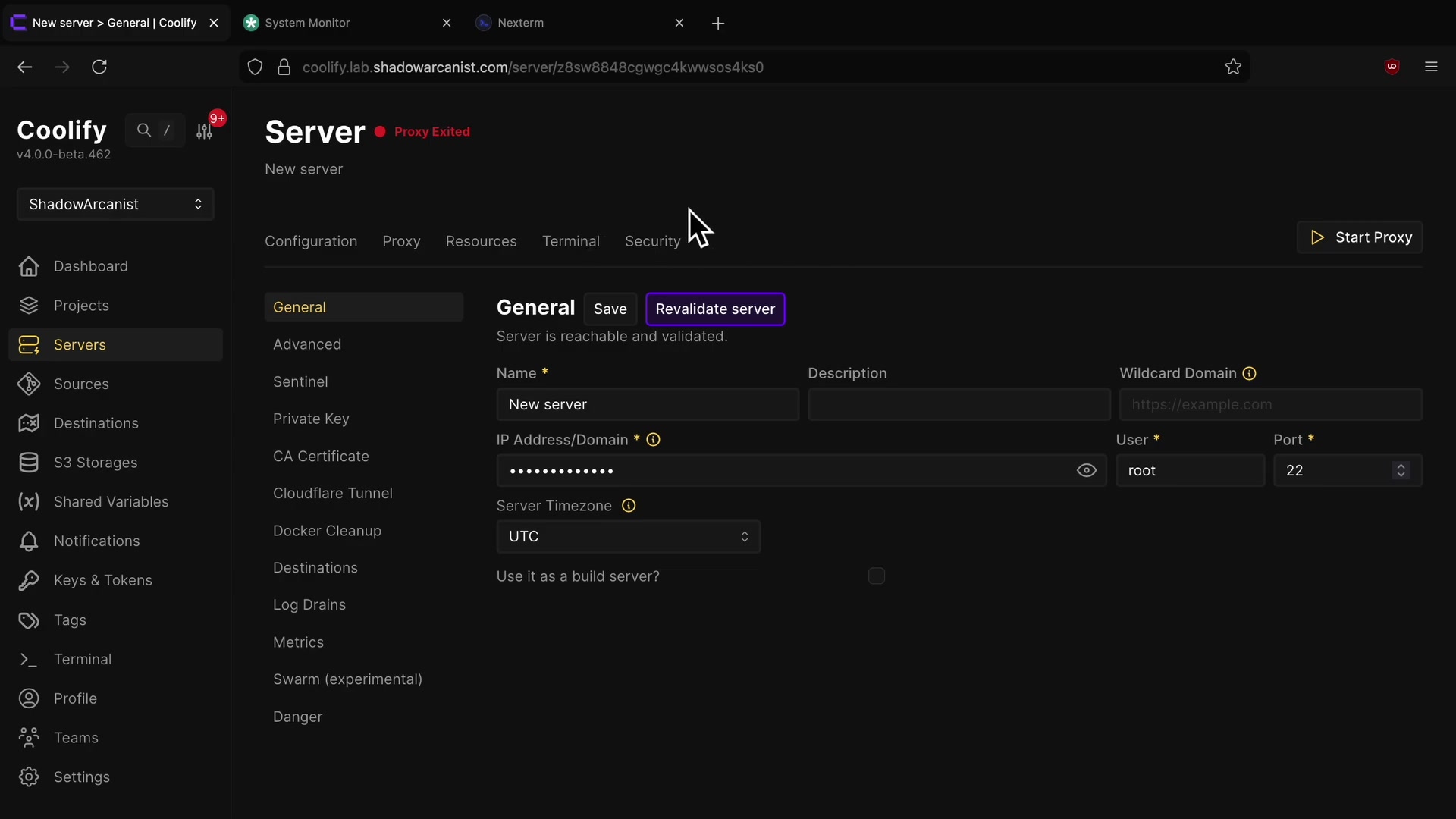
The projects that don't need Cloud Run — previews, client staging sites, CinePrompt, Transcript Maker — run on a self-hosted Coolify v4 instance on one GCP e2 VM in us-central1-b. Git push to deploy, automatic Let's Encrypt via Traefik, wildcard DNS, for under $10/month. The full setup is in Self-Hosting with Coolify.
Five rules I now follow
- Tag images with the commit SHA and deploy the SHA.
:latestis for humans. Rollback is then "deploy the previous SHA". - No long-lived cloud keys in CI. Workload Identity Federation for GCP (and, for packages, PyPI's Trusted Publishing). The one project still on a JSON key (Quintrix) is the next to migrate.
- Make the AI optional. Every agent endpoint in Nora Labs has a deterministic fallback, and responses say which engine answered. Outages degrade quality, not availability.
- Write the scaling limit next to the config.
--max-instances=1 # SQLite has a single writeris worth more than a page of docs. - Pick the platform per workload. Cloud Run for bursty APIs, a VM for heavy or stateful jobs, static hosting for content. Using one platform for everything is how you end up paying for idle Kubernetes nodes.
If you want the fundamentals behind any of this, the DevOps handbook series walks through Linux, Docker, Kubernetes, AWS, GCP, Nginx and Coolify chapter by chapter.
Finished this one?
Part of Self Guide · Stage 9: CI/CD and reliability. Progress is saved in this browser.