Kubernetes Hands-on: Pods, Deployments & Self-Healing
පිටුව 16: Kubernetes ප්රායෝගික පුහුණුව: Pods, Deployments සහ Self-Healing ක්රියාවලිය
Pod එකක් කියන්නේ මොකක්ද? Multi-container pods, Deployments සහ ReplicaSets, සහ Pod එකක් මැරුණම තත්පරයෙන් අලුත් එකක් හදන Self-Healing බලමු.
Lab 16 of 20 · Pods & Deployments · 5 hands-on activities · bilingual (English + සිංහල)
පිටුව 16: Kubernetes ප්රායෝගික පුහුණුව: Pods, Deployments සහ Self-Healing ක්රියාවලිය
Pod එකක් කියන්නේ මොකක්ද? Multi-container pods, Deployments සහ ReplicaSets, සහ Pod එකක් මැරුණම තත්පරයෙන් අලුත් එකක් හදන Self-Healing බලමු.
💡 සරල සිංහලෙන්: Pod එකක් සහ Self-Healing කියන්නේ මොකක්ද?
හෝටල් කාමරයේ උපමාව (The Pod):
Pod එකක් කියන්නේ හෝටල් කාමරයක් වගේ. ඒ කාමරේ ඇතුළේ ප්රධාන කෙනා (Main Web Container) ඉන්නවා. එයාට උදව් කරන්න තවත් කෙනෙක් (Sidecar Container - උදා: Logs යවන කෙනෙක්) එකම කාමරේ ඉන්න පුළුවන්. දෙන්නටම තියෙන්නේ එකම Room Number එක (IP Address).
Self-Healing (ස්වයංක්රීයව ලෙඩ සුවවීම):
අපි Kubernetes එකට කිව්වොත් "මට මේ Pods 3ක් හැමවෙලාවෙම ඕන" කියලා, කවුරු හරි වැරදිලා එක Pod එකක් Delete කරපු ගමන් හරි Server එකක් කැඩුන ගමන් හරි, Kubernetes එක තත්පරයකින් අලුත් Pod එකක් හදනවා! සයිට් එක කවදාවත් ඩවුන් වෙන්නේ නෑ.
Architectural Foundation & Systems Diagram
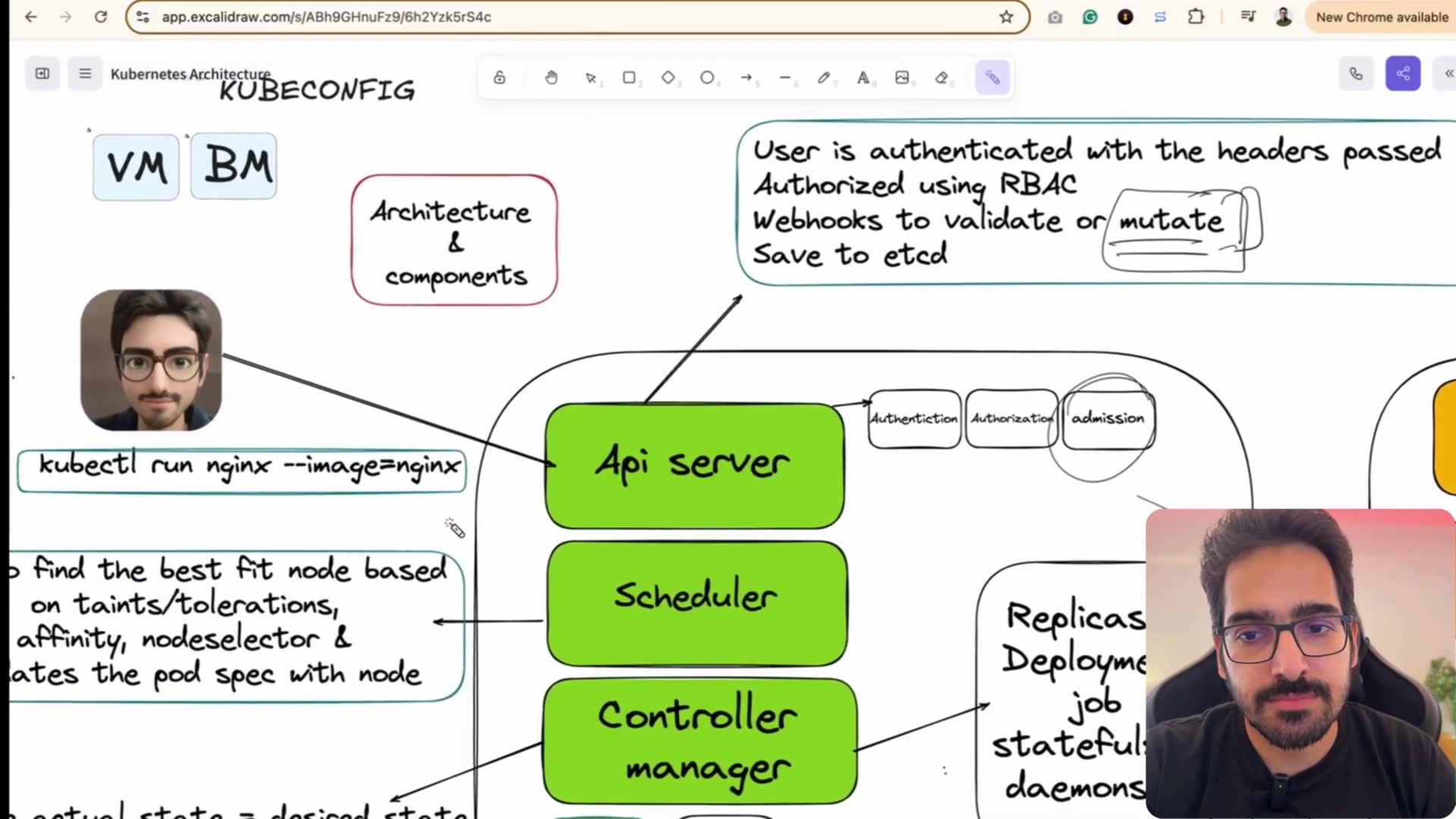
In Kubernetes, you almost never deploy individual containers directly. The smallest deployable unit in the Kubernetes object model is the Pod.
-
🥜 What is a Pod? — A Pod wraps one or more tightly coupled containers that share the exact same network namespace (IP address) and can communicate with each other over
localhost! -
🚀 Deployments & ReplicaSets — A Deployment manages a ReplicaSet, which guarantees that a specified number of identical pod replicas are running at all times. If a pod crashes, the ReplicaSet replaces it instantly.
-
🩺 Pod Lifecycle & Probes — • Liveness Probe: Detects if an app is deadlocked; restarts container.
• Readiness Probe: Detects if app is ready to receive network traffic.
Step-by-step practical lab
Step 01: Launch Imperative Test Pod Running Nginx
සිංහලෙන් — Kubernetes තුළ තනි Pod එකක් ධාවනය කරමු.
Launch an imperative test Pod running lightweight Alpine Nginx to verify pod scheduling and network allocation.
kubectl run nginx-pod --image=nginx:alpinerun: තනි Pod එකක් ඉක්මනින් පරීක්ෂා කිරීමට භාවිතා කරයි.--image=nginx:alpine: භාවිතා කරන container image එක දක්වයි.
Expected output
pod/nginx-pod createdSRE Tip: While 'kubectl run' is great for quick debugging, production workloads should always be managed through declarative Deployments!
Step 02: Query Active Pods with IP & Node Assignment
සිංහලෙන් — දුවන Pods, ඒවායේ IPs සහ දුවන Worker Node එක පරීක්ෂා කරමු.
View active pods, their ready status, restart count, node assignment, and assigned internal pod IP.
kubectl get pods -o wide-o wide: Pod එකට ලැබුණු අභ්යන්තර IP ලිපිනය සහ එය ක්රියාත්මක වන Worker Node එක පෙන්වයි.
Expected output
NAME                        READY   STATUS    RESTARTS   AGE   IP           NODE
nginx-pod                   1/1     Running   0          4m    10.244.1.14  k8s-worker-01
web-app-76565f9797-2kz9w    1/1     Running   0          2m    10.244.1.15  k8s-worker-01
web-app-76565f9797-9xj4p    1/1     Running   0          2m    10.244.2.18  k8s-worker-02
web-app-76565f9797-w8p2m    1/1     Running   0          2m    10.244.2.19  k8s-worker-02
SRE Tip: Notice that pods on the same node share an overlay subnet (10.244.x.x) provided by the Container Network Interface (CNI).
Step 03: Deep Inspect Pod Lifecycle Events & Logs
සිංහලෙන් — Pod එකක් startup වීමේදී සිදු වූ events සහ තොරතුරු පරීක්ෂා කරමු.
Inspect low-level container image pulling, startup timing, and lifecycle events to diagnose CrashLoopBackOff.
kubectl describe pod nginx-poddescribe: Pod එකේ metadata, container state සහ scheduler events සවිස්තරාත්මකව පෙන්වයි.
Expected output
Name:             nginx-pod
Status:           Running
IP:               10.244.1.14
Events:
  Normal  Scheduled  4m  default-scheduler  Successfully assigned default/nginx-pod to k8s-worker-01
  Normal  Pulling    4m  kubelet            Pulling image "nginx:alpine"
  Normal  Pulled     4m  kubelet            Successfully pulled image in 5.82s
  Normal  Created    4m  kubelet            Created container nginx-pod
  Normal  Started    4m  kubelet            Started container nginx-pod
SRE Tip: The Events section at the bottom of describe is the #1 tool for debugging ImagePullBackOff and OOMKilled errors.
Step 04: Create Declarative 3-Replica Deployment
සිංහලෙන් — ස්වයංක්රීයව Self-Healing වන Replicas 3ක් සහිත Deployment එකක් හදමු.
Create a managed Deployment with 3 resilient replica pods that automatically self-heals if any pod crashes.
kubectl create deployment web-app --image=nginx:alpine --replicas=3create deployment: ReplicaSet එකක් මඟින් පාලනය වන Deployment එකක් සාදයි.--replicas=3: නිරන්තරයෙන් Pods 3ක් ක්රියාත්මකව තැබීමට නියෝග කරයි.
Expected output
deployment.apps/web-app createdSRE Tip: If you delete one of these pods, the Kubernetes ReplicaSet controller detects the deficit and creates a brand new pod in under 1 second!
Hands-on practice activities
Work through these yourself — tick them off as you go.
- Activity 76: Launch Imperative Standalone Pod (Drill) — Launch an imperative test Pod running lightweight Alpine Nginx.
- Activity 77: Query Active Pods with IP Details (Drill) — View active pods, their ready status, restart count, node assignment, and assigned internal pod IP.
- Activity 78: Deep Inspect Pod Manifest and Events (Drill) — Inspect low-level container image pulling, startup timing, and lifecycle events.
- Activity 79: Create Declarative 3-Replica Deployment (Drill) — Create a managed Deployment with 3 resilient replica pods.
- Activity 80: Smallest Deployable Unit Quiz (Quiz) — What is the smallest deployable compute unit in the Kubernetes object model? Answer: Pod.
Keep going: ← Lab 15 · Lab 17 → · Track your progress in the Self Guide
ExerciseKnowledge check
What is the smallest deployable compute unit in the Kubernetes object model? / Kubernetes හි කුඩාම deployable ඒකකය කුමක්ද?
Finished this one?
Part of Self Guide · Stage 11: SRE Labs II — cloud, containers and delivery. Progress is saved in this browser.