Kubernetes (K8s) Architecture: Control Plane & Worker Nodes
පිටුව 15: Kubernetes (K8s) ගෘහ නිර්මාණ ශිල්පය: Control Plane සහ Worker Nodes
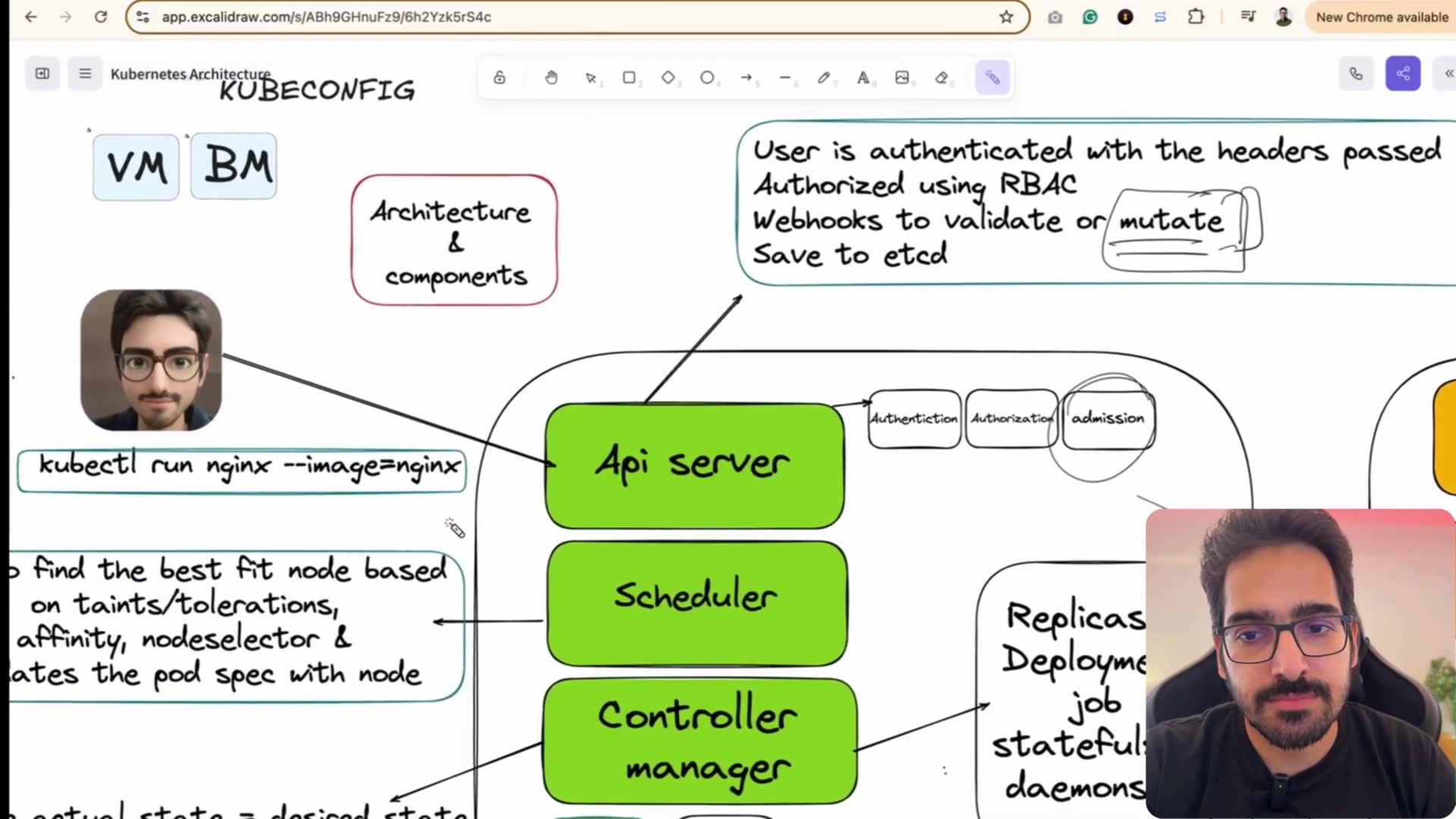
Docker තනියම මදි වුණේ ඇයි? Kubernetes Cluster එකේ මොළය (Control Plane: API Server, etcd, Scheduler) සහ අතපය (Worker Nodes: Kubelet, Kube-proxy).
Lab 15 of 20 · K8s Architecture · 5 hands-on activities · bilingual (English + සිංහල)
පිටුව 15: Kubernetes (K8s) ගෘහ නිර්මාණ ශිල්පය: Control Plane සහ Worker Nodes
Docker තනියම මදි වුණේ ඇයි? Kubernetes Cluster එකේ මොළය (Control Plane: API Server, etcd, Scheduler) සහ අතපය (Worker Nodes: Kubelet, Kube-proxy).
💡 සරල සිංහලෙන්: Kubernetes කියන්නේ ලොකු නැව් තොටුපළක් වගේ!
නැව් තොටුපළේ පාලක මැදිරිය සහ දොඹකර:
- Docker: Container පෙට්ටිය විතරයි. හැබැයි පෙට්ටි 1,000ක් ආවම ඒව කොහෙන්ද තියන්නේ, නැව් වලට පටවන්නේ කොහොමද කියලා Docker දන්නේ නෑ.
- Kubernetes (Control Plane - ප්රධාන පාලක මැදිරිය): නැව් තොටුපළේ ප්රධාන කාර්යාලය. API Server: ඔබ ගිහින් කතා කරන ප්රධාන කවුන්ටරය. etcd: මුළු තොටුපළේම බඩු ලිස්ට් එක ලියලා තියෙන සුපිරි ආරක්ෂිත ලෙජරය. Scheduler: කන්ටේනර් පෙට්ටිය තියන්න හොඳම තැන (Worker Node) තෝරන නිලධාරියා. Controller Manager: "මගේ කන්ටේනර් 5ම හරියට තියෙනවද" කියලා හැම තත්පරේම පරීක්ෂා කරන සුපවයිසර්.
- Worker Nodes (සේවකයින්): ඇත්තටම කන්ටේනර් දුවන Cloud Servers. ඒවයේ ඉන්න kubelet සේවකයා තමයි පාලක මැදිරිය කියන විදියට කන්ටේනර් On/Off කරන්නේ.
Architectural Foundation & Systems Diagram
Docker is incredible for running containers on a single laptop or server. But when you have 5,000 containers running across 200 cloud servers, you need an automated orchestrator: Kubernetes (K8s).
-
🔄 Declarative Desired State — In K8s, you never say "run this command now". You write a YAML declaration stating: "I desire 5 copies of Nginx running". Kubernetes continuously loops to ensure actual state matches desired state!
-
🛡️ Self-Healing Automation — If a worker node physical hardware crashes, or a container dies from an OOM error, the Kubernetes Controller Manager detects the mismatch and instantly reschedules new pods on surviving nodes!
-
🎮 kubectl CLI Tool — The universal command-line interface for communicating with the
kube-apiserver. Every DevOps engineer and SRE must masterkubectl.
Step-by-step practical lab
Step 01: Verify Kubernetes Cluster Control Plane Health
සිංහලෙන් — Kubernetes Cluster එකේ Control Plane (Master API සහ CoreDNS) තත්ත්වය පරීක්ෂා කරමු.
Query cluster control plane endpoints to confirm kube-apiserver and CoreDNS services are responsive.
kubectl cluster-infocluster-info: Kubernetes master API server සහ cluster add-on endpoints පෙන්වයි.
Expected output
Kubernetes control plane is running at https://172.31.0.1:6443
CoreDNS is running at https://172.31.0.1:6443/api/v1/namespaces/kube-system/services/kube-dns:dns/proxy
SRE Tip: Port 6443 is the standard secure HTTPS port for the Kubernetes API Server.
Step 02: Query Cluster Worker Nodes & OS Kernels
සිංහලෙන් — Cluster එකේ ඇති Worker Nodes, Ready status සහ Kernel අනුවාද බලමු.
Display all cluster worker nodes with Ready status, OS image, kernel release, and internal IP address.
kubectl get nodes -o wide-o wide: Internal IPs, OS Images සහ Kernel Versions සහිත පුළුල් output එකක් පෙන්වයි.
Expected output
NAME           STATUS   ROLES           AGE   VERSION   INTERNAL-IP    OS-IMAGE             KERNEL-VERSION
k8s-master-01  Ready    control-plane   14d   v1.30.2   172.31.10.10   Ubuntu 24.04 LTS     6.8.0-45-generic
k8s-worker-01  Ready              14d   v1.30.2   172.31.10.11   Ubuntu 24.04 LTS     6.8.0-45-generic
k8s-worker-02  Ready              14d   v1.30.2   172.31.10.12   Ubuntu 24.04 LTS     6.8.0-45-generic
SRE Tip: If a node status shows 'NotReady', inspect the node's Kubelet daemon with 'systemctl status kubelet' and check for disk pressure.
Hands-on practice activities
Work through these yourself — tick them off as you go.
- Activity 71: Verify Kubernetes Cluster Health (Drill) — Query cluster control plane endpoints (Kubernetes master API and CoreDNS).
- Activity 72: Query Cluster Worker Nodes Status (Drill) — Display all cluster worker nodes with Ready status, OS image, kernel, and internal IP.
- Activity 73: The Declarative Reconciliation Loop (Checkpoint) — Understand that K8s controllers run in an infinite loop: Observe -> Analyze Difference -> Act to reach desired state.
- Activity 74: etcd Disaster Recovery Principle (Checkpoint) — etcd stores the complete cluster state. Always automate automated etcd snapshots before performing cluster upgrades!
- Activity 75: Kubernetes Database Component Quiz (Quiz) — Which component acts as the consistent, distributed key-value store for all Kubernetes cluster state? Answer: etcd.
Keep going: ← Lab 14 · Lab 16 → · Track your progress in the Self Guide
ExerciseKnowledge check
Which component acts as the consistent, distributed key-value store for all Kubernetes cluster state? / Kubernetes cluster එකේ සම්පූර්ණ තොරතුරු ගබඩා කරන්නේ කුමන component එකේද?
Finished this one?
Part of Self Guide · Stage 11: SRE Labs II — cloud, containers and delivery. Progress is saved in this browser.